The rise of AI agents has fundamentally changed how software is built, with agentic platforms like Grok Build redefining the unit of software work. Instead of asking an AI assistant for a function, a developer or architect gives an autonomous agent a goal, constraints, a codebase, and a definition of done. The agent researches, proposes a plan, edits files, runs tests, and iterates. The goal is not human approval of every keystroke; it is human ownership at consequential decision points, with agents handling mechanical work and humans supplying judgment.
This tutorial shows how to combine that workflow with MongoDB Atlas as the operational database, memory layer, and retrieval engine for a small knowledge assistant.
The workflow is portable: usePlan Mode and Agent mode, or planning/build loop in Grok Build. Keep the application artifacts rules, specs, tests, seed data, and deployment files in Git so either builder (i.e., the human developer or the AI agent) can work from the same source of truth.
Why choose Grok Build for agentic development?
A modern coding agent can inspect a repository, find related files, propose multi-file changes, run terminal commands, and use external tools through Model Context Protocol (MCP). That makes the developer less of a line-by-line typist and more of an architect, reviewer, and test designer.
Grok Build is compelling because it combines an IDE-native workflow with persistent project context. Its project rules live in .grok/rules, where teams can version-control conventions, commands, and architectural constraints. Its Plan Mode researches the codebase, asks clarifying questions, creates a reviewable implementation plan, and waits for approval before building. That separation is valuable for AI applications, where an apparently small feature can touch schemas, indexes, prompts, APIs, security, and deployment.
The practical reason to choose Grok Build is control. You can inspect diffs as the agent works, constrain the files it should touch, require tests before implementation, and connect MCP servers without leaving the editor. The agent supplies speed; Git, rules, plans, tests, and human approval supply the guardrails.
See Grok Build (Cursor) Plan Mode and Grok Build (Cursor) Rules for the current workflow and configuration model.
How MongoDB Atlas powers today’s agentic AI applications
An agent needs more than an LLM. It needs durable conversation state, user and tenant boundaries, tool results, business records, documents, and fast retrieval. MongoDB Atlas brings those workloads together in a document model, so an application can keep operational data and AI context close to one another instead of synchronizing multiple specialized stores.
MongoDB Atlas Vector Search lets developers retrieve semantically related content from MongoDB collections. It can support retrieval-augmented generation (RAG), long-term memory, recommendations, and tool context, while ordinary MongoDB queries still handle exact filters and transactional reads. This combination matters: an agent can find “refund policy for annual plans” semantically, then apply an exact tenant or product filter before the LLM sees the result.
MongoDB Atlas is also designed for the realities of production: managed clusters, database access controls, indexes, backups, observability, and deployment across major clouds.
A particularly useful simplification is Automated Embedding. Atlas can generate and maintain embeddings for a configured text field using a Voyage AI model, including at index time and query time. That reduces custom embedding workers and synchronization code. Choose voyage-4 for a balanced general-purpose default, voyage-4-lite for cost-sensitive, high-volume workloads, or a code-focused Voyage model for technical content when available in your Atlas configuration.
Read MongoDB Automated Embedding and MongoDB AI Integrations before selecting the exact model and index options exposed in your region and Atlas project.
The joint value proposition: MongoDB Atlas and Grok Build
Grok Build helps developers turn intent into a tested code change, MongoDB Atlas turns that code into a data-aware AI application with one place for documents, memory, metadata, and vector retrieval.
Figure 1. MongoDB Atlas connects SpaceXSI’s agentic coding workflow in use.
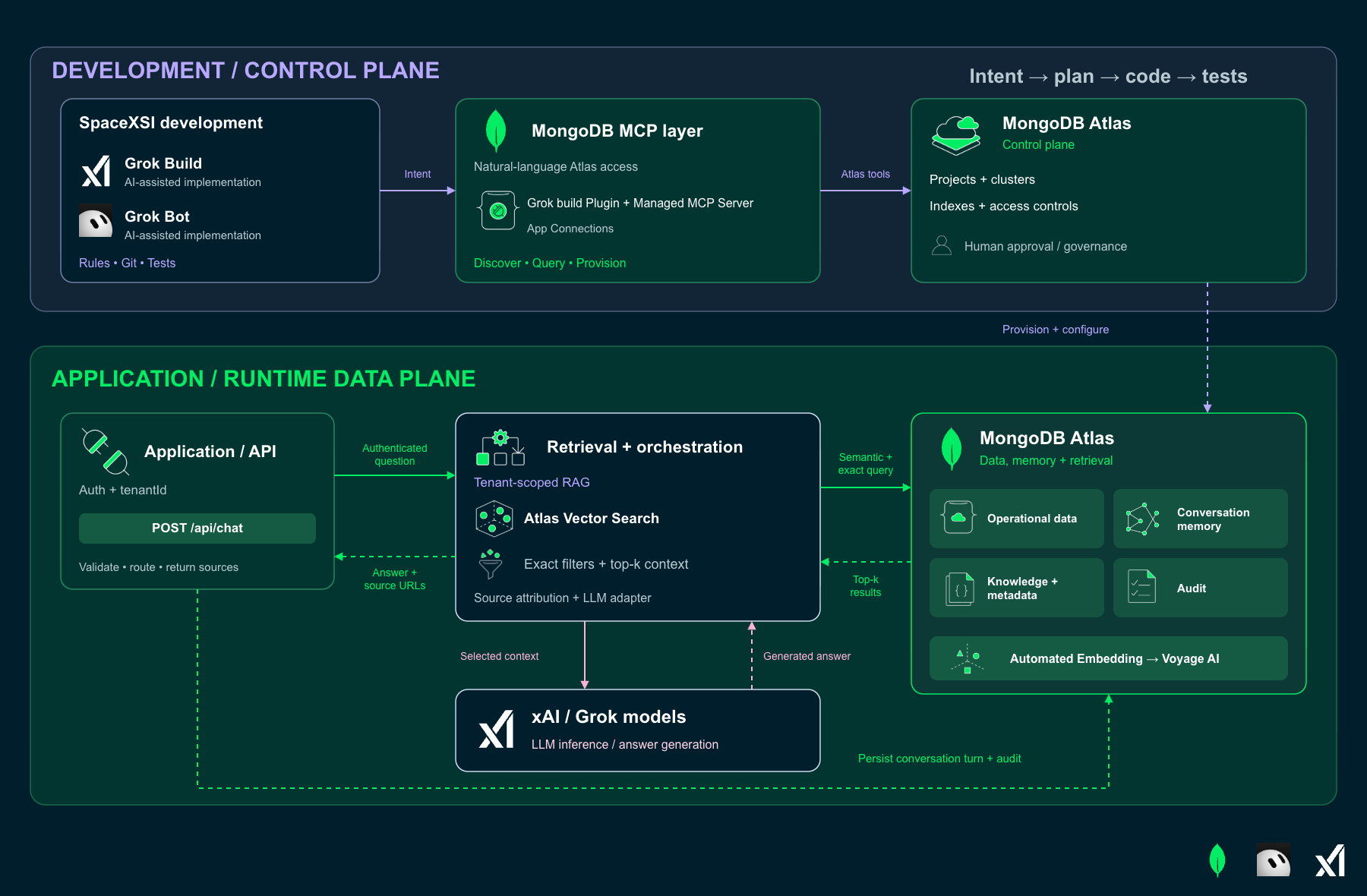
Together, they shorten the path from prompt to production: Grok Build can inspect the repository and call Atlas tools through MCP, while Atlas supplies managed data services, Vector Search, Automated Embedding, and access controls. The developer stays in a tight plan-build-test loop instead of stitching together a separate database, vector store, embedding pipeline, and infrastructure script.
The MongoDB Atlas Managed MCP Server and agent skills with Grok Build
The MongoDB Atlas Managed MCP Server functions as the critical integration layer, empowering Grok Build agents to move beyond speculative code generation and directly interact with your Atlas deployments.
This server equips coding agents with over 40 specialized tools categorized into three primary domains:
By default, the Atlas Managed MCP Server runs read-only; destructive or billable operations like insert/update/delete require an explicit opt-in. A self-managed (local) MCP Server is different — it allows writes by default, so set --readOnly (or MDB_MCP_READ_ONLY=true) if you want the same safety net. See MongoDB MCP Server Configuration Options for the full defaults.
The official MongoDB Grok Build Plugin bundles the MongoDB MCP Server and pre-built MongoDB agent skills. Install it from Grok Build’s Marketplace by opening the command palette or Settings, searching for “MongoDB,” and following the prompts. You can also install it from the Agent input with:
After installation, pick the right connection for your setup. Choose the MongoDB Atlas managed connection when the plugin offers it and authorize your Atlas organization and project — Atlas handles authentication for you. For a self-managed server, point Grok Build's MCP settings at your own instance and connection string (SCRAM-SHA-256 by default, with OIDC, LDAP, Kerberos, and X.509 also supported). Follow MongoDB MCP Server Get Started and MongoDB MCP Server Configuration Options for client- and auth-specific setup.
Authenticate your Atlas account by following the instructions below:
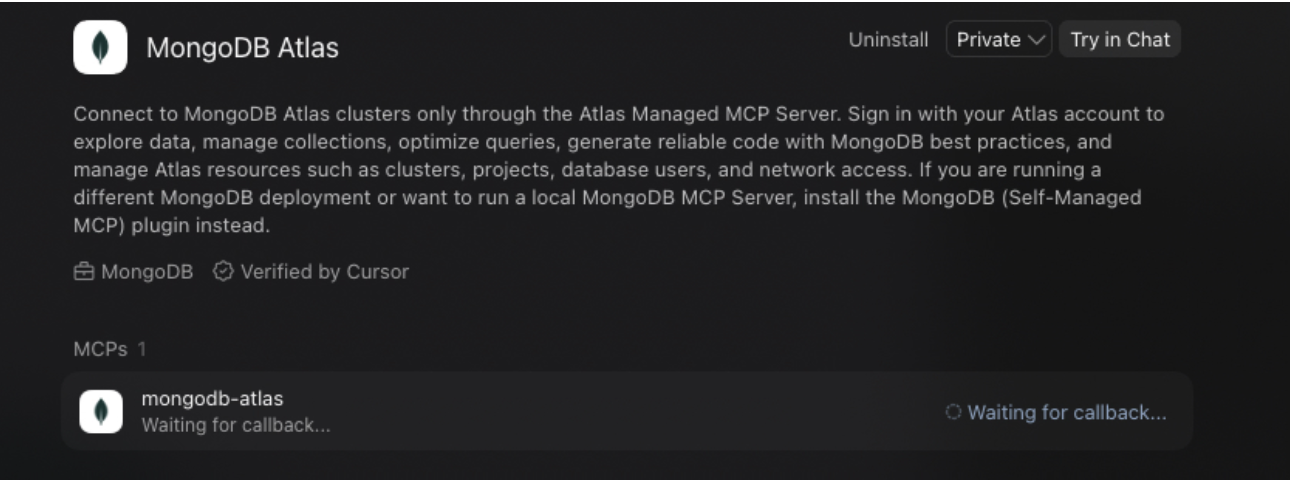
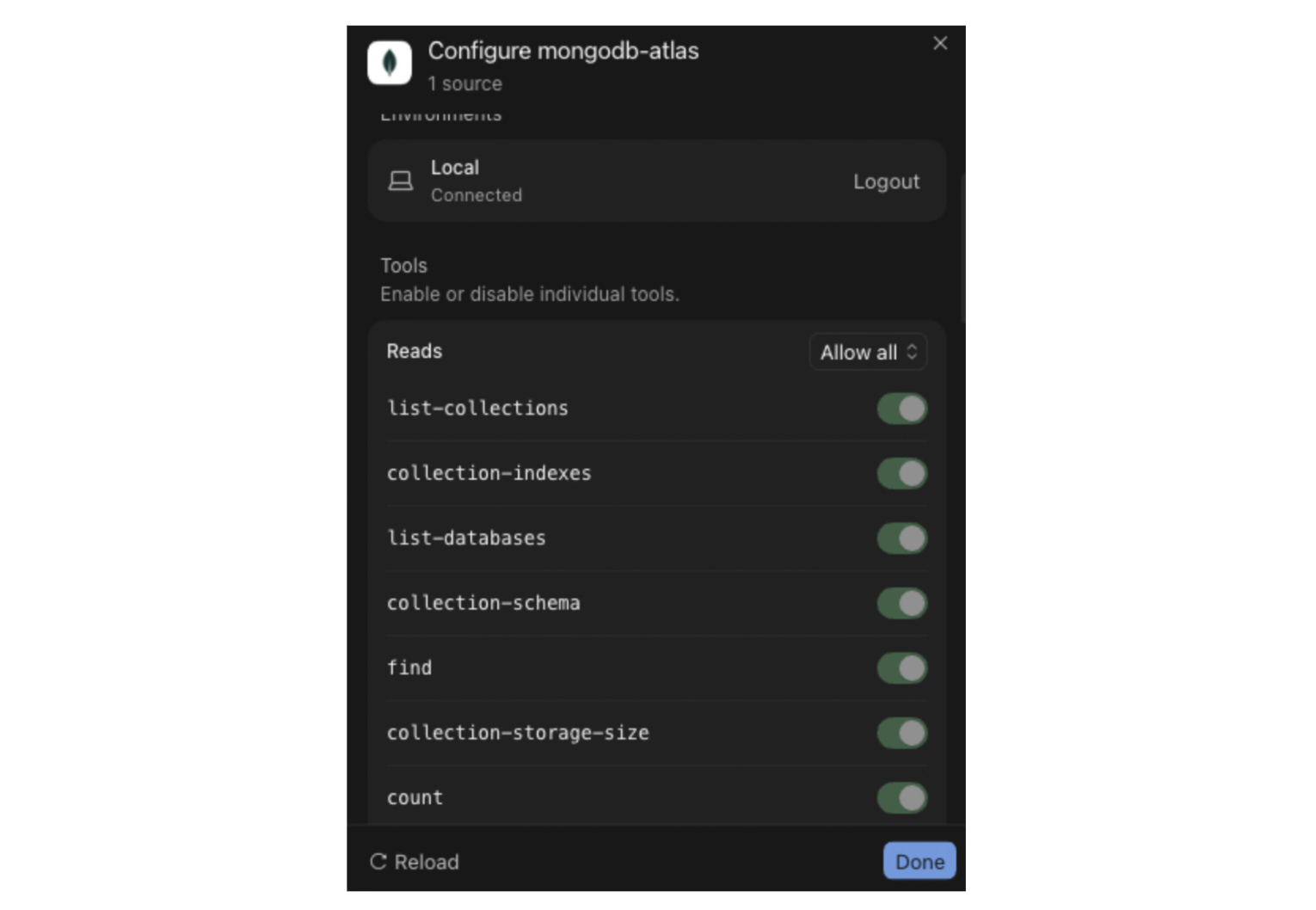
Every tool remains active initially; however, you can adjust these settings or refresh the environment to suit specific requirements.
Use a development project, least-privilege roles, and environment-managed secrets. A connection string supports database access; Atlas-specific cluster management requires appropriately scoped service-account credentials. The developer still approves billable, destructive, or production changes.
Provision a new MongoDB Atlas cluster from Grok Build
Start with discovery rather than guessing project IDs:
Then ask for a bounded development resource:
The agent executes the instructions, prompting for confirmation and clarifying required permissions before any cluster provisioning begins.
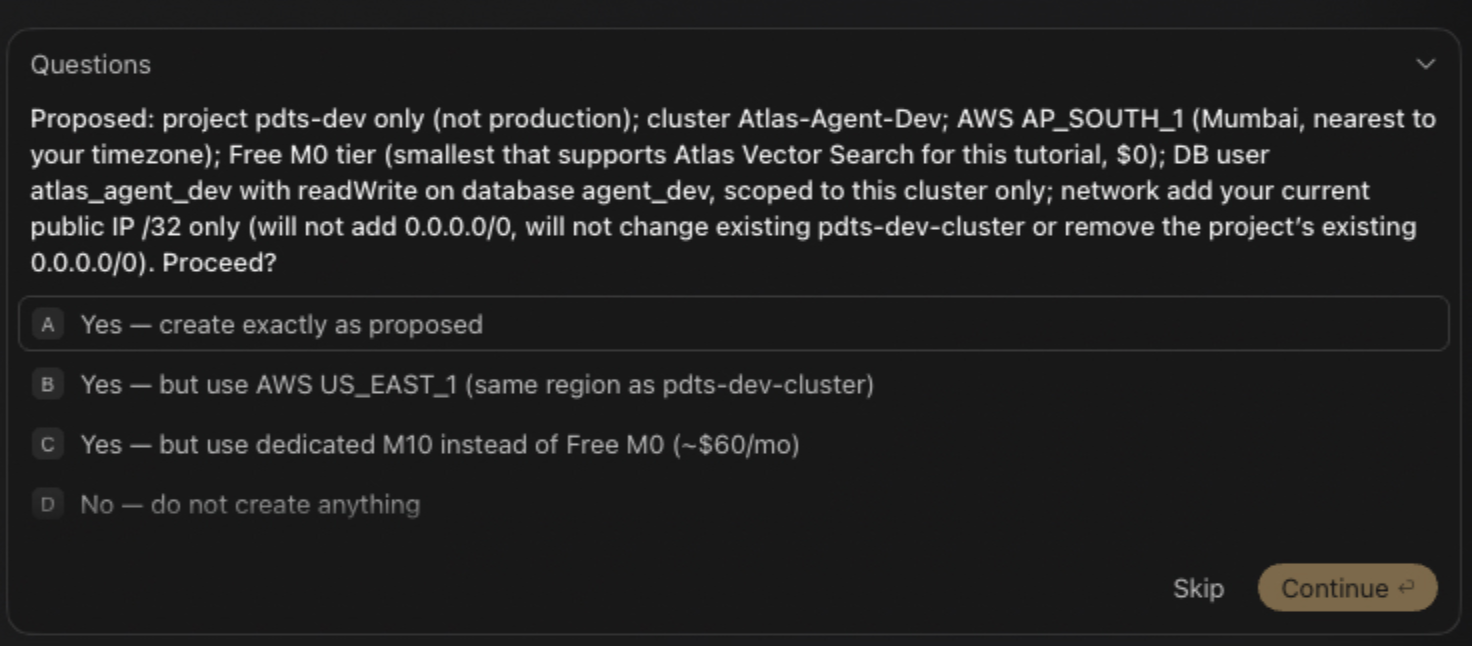
Upon confirming the configuration, this tutorial utilizes a dedicated M10 cluster as the primary deployment resource.
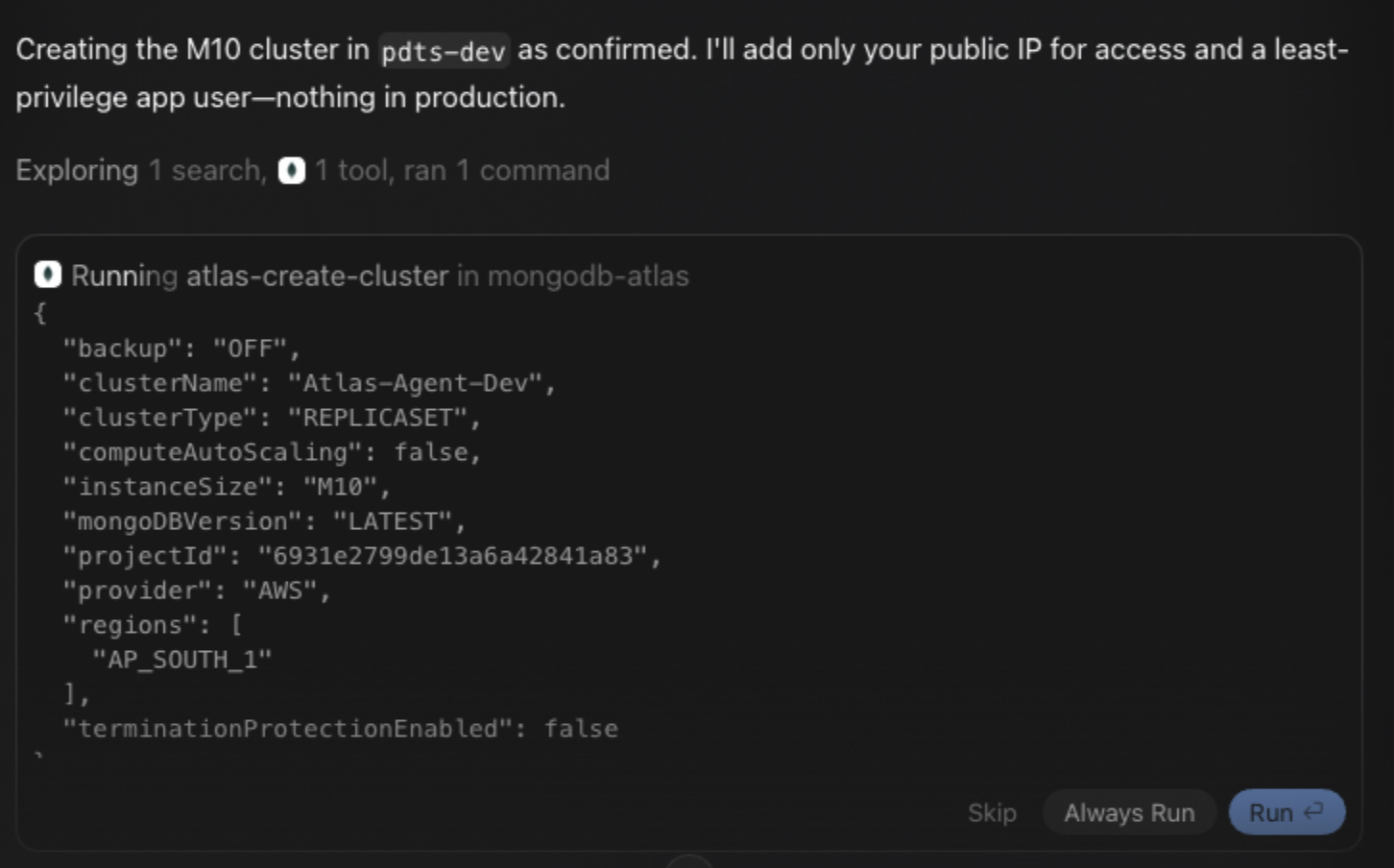
Tool names and tiers depend on the plugin and MongoDB Atlas permissions. Let the agent discover them rather than hard-coding MCP method names. See MongoDB MCP Server Tools.
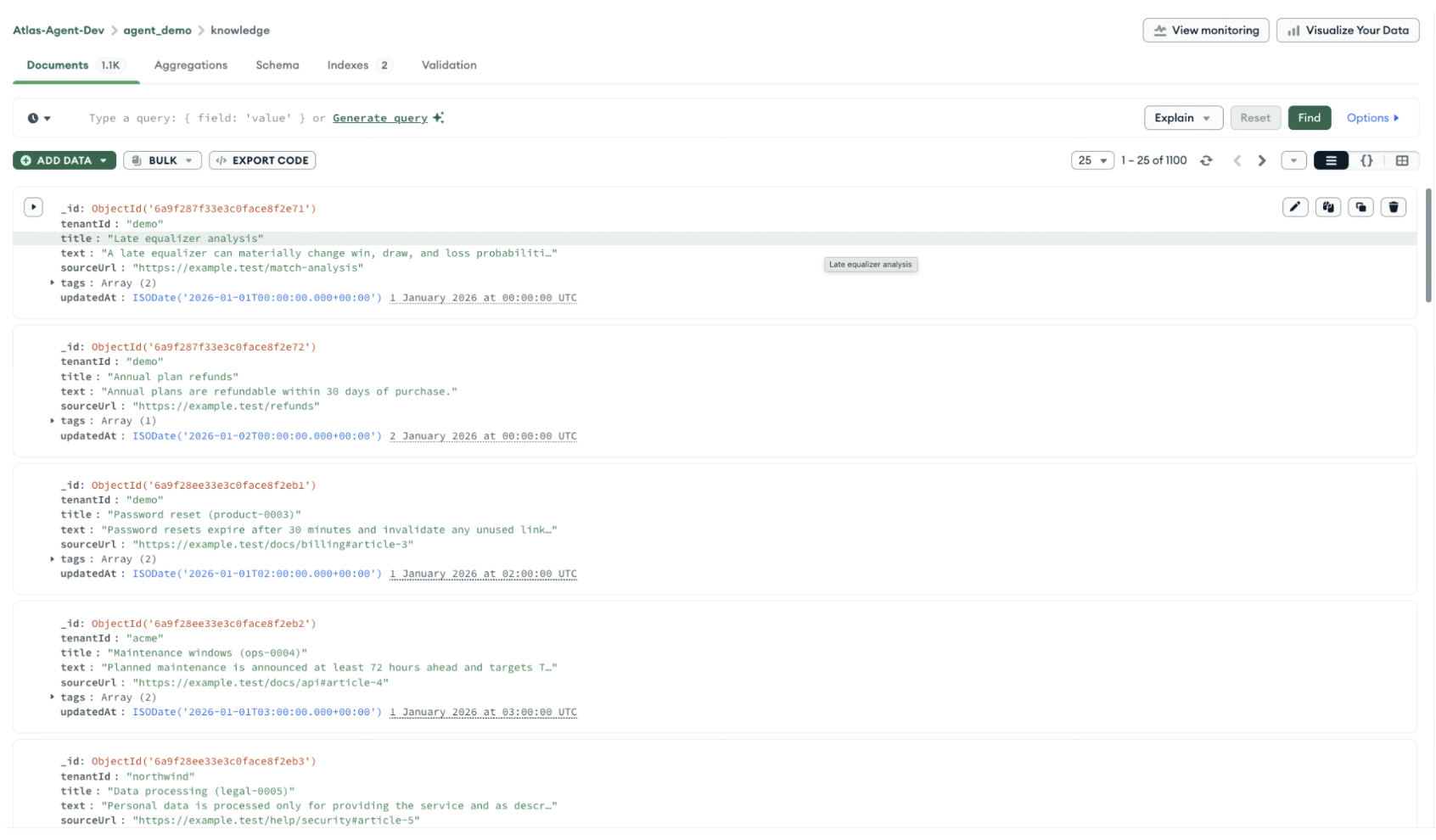
Load seed data through the plugin.
Use a small, synthetic fixture for development. Save this as seed/knowledge.json:
Prompt Grok Build to create the database and load it:
In MongoDB Atlas you can now see the collection created with define data schema and documents.
Query and interact with MongoDB Atlas using natural language
Once connected, Grok Build can translate intent into safe database exploration. Examples include:
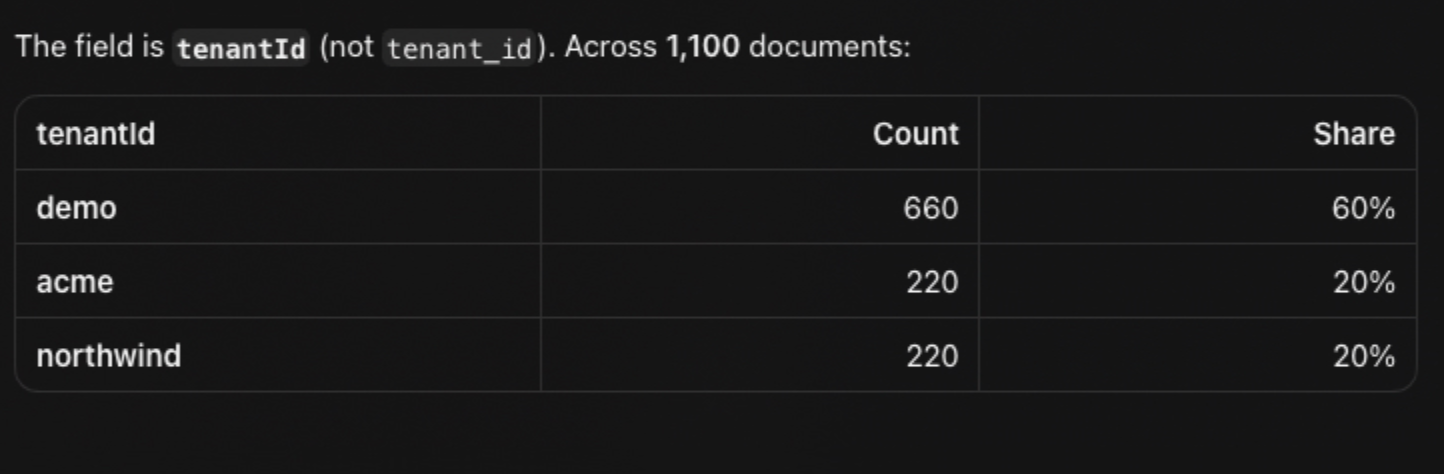
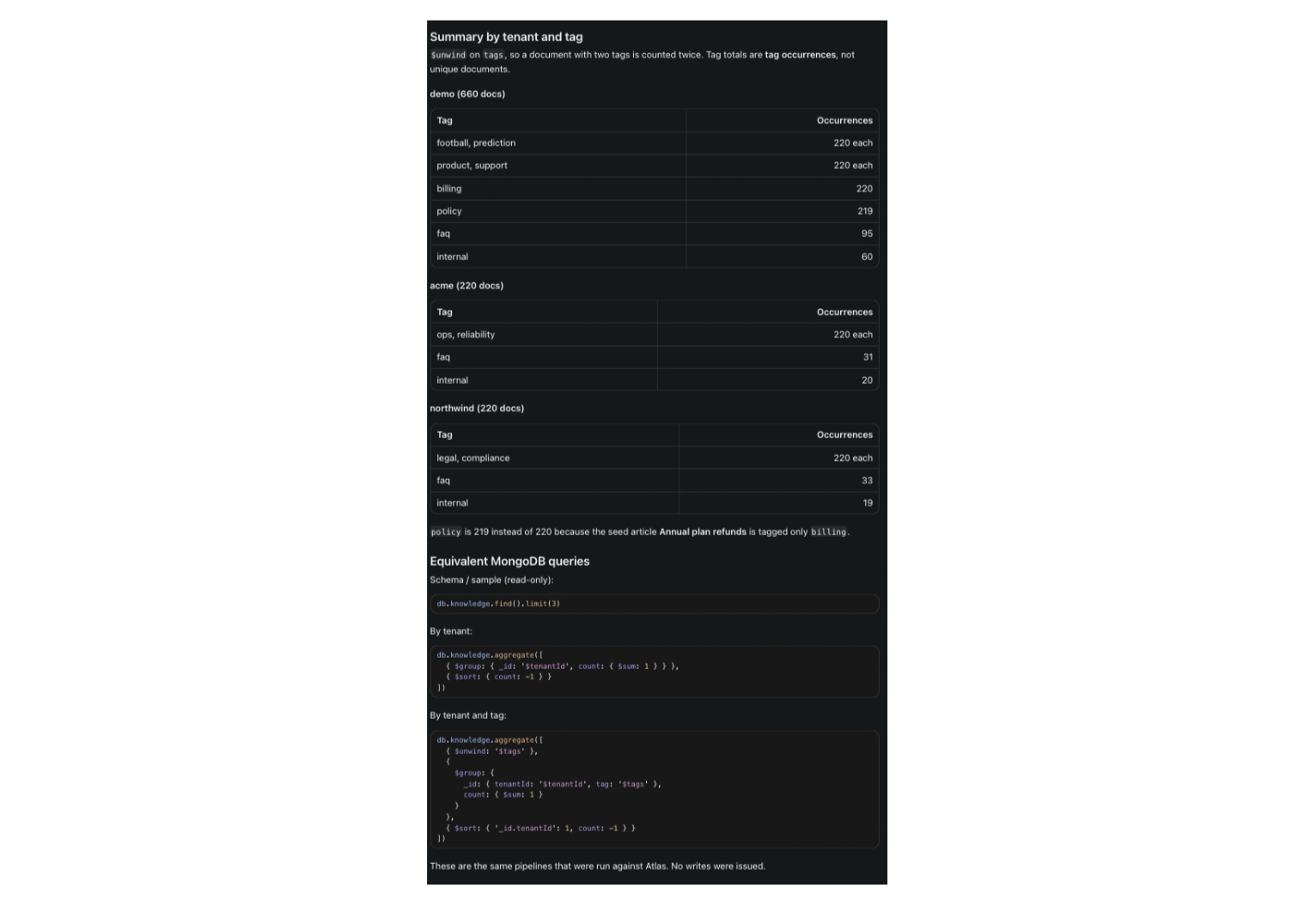
Find tenant distribution:
You can prompt the agent with query natural language requests such as:
Which results in:
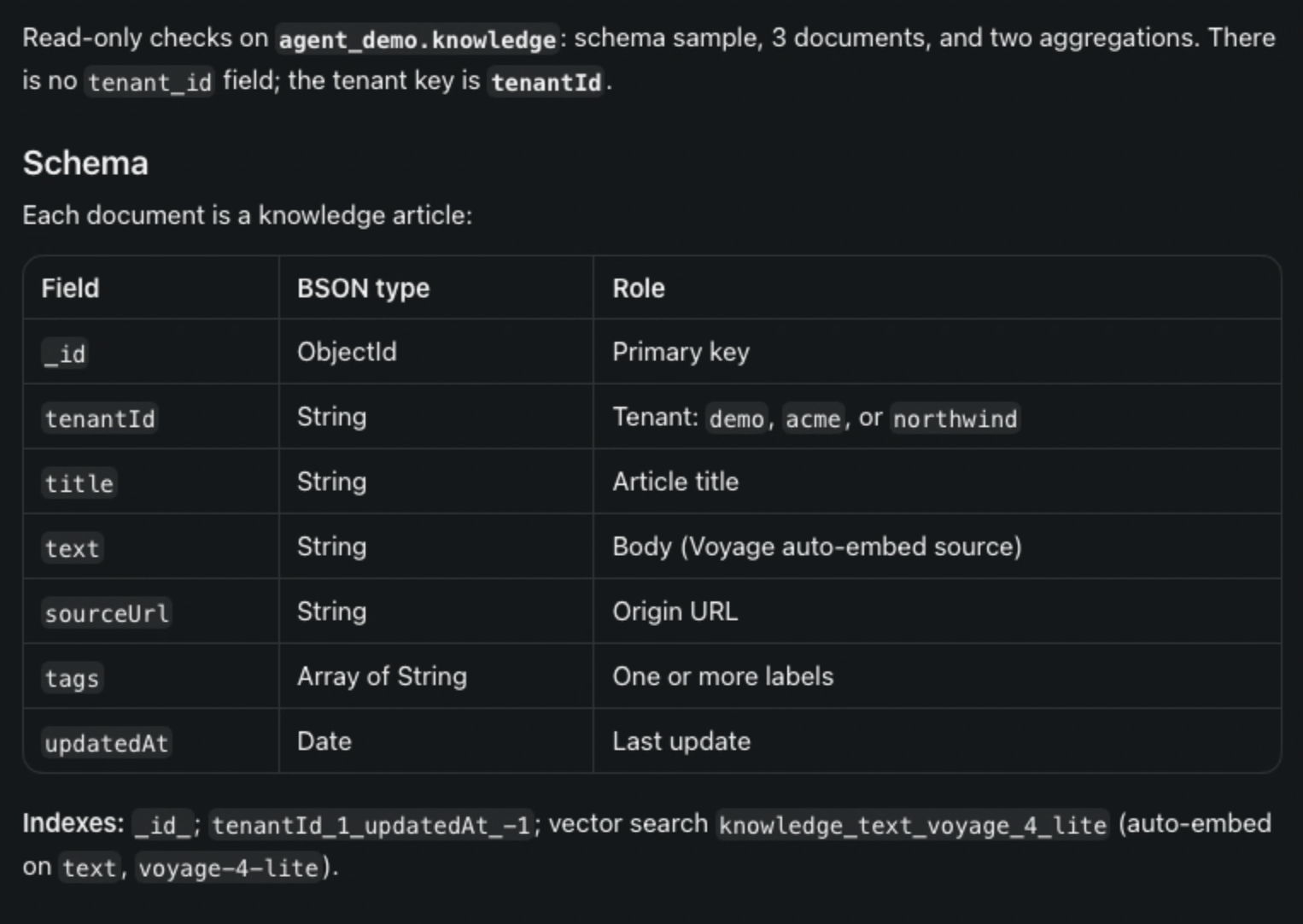
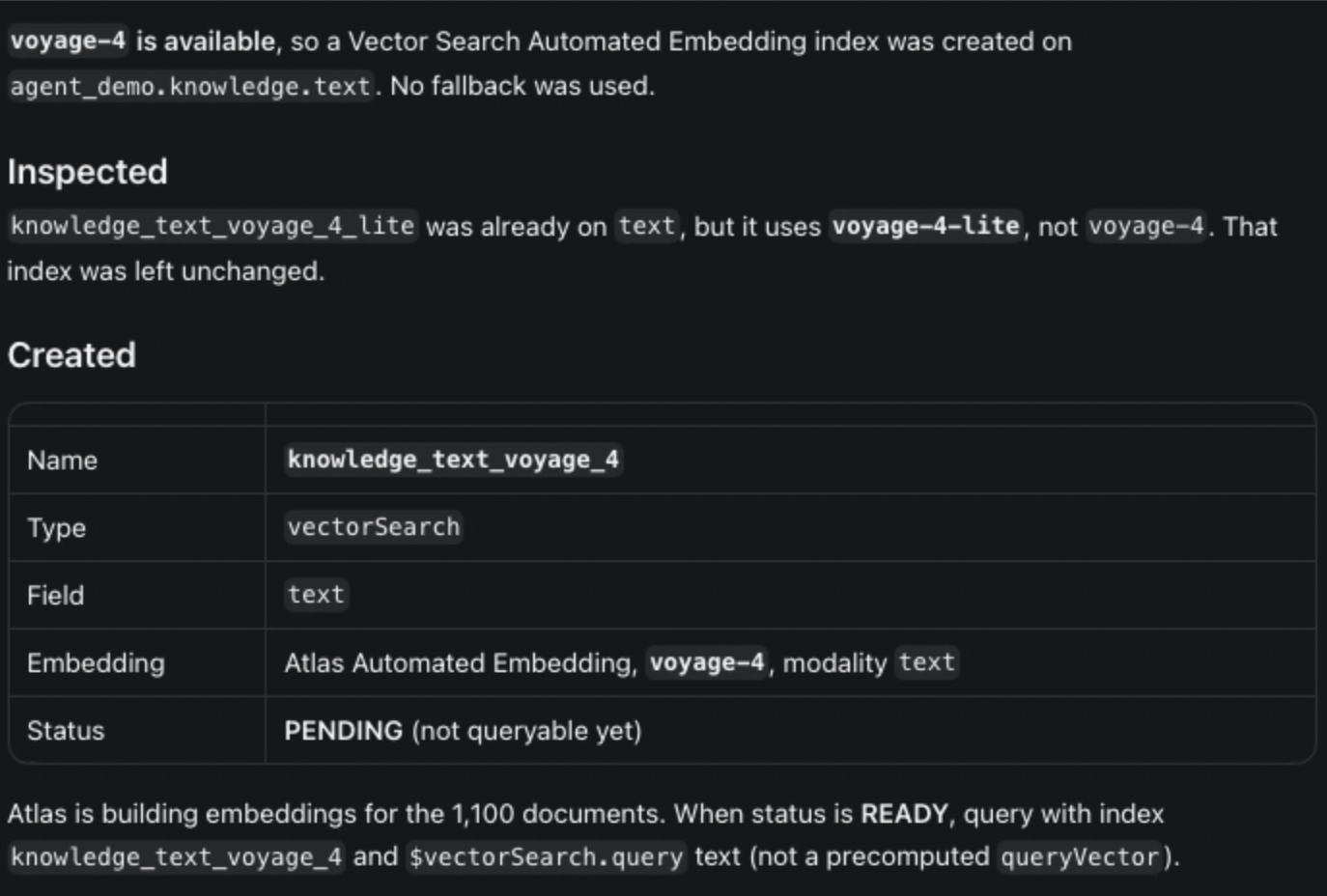
Configure or inspect Vector Search index:
To inspect or create the vector search index using Automated Embedding, run:
Run a vector search test:
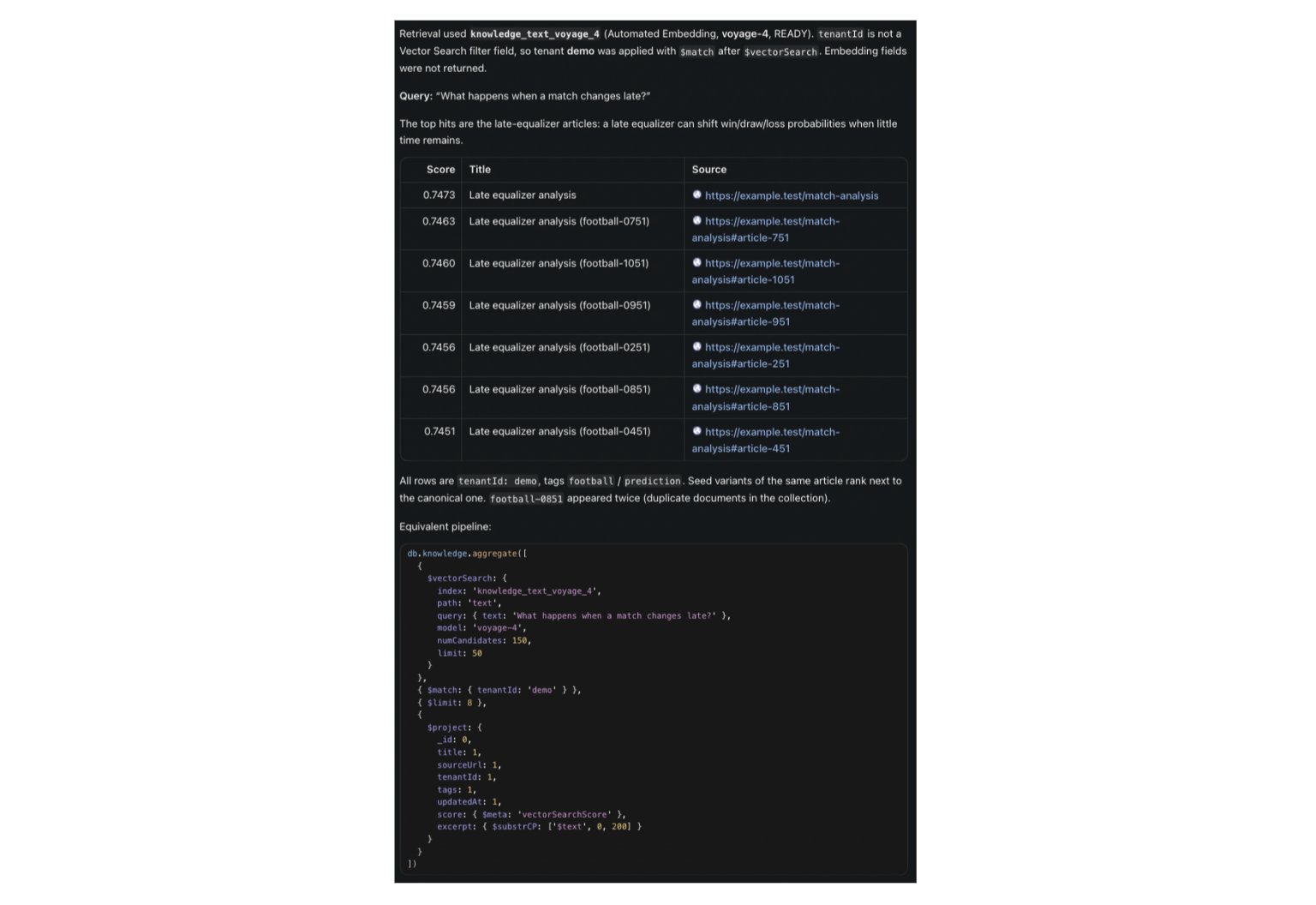
This keeps Grok Build close to live Atlas context while preserving human approval for mutations and infrastructure.
The detailed steps to create your first agentic application with MongoDB Atlas and SpaceXAI models using Grok Build are available here.
Why build with Grok Build and MongoDB Atlas?
MongoDB Atlas and Grok Build complement each other at the exact point where AI projects become real software. Grok Build accelerates exploration, implementation, and testing. Atlas supplies the durable application state, semantic retrieval, and managed operational foundation.
The result is not “AI-generated code” as an end in itself. It is a repeatable delivery loop: specify the architecture, provision a controlled data layer, seed realistic fixtures, evaluate behavior, build in small slices, and deploy with evidence. That is a practical way to move from an idea in a prompt to an AI application you can operate.
Next Steps
Learn more about Grok Build (Cursor) Cloud Agents.
Visit our documentation on MongoDB AI Integrations and Partners.