MongoDB Search on Atlas combines three systems—database, search engine, and sync mechanisms—into one to deliver application search experiences 30%-50% faster. MongoDB Search on Atlas is the easiest way to build rich, fast, and relevance-based search, without burdening your developers and IT operations teams with additional technologies to deploy, learn, and maintain.
The challenges of application search
Search is ubiquitous in application experiences. Whether we are shopping for groceries or buying a new home, browsing the web to find answers to our burning questions, servicing our customers, looking for our next job, or seeking suggestions for our next vacation, the search bar helps us navigate and discover the most relevant information—all in a way that seemingly interprets our natural language. People now expect these same intuitive search experiences in every application they use, whether at home or at work.
Building these experiences is hard. In many cases, developers have to bolt on a search engine like Elasticsearch to their operational database and create a replication mechanism to keep the two systems synchronized. This approach introduces a huge amount of complexity to the application stack, reducing developer velocity while driving up risk, complexity, and cost.
What is Elasticsearch?
Elasticsearch is a distributed search and analytics engine built on top of Apache Lucene and developed by Elastic. It extends Lucene's indexing and search functionalities using RESTful APIs, and achieves data distribution across multiple servers through the use of the index and shard concepts. Elasticsearch is based on JSON and is suitable for search use cases against time series data, structured or unstructured text, numerical data, or geospatial data.
Deployment options include self-hosting Elasticsearch, where the user is self-managing their instance, and Elastic's cloud-hosted variant included in Elastic Cloud (which includes the rest of the ELK stack).
MongoDB Search on Atlas makes it easy to build fast, relevant, full-text search on top of your data in the cloud. By embedding an Apache Lucene search engine directly alongside your database, data is automatically synchronized between the two systems, developers work with a single driver and API, there is no separate system to run and pay for, and everything is fully managed for you. It combines the power of Apache Lucene with the developer productivity, scale, and resilience of the MongoDB Atlas database.
With just a couple of API calls or clicks in the Atlas UI, you instantly expose your data to sophisticated, relevance-based search experiences that boost engagement and improve customer satisfaction. Your data is immediately more discoverable, usable, and valuable—all fully managed for you in the cloud, removing operational burden. Customers have reported 30% to 50% improvements in time to market for new application functionality by adopting MongoDB Search on Atlas.
What MongoDB MongoDB Search on Atlas offers over Elasticsearch
A closer look at the respective approaches of Elasticsearch and MongoDB Search on Atlas.
Architecture
Elasticsearch: A bolt-on approach
If a database's internal search features are not adequate to satisfy the desired user experience, then another option is to bolt on a dedicated search engine, such as Elasticsearch, alongside the database.
This provides the search features demanded by customers, but it does so while imposing additional constraints on developers and ops teams while driving up data duplication and technology sprawl.
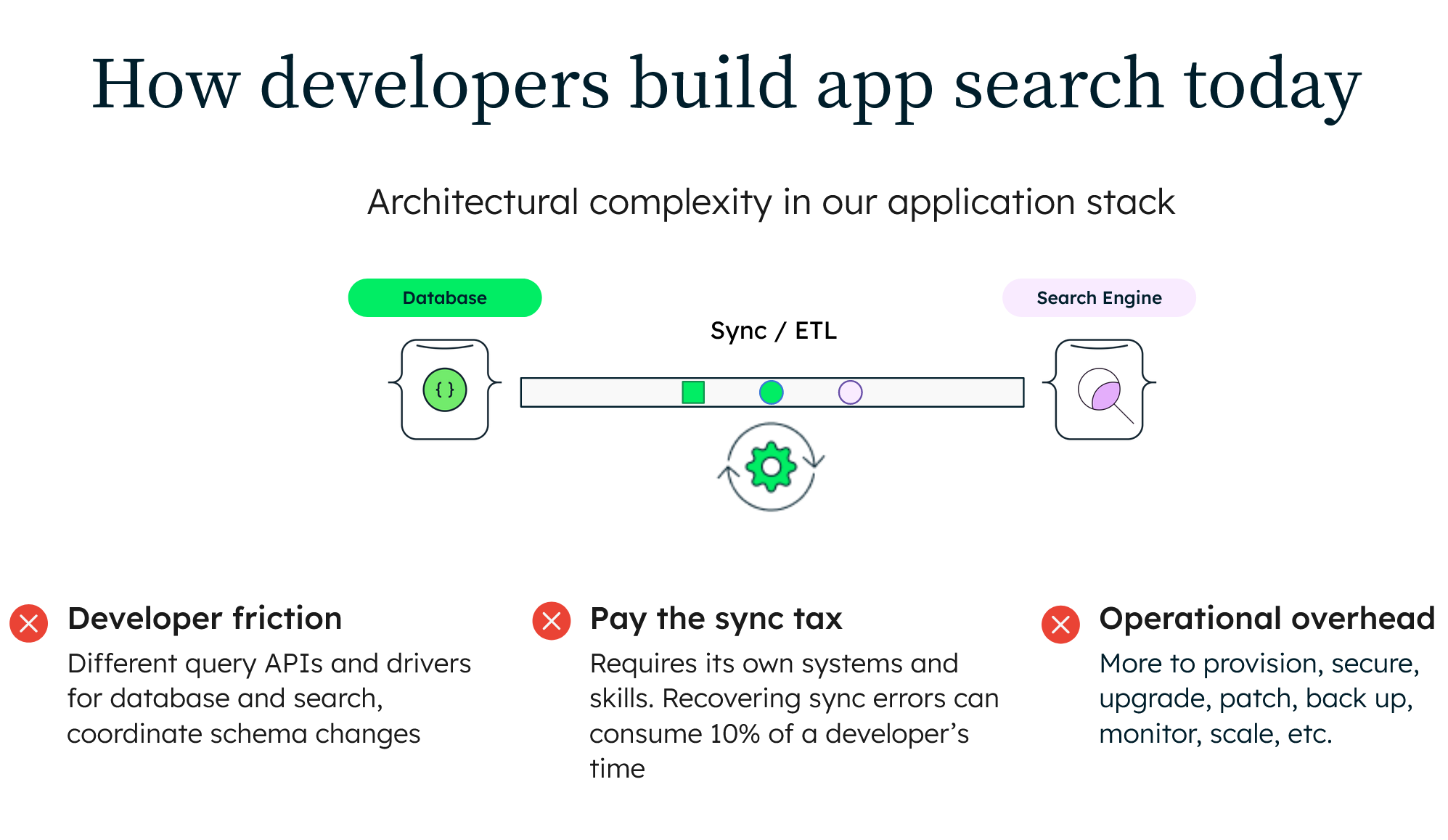
A bolt-on, specialized search engine alongside your database mandates synchronizing data between the two systems. While users get the rich search experience they expect, it comes at a significant cost. The application stack gets more complex and unwieldy. All of this translates to reduced developer velocity, compromised customer experience, and escalating costs.
The diagram below shows how search works with a bolt-on solution.

Synchronization overhead
To surface relevant and up-to-date search results, the database and search engine need to be kept synchronized, duplicating data between systems.
This means engineering teams need to create a synchronization mechanism that replicates data from the database to the search engine. Typically, they will create a data pipeline with custom filtering and transformation logic built on top of messaging systems such as Apache Kafka, or packaged connectors from specialized providers. Whether building or buying, the process takes time and adds ongoing costs. The synchronization mechanism also has to be deployed onto its own nodes, creating additional hardware sprawl.
Once the synchronization mechanism has been deployed, it needs to be monitored and managed, adding more engineering overhead.
It is important that replication to the search engine keeps pace with database writes so that search results do not excessively lag the database and break application SLAs. Monitoring the replication process is necessary to identify and remediate synchronization issues. This becomes especially complex if the search index falls so far behind the database that it has to be resynced from scratch, causing potential application downtime. It is not uncommon to find that 10% of engineering cycles are lost to manually recovering synchronization failures.
New application features that necessitate changes to the database's schema often need both the synchronization logic and the search engine schema to also be updated at the same time. This creates more dependencies that slow down the pace of rolling new features to production.
How MongoDB Search on Atlas is different
AMongoDB Search on Atlas is built on top of MongoDB, the most popular and widely used modern database in the market. MongoDB has become so popular because engineering teams can build and ship applications faster than other data platforms. You can get started with both MongoDB Atlas and MongoDB Search on Atlas in minutes on a fully managed service that handles operations for you on any cloud you choose.
By embedding an Apache Lucene search index directly alongside the database, data is automatically synchronized between the two, developers work with a single API, there is no separate system to run and pay for, and everything is fully managed for you, relieving operational burden. MongoDB radically simplifies your data architecture, enabling you to gain a competitive advantage by innovating faster while reducing cost, risk, and complexity.
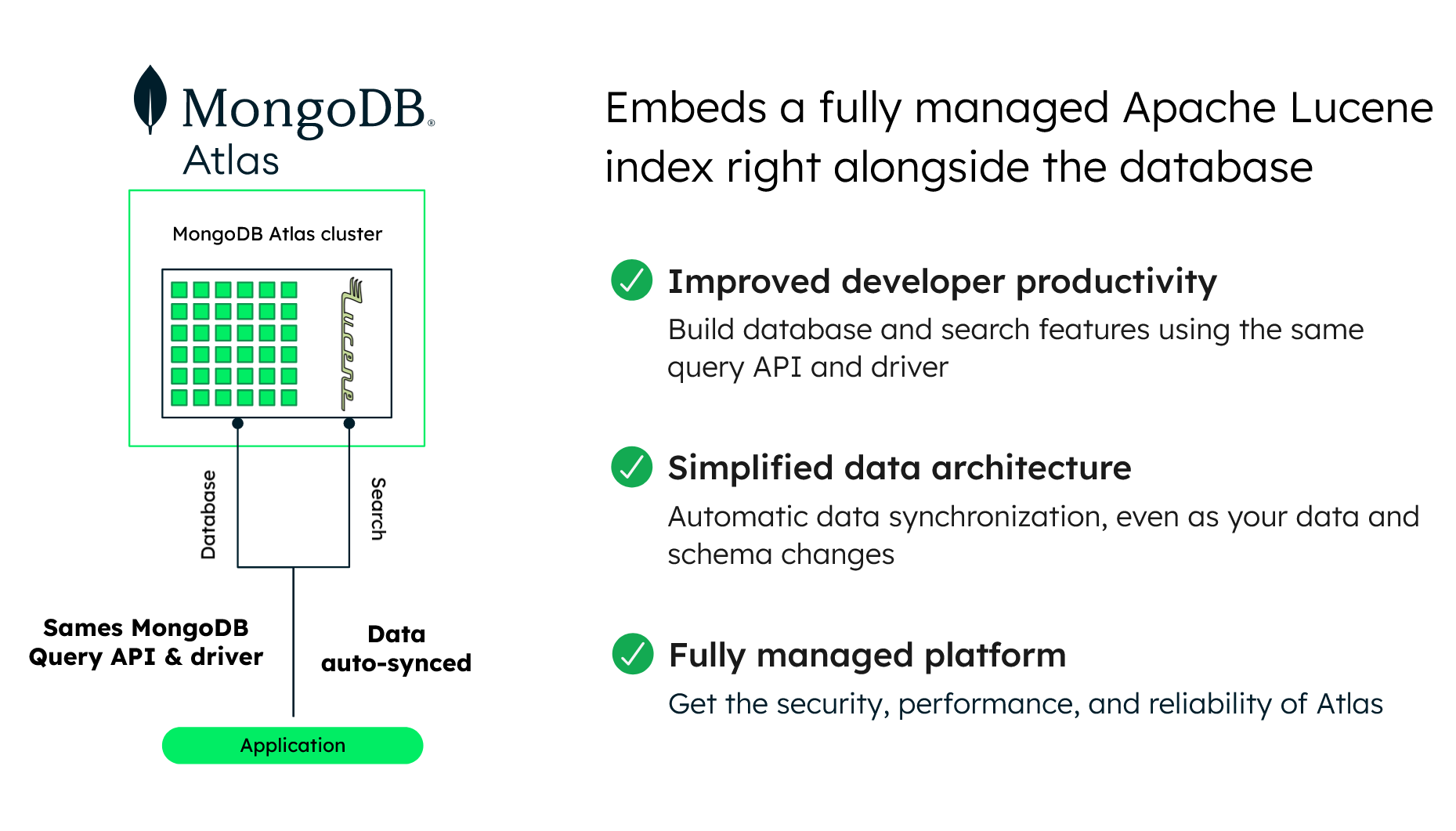
With a distributed architecture, your database and search engine are resilient and globally scalable. Replication with self-healing recovery keeps your applications highly available while giving you the ability to isolate operational and search workloads on separate nodes within a single cluster. Native sharding provides elastic and application-transparent, horizontal scale-out to accommodate your workload's growth, along with geographic distribution for data residency controls. These controls ensure that data is kept close to users for low latency and to comply with data sovereignty mandated by modern privacy regulations.
MongoDB Search on Atlas is part of MongoDB’s multi-cloud modern database, which combines transactional processing, real-time analytics, and a federated query engine in an elegant and integrated data architecture. Through a flexible document data model and unified query interface, Atlas provides a first-class developer experience to power almost any class of application. At the same time, it meets the most demanding requirements for resilience, scale, and data privacy.
Why not just use a search engine as a database?
With search engines storing and querying data, some engineering teams may consider eliminating the database altogether and just using the search engine for data persistence. At first glance, this would address many of the constraints discussed above, presenting a single system to develop against and to operationalize, while eliminating the overhead of data synchronization.
But as noted earlier, databases and search engines are different technologies designed to do different things.
Beyond serving application queries, databases are designed around a core set of data persistence and processing capabilities. These demand data integrity, consistency, and durability; balanced performance across reads and writes; concurrency; availability; security; disaster recovery; and more.
With a specialized architecture and indexing focused on fast, relevance-based information retrieval, dedicated search engines have a different set of design goals that compromise many of the capabilities that make databases so essential.
Elastic itself cautions against using a search engine as a database in core product documentation.
As discussed above, Elasticsearch is a capable search engine technology. However, its core system architecture is built around Lucene indexes in a way that forces compromises in many core database capabilities in order to meet its primary design goal as a scalable search engine.
DevOps
The impact on developer productivity
It is critical in today's digital economy for developers to build and evolve applications at speed. Introducing a separate search engine, like Elasticsearch, alongside the database means developers now have two separate systems they need to work with, which slows them down.
With this approach, developers have to learn how to work with two entirely different query languages to access the database and the search engine. This increases their learning curve and means frequent context switching when building application functionality, both of which impact their productivity while complicating testing and ongoing maintenance.
Because this approach requires two different APIs/drivers, application dependencies become much more complex, reducing the pace and frequency of releasing applications to production.
The DevOps burden
Doubling up with a database and separate search engine such as Elasticsearch also adds time, cost, and complexity to operations and site reliability engineering (SRE) teams.
Now they have an additional system in their technology stack that needs constant care and feeding: It has to be provisioned, secured, monitored, scaled, patched, and backed up with its own tooling and APIs. It also means working across multiple vendors, making issue resolution more complex. Every new project means another dataset living in its own silo, adding to data sprawl and governance overhead.
How MongoDB Search on Atlas is different..
..for the developer
The document data model is intuitive and flexible. Documents map directly to the objects in your code so they are much easier and more natural to work with. You can store, index, and search data of any structure and modify your schema at any time as you add new features to your applications.
You work with data as code. The MongoDB Query API and drivers are idiomatic to your programming language. Ad hoc queries, indexing, full-text search, and real-time aggregations provide powerful ways for accessing, grouping, transforming, searching, and analyzing your data to support any class of workload.
..for IT operations
By embedding an Apache Lucene search index directly alongside the database, data is automatically synchronized between the two. This means engineers and administrators work with a single API. There is no separate system to run and pay for, and everything is fully managed for you, relieving operational burden. The MongoDB modern data platform radically simplifies your data architecture, enabling you to gain a competitive advantage by innovating faster while reducing cost, risk, and complexity.
Why choose MongoDB Search on Atlas?
Eliminate synchronization overhead
Data is automatically and dynamically synced from the Atlas database to MongoDB Search on Atlas indexes. Developers and DevOps avoid having to deploy and manage their own sync mechanism, write custom transformation logic, or remap search indexes as the database schema evolves.
Ship new features faster
Developers now work with a single, unified API across both database and search operations, simplifying queries and reducing development time. They no longer need to context-switch between different query languages. With a single driver, build dependencies are reduced by consolidating the driver packages that need to be added to the application code for client access. They can also test queries and preview results with interactive tools to fine-tune performance and scoring before deploying them directly into application code. Developers and IT operations can also get back 10% of engineering cycles previously lost to manually recovering sync failures, reinvesting that time to innovate for end users.
Remove operational heavy-lifting
MongoDB Atlas automates provisioning, replication, patching, upgrades, scaling, security, and disaster recovery while providing deep visibility into performance for both database and search. By working with a single platform, developers avoid the exponential increase in the number of system components they need to design, test, secure, monitor, and maintain.
MongoDB Search on Atlas is optimized for:
Catalog and content search
The search bar is the primary interface for users to navigate the product catalog or content metadata.
Customers using MongoDB Search on Atlas for catalog and content search include Keller Williams, one of the world's largest real estate agents; a global auto-retailer that replaced Elasticsearch for its parts catalog; and CNFT.IO, the first and largest NFT marketplace trading on the Cardano blockchain.
In-application search
MongoDB Search on Atlas is ideal for line-of-business applications supporting internal users or customer self-service portals where search is a supporting function used to enhance information discovery.
MongoDB Search on Atlas customers with these use cases include Current (one of the United States’ fastest growing challenger banks) and a multinational convenience store chain for inventory management and customer self-scan checkout systems.
Single view
Users interact with the single view via search as a supporting function. The single view application itself relies on specific MongoDB Search on Atlas capabilities such as fuzzy matching and autocomplete to query disparate data ingested from multiple sources into the single, 360-degree view.
MongoDB Search on Atlas customers powering single view include a global top 10 insurer and one of Europe’s largest energy providers.
Is MongoDB Search on Atlas always the right solution?
The above examples demonstrate how MongoDB Search on Atlas is designed for application search use cases. By design, it is tightly integrated with the MongoDB Atlas platform. Therefore, all data has to first be stored in MongoDB database collections in order to then create the required search indexes against it.
MongoDB Search on Atlas is not currently designed for log analytics typically used in DevOps observability or security and threat hunting applications. MongoDB Search on Atlas is also not suitable for enterprise-wide search systems. In these scenarios, Elasticsearch provides built-in connectors and agents to crawl and extract data from multiple internal source systems, index them, and then make data and analytics searchable with bespoke tools.
For these use cases, it can be better to use MongoDB as one of your data sources alongside your existing Elasticsearch search engine.
Getting started with MongoDB Search on Atlas
MongoDB Atlas offers a forever-free tier for development. Once deployed, you simply click a button to add search to your application. With unlimited time to explore, you can see for yourself how a fully managed search engine integration helps your team build applications faster. MongoDB Search on Atlas is available with all Atlas clusters—including free clusters—so you can evaluate it at no cost. Our Getting Started tutorial walks you through the process. MongoDB Search on Atlas documentation provides a complete reference on how to configure, manage, and query search indexes, along with performance recommendations. The MongoDB Developer Center and MongoDB YouTube channel provide a wealth of articles and tutorials for beginners and expert users.
Migrating from Elasticsearch
If you currently employ Elasticsearch as a bolt-on to your database, we have developed a five-step methodology to help you migrate away from the headache of managing two independent schemas and datasets.
The guide walks you through how to:
- Qualify target workloads
- Migrate your existing indexes
- Migrate your existing queries
- Validate and relevance-tune your MongoDB Search on Atlas queries and indexes
- Size and deploy your MongoDB Search on Atlas infrastructure
The guide wraps up with examples of customers that have made the switch and provides guidance on how to get started with MongoDB Search on Atlas, along with key services that can help you in your journey.
Support throughout your application lifecycle
Advisory consulting
MongoDB's Professional Services team is available as a trusted delivery partner to help you and your teams bring applications built with MongoDB Search on Atlas to life. Whether you need support with one specific element of your application lifecycle (e.g. training) or you need guidance throughout the entire journey, we’re here to provide the right type of services you need to be successful with your search project.
Flex consulting
Flex Consulting is available directly from the Atlas UI. It provides your teams access to consulting engineers for short, remote sessions to target specific technical hurdles. These include applying best practices and design patterns for first-time MongoDB Search on Atlas users, moving data into MongoDB Atlas from existing databases and external search engines, and optimizing existing MongoDB Search on Atlas queries and indexes.