Key takeaways
A MongoDB cluster is a group of MongoDB servers working together to achieve scalability and/or high availability.
In contrast to a single-server MongoDB database, a MongoDB cluster allows a MongoDB database to horizontally scale across many servers with sharding, or to replicate data, ensuring high availability and data redundancy with MongoDB replica sets, therefore enhancing the overall performance and reliability of the MongoDB cluster.
We can easily configure MongoDB clusters for replication and sharding as per our workload and use case requirements.
Table of contents
- What is a MongoDB Atlas cluster?
- Creating a cluster in MongoDB
- MongoDB replica sets
- How do MongoDB replica sets work?
- Read and write operations in a replica set
- MongoDB sharding
- What is a MongoDB sharded cluster?
- Production environment
- High availability and disaster recovery
- Scalability
- FAQs
What is a MongoDB Atlas cluster?
In the context of MongoDB, “cluster” is the word usually used for either a replica set or a sharded cluster. A replica set is the replication of a group of MongoDB servers that hold copies of the same data; this is a fundamental property for production deployments as it ensures high availability and redundancy, which are crucial features to have in place in case of failovers and planned maintenance periods.
A MongoDB Atlas cluster is a document database-as-a-service offering in the public cloud (available in Microsoft Azure, Google Cloud Platform, and Amazon Web Services). This is a managed MongoDB service, where with just a few clicks, you can set up a working MongoDB cluster, accessible from your favorite web browser. You don't need to install any software on your workstation as you can connect to MongoDB (Atlas) directly from the web user interface and inspect, query, and visualize data.
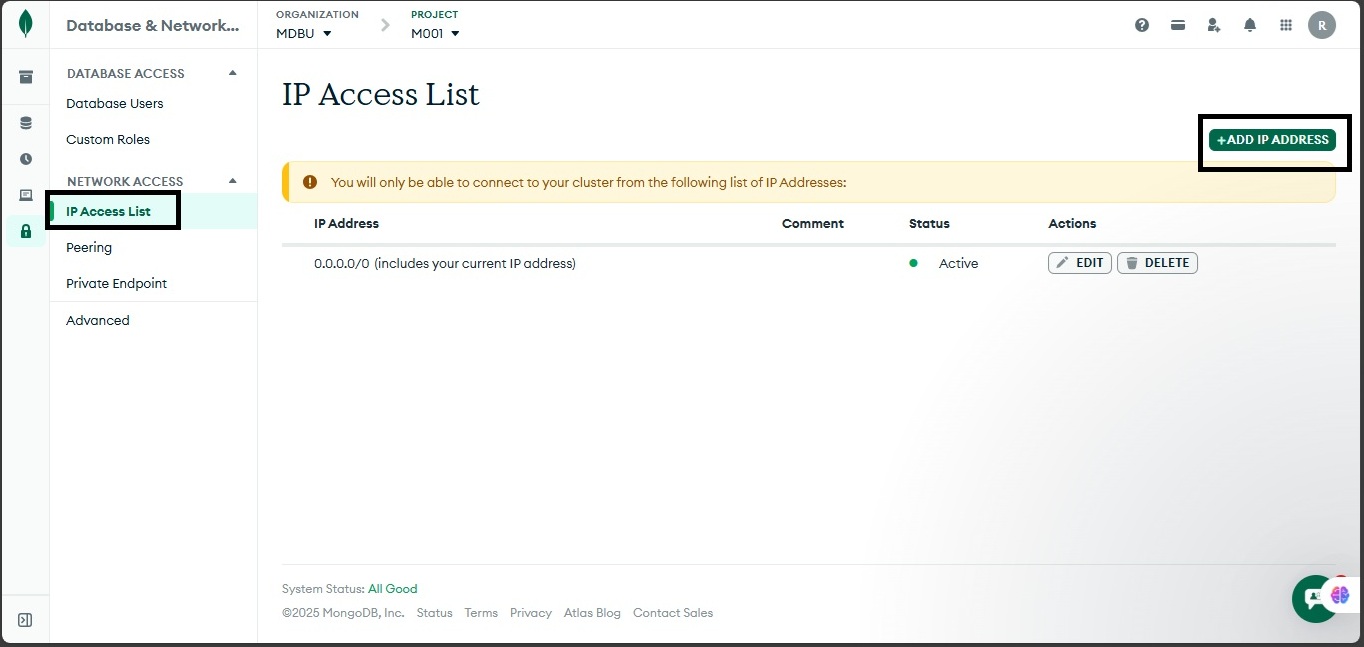
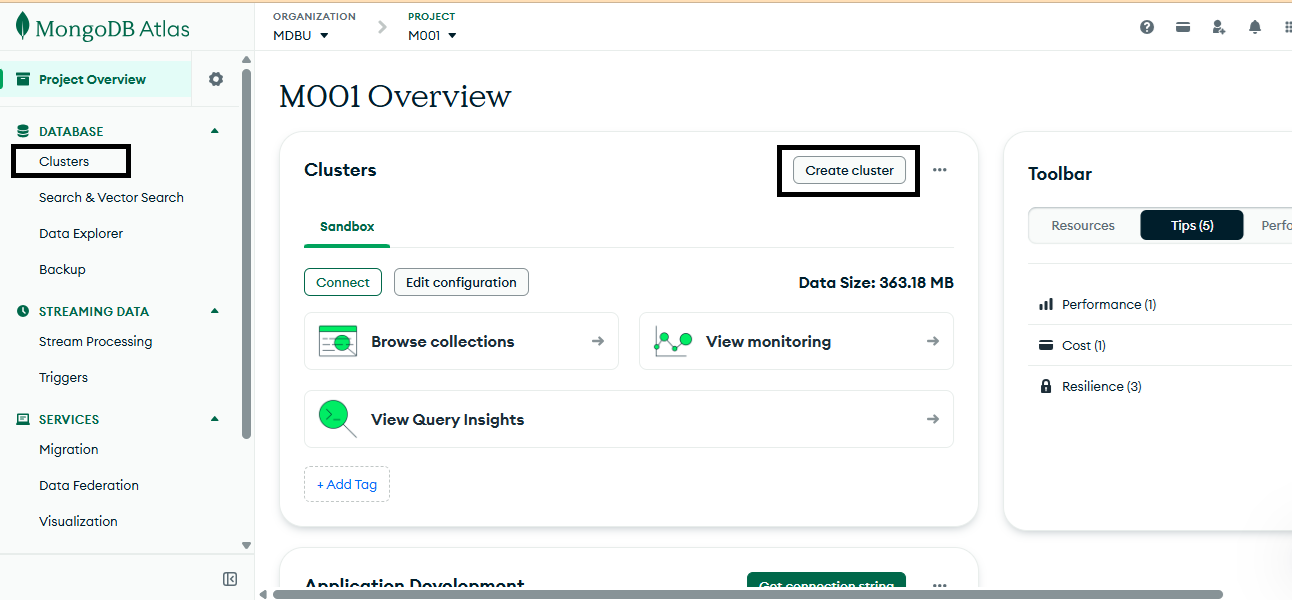
Alternatively, if you prefer to connect from your computer, you can use the MongoDB Shell from the command line, MongoDB Compass for a more visual experience, or MongoDB for VS Code to connect directly from your IDE. To do this, you'll need to configure the firewall from the web portal to accept your IP. From the Atlas homepage, click on “Clusters” on the left navigation pane, and select “Database” and “Network Access” from the Security group. Navigate to “Security and Network Access.” Click on “IP Access List” from the “Network Access” menu, and click on “Add IP Address” to add your IP:
Below is an example of how to connect with the MongoDB Shell. Substitute the following configuration settings (MongoDB Atlas cluster name, database name, and username) in the mongosh command line window. For example:
Note: When using the MongoDB Shell like above, you will be prompted to type the password that you submitted when the MongoDB deployment was created.
Creating a cluster in MongoDB
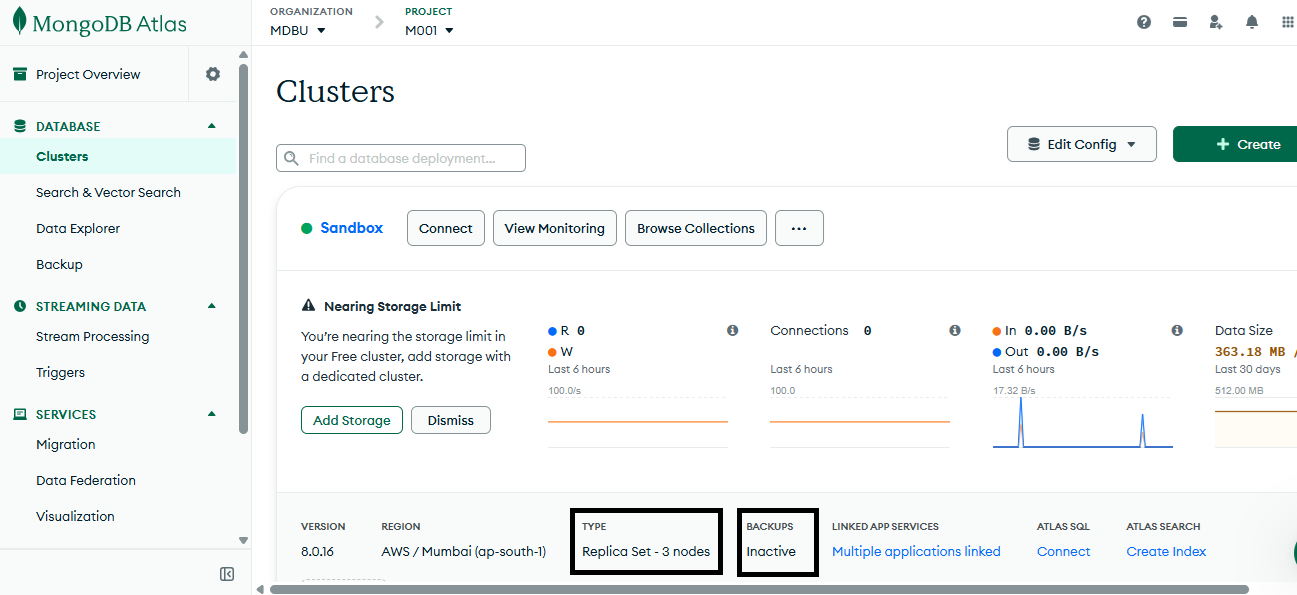
Whether your initial intentions are about developing proof of concept applications or planning for a production environment, a very good starting point is to create a new MongoDB cluster on MongoDB Atlas. By using the free tier, the default setup is to deploy a MongoDB cluster with a replica set. However, if you also want to enable sharding, then you have to enable this feature separately and specify the number of shards to have, using a dedicated cluster (M30 and up).
MongoDB replica sets
A MongoDB replica set ensures replication is enforced by providing data redundancy and high availability over more than one MongoDB server when there are node failures or outages.
Without a replica set, all the data would be present in exactly one server. In case that main server fails, then all data would be lost. A replica set for a MongoDB deployment provides the same data in multiple machines (multiple nodes). This increases fault tolerance, as, if one server fails, another database server takes over. Further, load balancing distributes requests across multiple servers, ensuring that traffic is redirected to the available servers. Multiple replica sets also provide extra read operations capacity for the MongoDB cluster, directing clients to the additional servers, subsequently reducing the overall load of the cluster.
Replica sets can also be beneficial for distributed applications due to the data locality they offer, so that faster and parallel read operations happen to the replica sets instead of having to go through one main server.
How do MongoDB replica sets work?
A MongoDB replica set consists of a primary node and multiple secondary nodes working together to ensure data availability and durability.
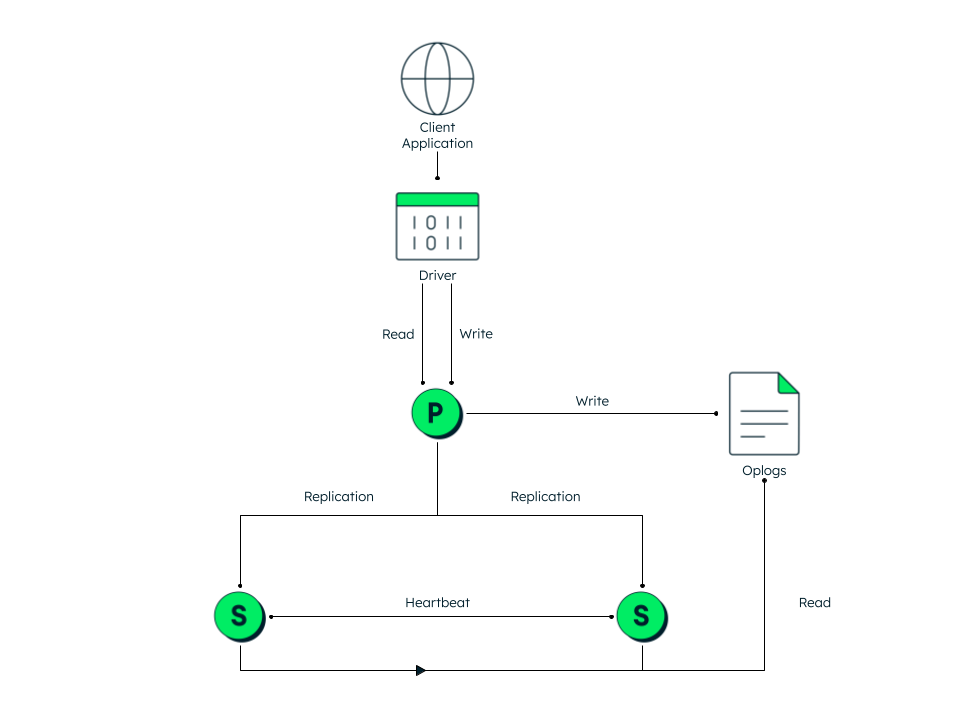
In the above diagram, we have one primary and two secondary nodes all with the same data. The secondary nodes communicate with each other with heartbeat (ping).
Primary node operations
The primary node handles all write operations and maintains an operation log (oplog)—a special capped collection that records all data modifications. There can only be one primary node active at any time in a replica set.
Secondary node operations
Secondary nodes continuously replicate the primary's oplog and apply these operations to maintain identical copies of the data. This asynchronous replication mechanism ensures the replica set can continue functioning even if some members fail.
Election process
When the primary node becomes unavailable, the replica set initiates an election to select a new primary node from among the secondary nodes. Elections can be triggered by various events:
Primary node failure
Network connectivity issues lasting longer than the timeout period (default: 10 seconds)
Addition of new nodes to the replica set
Initial replica set configuration
Planned maintenance operations
Read and write operations in a replica set
MongoDB's replica set implementation is transparent to client applications—they interact with the cluster the same way regardless of whether it's running as a single server or with replication enabled.
Read preferences
While MongoDB directs all write operations to the primary node, it offers flexible read operation routing through read preferences. By default, read operations target the primary node, but applications can optionally specify different read preferences to direct queries to secondary nodes. This capability allows applications to:
Balance read workloads across the replica set.
Reduce latency in multi-region deployments.
Support different consistency requirements for different types of queries.
Several read preference modes can be configured. For example, if a client application is configured to go directly to secondaries, then the mode parameter in the read preference should be set to secondary. If there are specific needs for the least network latency irrespective of whether that happens in the primary or any secondary node, then the nearest read preference mode should be configured. However, in this option, a risk of potentially stale data comes into play (if the nearest node is a secondary node) due to the nature of asynchronous replication from primary to secondary.
Alternatively, the read preference mode can be set to primary preferred or secondary preferred. These two modes also make use of another property called maxStalenessSeconds to determine to which node of the replica set the read operation should be directed. In all cases where there is a chance for the read operation to happen on a non-primary node, you must ensure that your application can tolerate stale data.
Write preferences
When writing data in a MongoDB replica set, you can include additional options to ensure that the write has propagated successfully throughout the cluster. This involves adding a write concern property alongside an insert operation. A write concern means what level of acknowledgement we desire to have from the cluster upon each write operation, and it consists of the following options:
The w value can be set to 0, meaning that no write acknowledgment is needed. 1 is the default and it means that it only requires the primary node to acknowledge the write, while any number greater than 1 corresponds to the number of nodes plus the primary that need to acknowledge. For example, 4 means 3 secondaries need to signal as well as the primary node.
The j value corresponds to whether MongoDB has been written on disk in a special area called the journal. This is used from MongoDB for recovery purposes in case of a hard shutdown, and it is enabled by default.
Finally, the wtimeout value is the time the command should wait before returning any result. If this is not specified and if for any reason the actual write has any network issues, then the command would block indefinitely, so it is a good practice to set this value. It is measured in milliseconds and it is only applicable for w values greater than 1.
In the following example, if we have a five-node replica set, we are requesting that the majority (w option) of the nodes (three) replies back with a successful write acknowledgment:
In the above example, we are using the mongo shell insert command with two parameters. The first parameter is the document that will be inserted into the products collection. The second parameter is the write concern, which specifies that the write operation must be acknowledged by a majority of the data-bearing nodes within a five-second timeout period.
MongoDB sharding
Since vertical scaling has limitations due to hardware requirements as well as a single point of failure, MongoDB clusters rely on horizontal scaling through sharding. In a sharded cluster, data is distributed across many servers. A sharded MongoDB scales reads and writes along multiple shards.
What is a MongoDB sharded cluster?
A MongoDB sharded cluster distributes large datasets across multiple shards (servers) to achieve horizontal scalability and improved performance for both read and write operations.
Sharding is particularly beneficial for collections with large data volumes and high query rates.
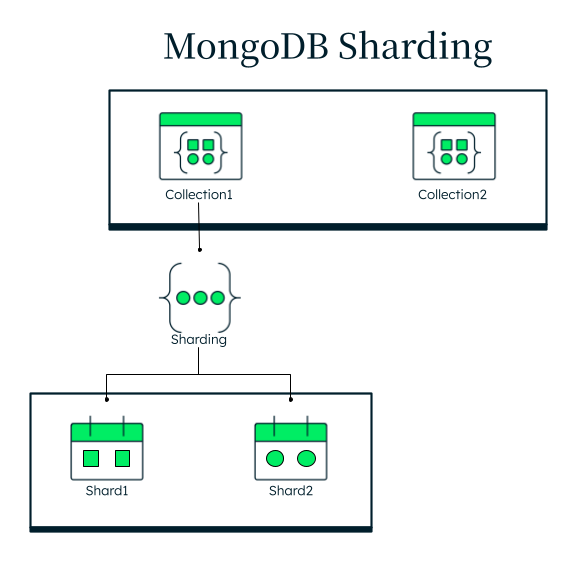
In the above diagram, Collection1 is sharded across multiple servers, while Collection2 remains unsharded. If Collection1 were confined to a single server, that server's CPU could become overwhelmed due to insufficient capacity to handle incoming requests. By distributing Collection1 across multiple shards, the system can better handle the workload by spreading it across more computing resources.
A MongoDB sharded cluster consists of three essential components:
Shards: Each shard can be configured as a replica set, providing both high availability and horizontal scalability.
Query router (mongos): This component serves as an intermediary between clients and shards. The mongos process routes queries to appropriate shards and handles load balancing across the cluster for all read and write operations.
Config servers: These servers provide essential metadata services for the cluster. They store cluster configuration data, chunk location and range information, authentication details including usernames, role-based access control settings, and database and collection permissions.
Production environment
A robust production MongoDB deployment requires careful planning around several key aspects:
High availability and disaster recovery
To ensure business continuity and minimize downtime, deploy MongoDB replica sets (multiple nodes) across one or multiple regions based on your risk assessment and recovery requirements.
Each replica set consists of a primary mongod process and multiple secondary processes. It is recommended to maintain an odd number of mongod processes to ensure a majority vote can be reached when the primary fails and a new primary needs to be elected.
Scalability
While proper data modeling, collection design, and indexing strategies are foundational, a sharded cluster is essential for handling large-scale production workloads. A well-planned sharding strategy enables your MongoDB cluster to scale horizontally as data volumes grow, maintain performance under heavy workloads, and distribute data and queries across multiple servers.
When designing your production environment, it's important to plan your sharding strategy early, even if you don't implement it immediately. This forward-thinking approach helps ensure your application can scale smoothly as your data and traffic grow.