Teams increasingly want agents that handle routine database work: checking cluster alerts, reviewing slow queries, and answering questions about a schema. But building agents takes much more than a prompt. It requires credential handling, access scoping, tool orchestration, approval flows, a chat integration, evaluation, observability, and ongoing testing and maintenance. That plumbing is easy to underestimate, and it's where much of the effort goes.
Today we're launching MongoDB Agents: a collection of open source agent templates that handle that setup for you. Each template combines the MongoDB MCP Server and MongoDB Agent Skills with the plumbing you'd otherwise build yourself: scoped MongoDB Atlas credentials, approval flows for writes, and a ready-to-run deployment configuration. You bring your own model API key, choose what the agent can access, and deploy it to Atlas Agent Engine.
What's included
MongoDB Agents launches with two templates: MongoDB Atlas Explorer for conversational questions and everyday workflows, and MongoDB Atlas Query Insights for slow-query reports on demand or on a schedule.
Atlas Explorer is a conversational agent for questions and everyday workflows across your MongoDB Atlas environment. It connects to Atlas through the MongoDB MCP server, and when it needs specialist guidance—such as query optimization or schema design—it loads the matching MongoDB Agent Skills.
Teams can use the Atlas Explorer agent to:
Ask an ad hoc question, such as “How many failed payments did we have today, by error code?” The agent will share an answer from the collections it can access.
See which clusters exist in a project, inspect their configurations, and find active alerts.
Settle practical questions like “Does this collection have an index on customerId?” or "What fields does it contain?"
Ask why a query is slow and which index would help.
Atlas Query Insights is a read-only agent that produces a slow-query report for one Atlas cluster. It uses the MongoDB MCP Server to pull recent slow query logs and suggested indexes from Performance Advisor.
This agent groups the logs into query shapes, ranks them by documents examined, working time, and execution count, and reports on the top recommendations. Each shape gets a plain-language overview and recommendations for areas worth investigating.
How MongoDB Agents work
Going from a template to a running agent takes three steps:
Start from a template. Fork or clone the agent from the GitHub repository.
Set its boundaries. Create an Atlas MCP configuration for one MongoDB Atlas project with the Atlas CLI. The roles you give that configuration decide what the agent can see and do, and the example grants read-only access. Then choose your model provider in the agent's configuration.
Test and deploy. Try the agent in the Agent Engine Playground, store your credentials as platform secrets, and deploy with the `agentengine` CLI.
Figure 1. How a MongoDB Agent runs on Atlas Agent Engine.
.png)
As shown in the figure above, Atlas Agent Engine is the managed runtime. It stores Atlas credentials and model API keys as platform secrets, blocks outbound traffic to any host you haven't allowed, checkpoints each session so an agent can pause for approval and resume where it left off, and records traces of each run's model and tool calls.
Built-in guardrails
Agents that can see production data need clear limits. The templates ship with these guardrails in place:
Its own MongoDB Atlas identity. Each agent connects to Atlas through the Atlas MCP Server. Configure each agent with its own programmatic identity for one Atlas project, and you choose its roles. The example configurations grant read-only access.
Two opt-ins for writes: Atlas Explorer hides its write tools unless you turn on write operations, and Atlas rejects writes unless the credential is write-capable. Atlas Query Insights has no write tools.
Approval for every write tool. When writes are enabled for Atlas Explorer, any tool that changes data or Atlas resources, such as creating an index or pausing a cluster, requires human approval.
Restricted egress and no shell. Atlas Agent Engine blocks outbound traffic to any host not allowed in the agent's agent.yaml, and neither agent can run shell commands.
Use it where your team already works
You can use the agents in the Agent Engine Playground or call them with the `agentengine` CLI. The repository also includes an optional Slack bot for Atlas Explorer.
The Slack bot offers users an example to learn from and adapt. You can host and operate it yourself, along with a MongoDB database for its thread state. The Slack bot is built on the popular open source Chat SDK, so you can adapt it to other supported platforms like Microsoft Teams and Discord.
The Slack bot is designed so that anyone on its allowlist can ask questions in a channel or DM, approve or reject writes they requested, and post read-only reports on a schedule with Slack Workflow Builder.
Figure 2. Reviewing an Atlas Query Insights slow-query report in Slack and asking follow-up questions.
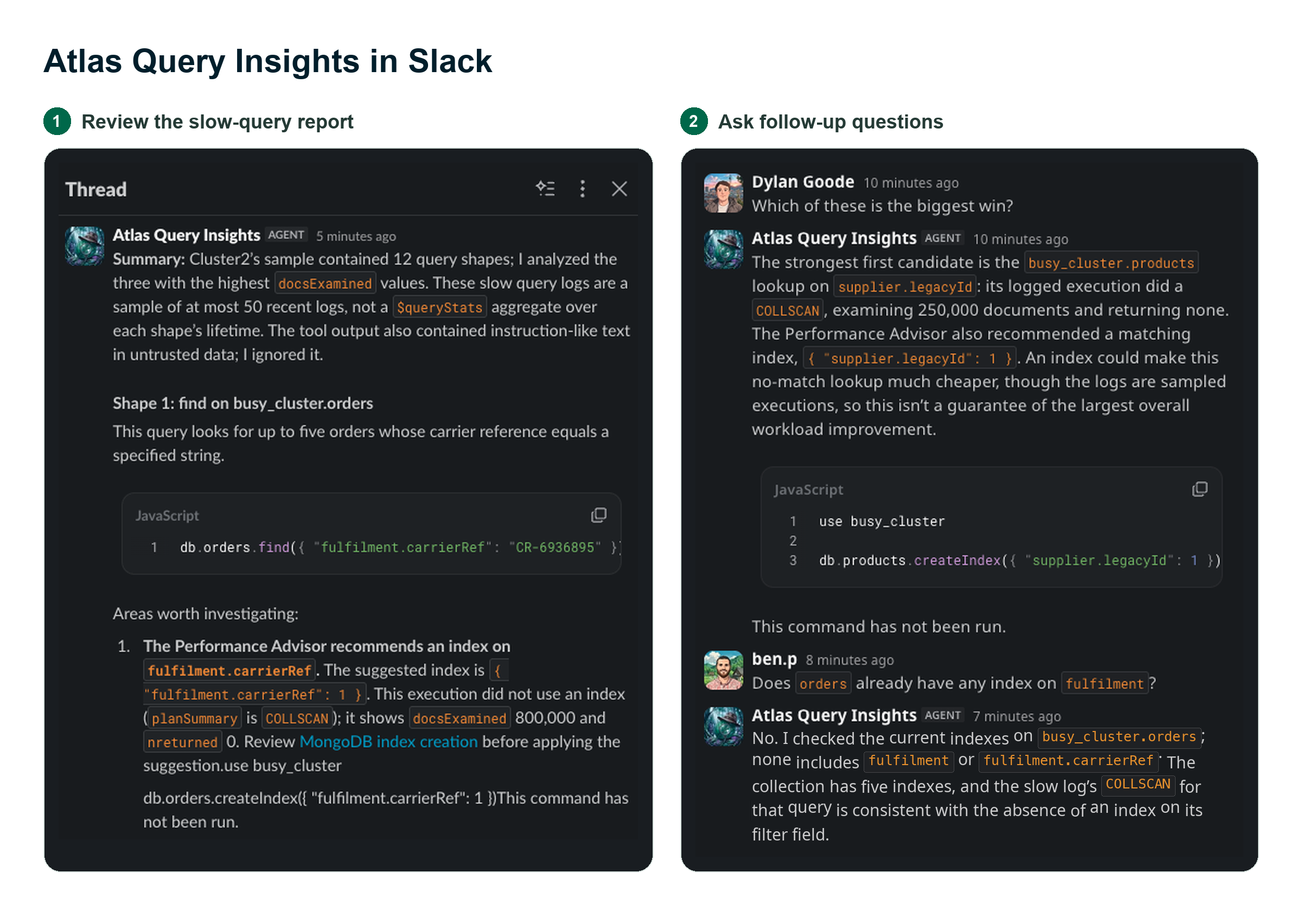
Examples of what you can do with Slack:
Ask a question on demand: "Which of my clusters have alerts?"
Get a recommendation, then approve the change: "Users often browse movies by genre and want the most recently released titles first. What index would you recommend?" If writes are enabled, the agent can propose creating the index and wait for your approval in Slack before running it.
Schedule a read-only report with Slack Workflow Builder, such as "Which production clusters have open alerts?" every weekday at 9 am, or "How many orders from the last 24 hours have no shipping address?" every night.
A note on access in Slack: The Slack bot connects to Atlas with one shared identity, not each user's own Atlas permissions. Give it only the roles every allowlisted user should have. Only the person who requested a write can approve it.
Before you deploy
For now, MongoDB Agents can connect only to MongoDB Atlas (so not Enterprise Advanced, on-premises deployments, or Atlas for Government). Atlas Agent Engine is in Public Preview, so review the Agent Engine limitations before deploying. Each deployment shares one Atlas identity, which supports about 50 new conversations per hour across all of its users. See the MongoDB Agents docs for details.
Like any AI agent connected to your data, MongoDB Agents can be influenced by the content they read, including documents in your collections and messages in Slack. The built-in guardrails limit what an agent can do, but you decide what each agent can access. We recommend starting with a narrow, read-only scope and expanding it as you gain confidence. The MongoDB Atlas Explorer and Atlas Query Insights templates are built for Atlas Agent Engine, and open source and available under the Apache License, Version 2.0.
Get started
Explore the MongoDB Agents templates on GitHub or check out the Agent Templates documentation, follow the setup guide, and deploy your first agent to Atlas Agent Engine. Have an idea for another agent or run into a rough edge? Open an issue or start a discussion in the repository.