Artificial intelligence applications increasingly rely on retrieval‑augmented generation (RAG) to keep large language models grounded in trusted information. But not all RAG systems are created equal. Many rely solely on internal databases, while others depend exclusively on external APIs. Both approaches can introduce hallucinations, outdated information, or limited control over content sources.
This is where the new hybrid search integration between Tavily and MongoDB makes a difference. Developers can now query both the web and their own MongoDB Atlas database in a single call. They can also configure exactly which web sources to trust, how many results to pull from external versus internal systems, and create highly accurate, low‑latency AI experiences.
In this blog post, I’ll walk through what this integration offers, when to use it, and how to build a full-hybrid RAG application using MongoDB Atlas, Voyage AI embeddings, and a dataset of publicly available scientific research papers from NCBI PubMed Central (PMC). You’ll also get a complete step‑by‑step setup guide using a GitHub demo project.
Why hybrid search matters (and when to use it)
The Tavily + MongoDB integration introduces a hybrid RAG pipeline capable of retrieving:
Local results stored in MongoDB Atlas with vector search
External results from trusted web domains via Tavily API
Rank the results of both sources using Voyage AI
This level of control makes hybrid search especially valuable across several domains where accuracy and trust are critical. For example, teams building healthcare, biotech, and scientific research tools can rely on their vetted internal datasets while still incorporating up‑to‑date insights from trusted medical sources. Legal, compliance, and regulatory chatbots benefit from the same flexibility, ensuring responses remain grounded in authoritative information. Enterprise knowledge assistants can blend internal documentation with selected public sources, and sectors like e‑commerce or fintech can pull in real‑time data without sacrificing reliability.
By adjusting how much weight to give local versus external search results, organizations can tailor the system to their needs. This tunable balance ensures your AI remains both accurate and adaptable.
Now that you’ve seen the values of hybrid search, let’s walk through the demo application that brings all of these pieces together.
About the demo application
The project is designed as a clean and extensible example of hybrid RAG architecture, following a familiar MVC structure so developers can easily understand how data, business logic, services, and the UI work together.
The codebase is organized into the following layers:
Models: Define how data is stored and accessed, including the logic for processing PubMed XML files and performing MongoDB operations.
Controllers: Act as the bridge between user actions and the system’s internal logic, orchestrating search requests and managing the data‑loading workflow.
Service modules: External integrations such as Tavily’s hybrid search API and Voyage AI’s embedding and reranking models are encapsulated in dedicated service modules.
Utility helpers: Take care of configuration and environment management, while small command‑line scripts automate tasks like downloading NCBI PMC articles and generating embeddings.
A lightweight Flask app ties everything together and renders a simple HTML‑based search interface. Together, these components form a complete hybrid RAG pipeline:
Downloads and processes scientific articles from PubMed Central.
Stores them in MongoDB Atlas, where embeddings are later added.
Generates semantic vectors using the Voyage AI model.
It conducts information retrieval from both local data and the web.
Reranks everything into a single, consistent response.
Whether you’re evaluating architectural patterns or building your first hybrid RAG system, this demo provides a straightforward, production‑inspired example you can learn from or extend.
Key components include:
load_data.py for downloading and parsing PMC research articles
voyage_mongo_embed.py for generating embeddings and updating the database
tavily_client.py as a hybrid search wrapper
app.py as the Flask backend
Step‑by‑step setup guide
1. To begin, you will need a MongoDB Atlas cluster.
An M10 cluster (or larger) is required. If you do not have one set up, please refer to the official MongoDB setup guide.
When configuring your database and collection, ensure you:
- Create a database user with the necessary read and write permissions.
- Configure your IP allow list for proper access.
- Finally, make sure to keep your connection string readily available.
2. Set up the Tavily API
In this part, we will guide you through the steps to create the Tavily API key. Once it’s done, save the values for later usage, the same as in case of the MongoDB connection string.
- Visit Tavily’s page.
Sign up if it’s the first time you will use it, or log in if you already have an account.
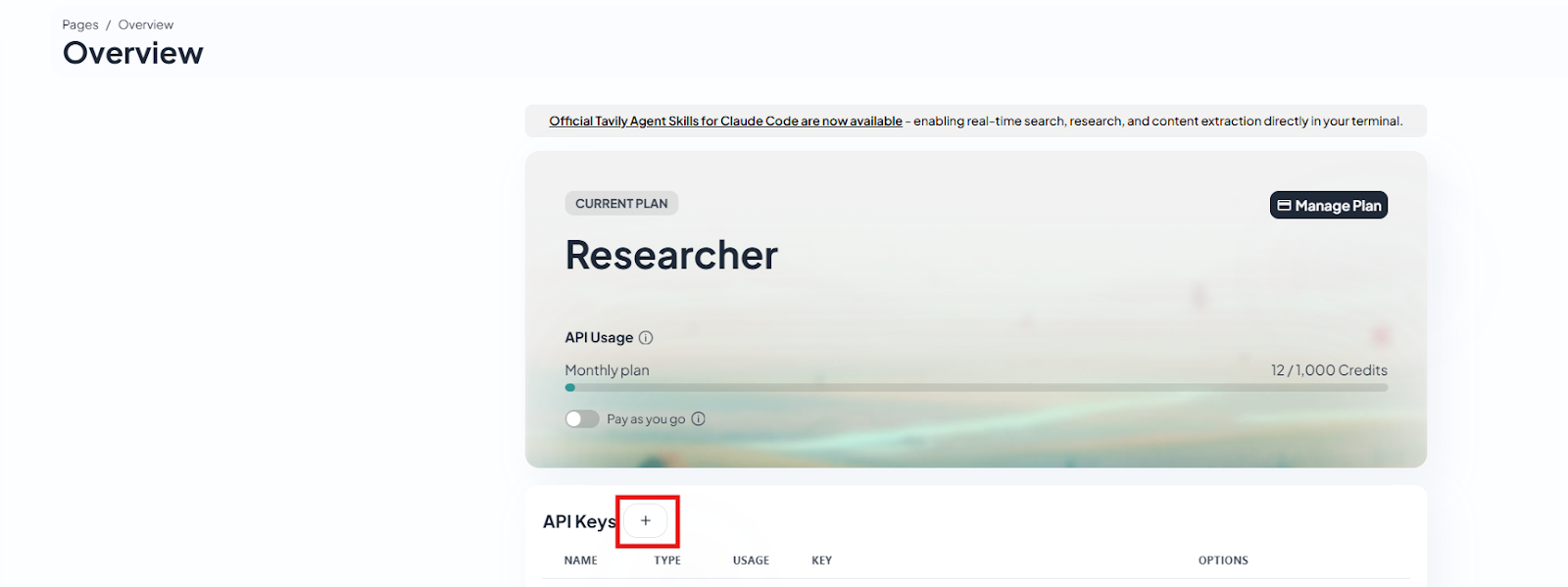
Once this is done, you get to the Overview page. Here you can see the actual usage and also create API Keys. Now let’s go ahead and click on the plus sign next to the API Keys option.
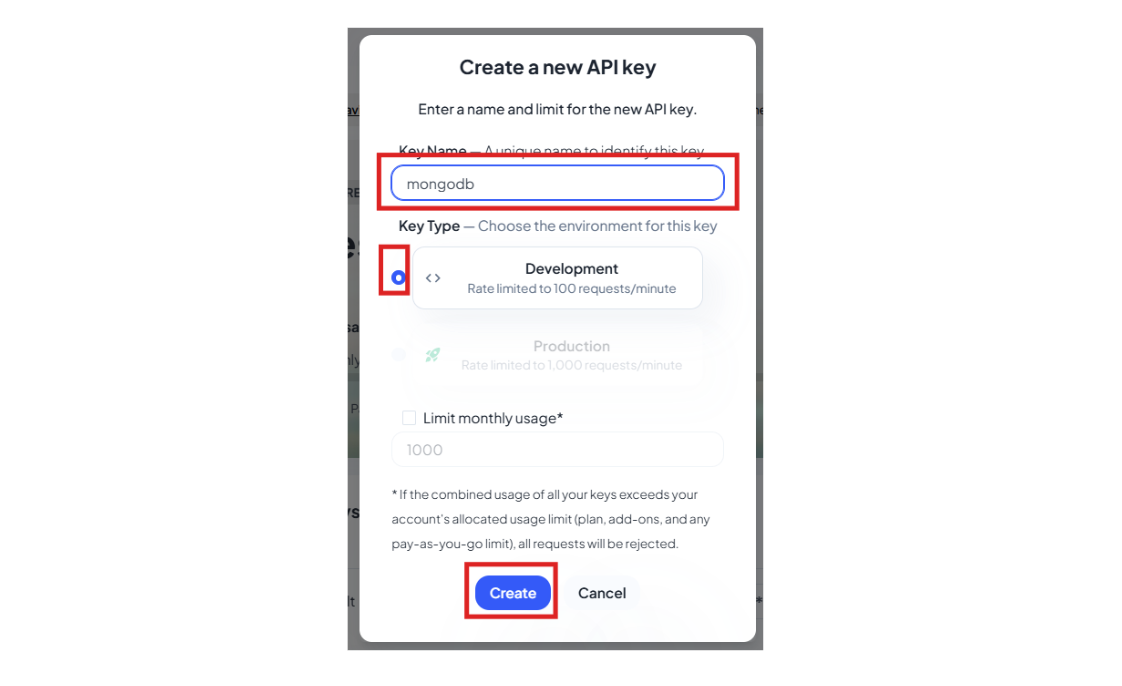
- Give the API Key a name and click on Create.
- Once the API key is created, use the copy icon to save it for later use. (In the .env file, you will need to include this value.)
3. Create VoyageAI API key
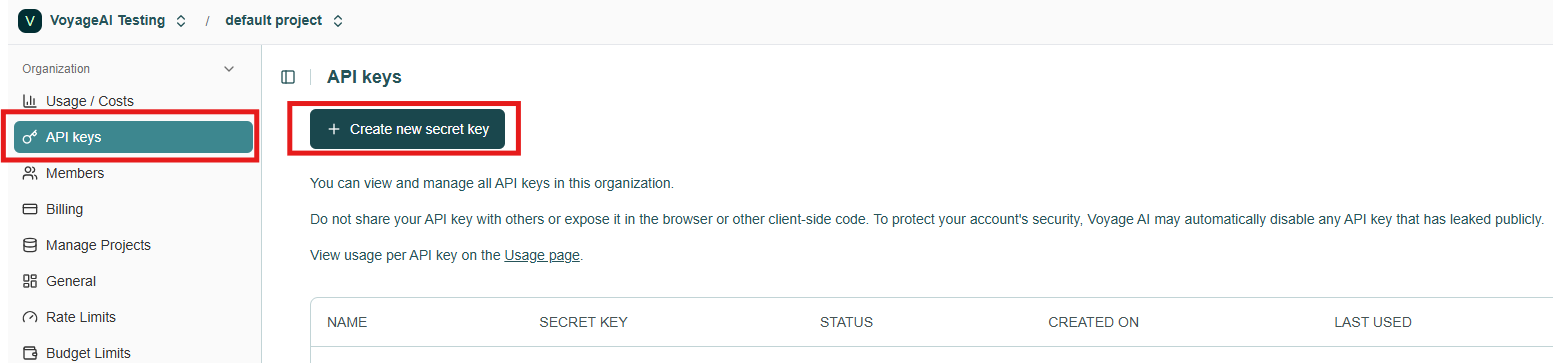
Voyage AI utilizes API keys to monitor usage and manage permissions. To obtain your key, please sign in with your Voyage AI account and click the "Create new secret key" button in the API keys section of the Voyage dashboard.
4. Clone the repository
5. Configure environment variables
Rename the .local.env file to .env and fill all the variables you find there:
- MONGODB_URI — the MongoDB connection string for your Atlas cluster
- DB_NAME and COLLECTION_NAME — the database and collection where your processed PubMed documents will be stored
- FIELD_TO_EMBED — the document field containing the text you want to convert into embeddings (in our case it’s called content)
- EMBEDDING_FIELD — the field where the generated Voyage AI embeddings will be saved
- VOYAGE_API_KEY — your API key for calling Voyage AI’s embedding and reranking models
- MONGODB_INDEX — the name of the Atlas vector search index created for hybrid retrieval
- TAVILY_API_KEY — your Tavily API key that enables web‑augmented search results
Once these variables are set, the application has everything it needs to run the full hybrid RAG workflow: loading and storing scientific content, generating embeddings, searching your MongoDB collection semantically, and blending those results with trusted real‑time web data.
6. Create a virtual environment
7. Install dependencies
8. Load data from NCBI PubMed Central
PMC provides millions of biomedical and life‑science research articles in JATS XML format through their Open Access Subset. These are freely available for text mining and are updated.
For the sake of this demo, there were some considerations taken into account:
A general PMC Open Access URL is used. Therefore, the content may vary depending on when the execution occurs.
Only relevant fields (title, abstract, body text) are extracted.
For simplicity, a maximum file size of 20 KB is enforced. Files exceeding this limit are discarded and not included in further analysis.
After completion, your MongoDB Atlas cluster will contain clean documents ready for embedding.
9. Generate embeddings with Voyage AI
MongoDB Atlas simplifies your architecture by allowing you to store vector embeddings and the original metadata directly within the same document, thus keeping all related information unified.
You are encouraged to experiment with various Voyage AI models; the demonstration is not restricted to the one used in this example.
10. Create a vector search index in MongoDB Atlas
Now that our data is cleaned, loaded into MongoDB Atlas, and enriched with embeddings stored in the field defined by the EMBEDDING_FIELD variable, we can move on to creating the vector index that powers semantic search.
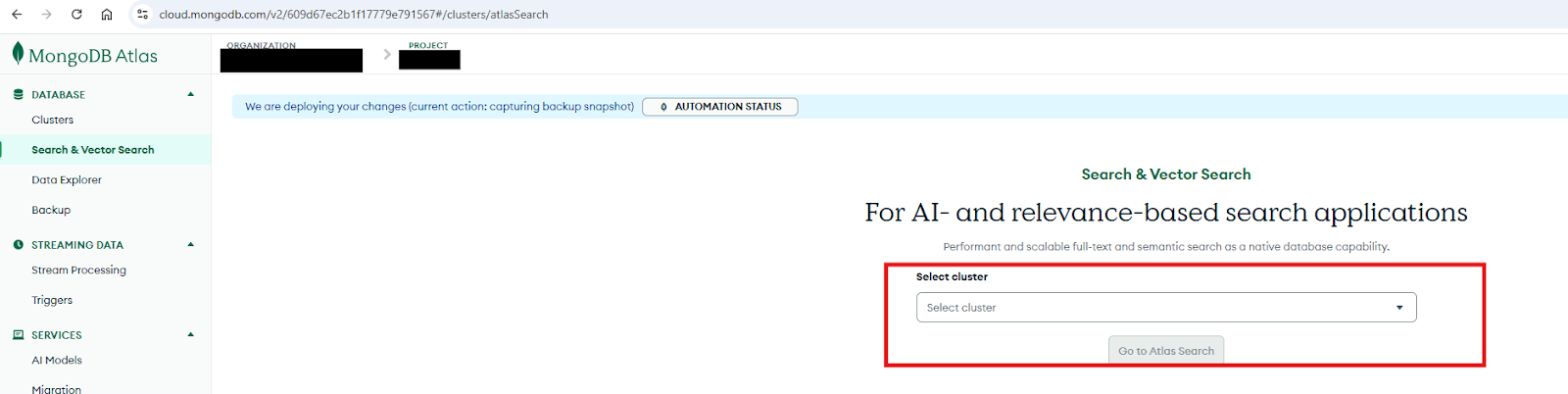
Step 1: To create the index, open MongoDB Atlas and navigate to Search and Vector Search from the left‑hand menu.
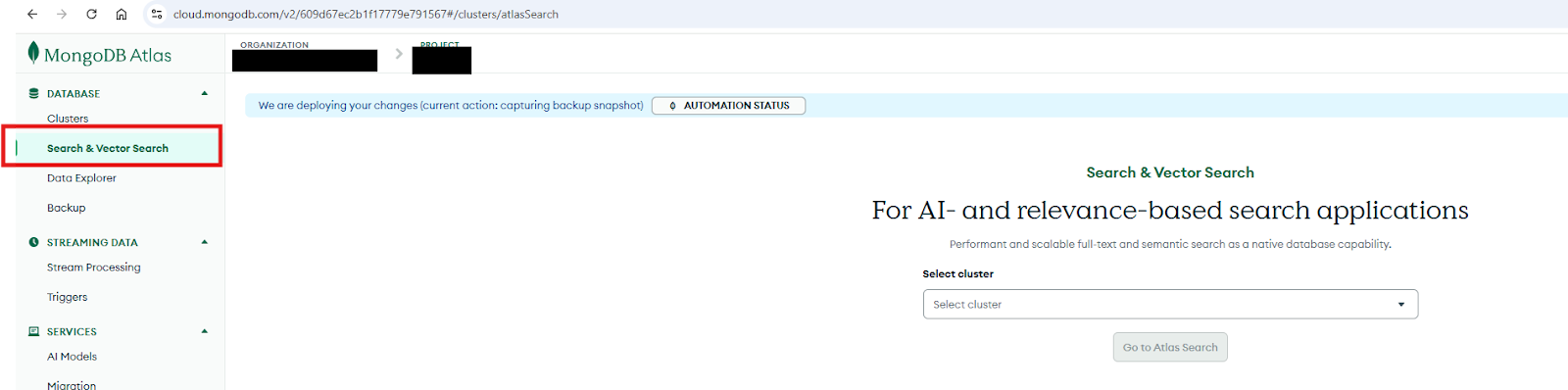
Step 2: In the Select cluster dropdown, choose the cluster where your documents and embeddings are stored, then click Atlas Search.
Step 3: You will see a list of existing search and vector indexes. Select Create Search Index on the right.

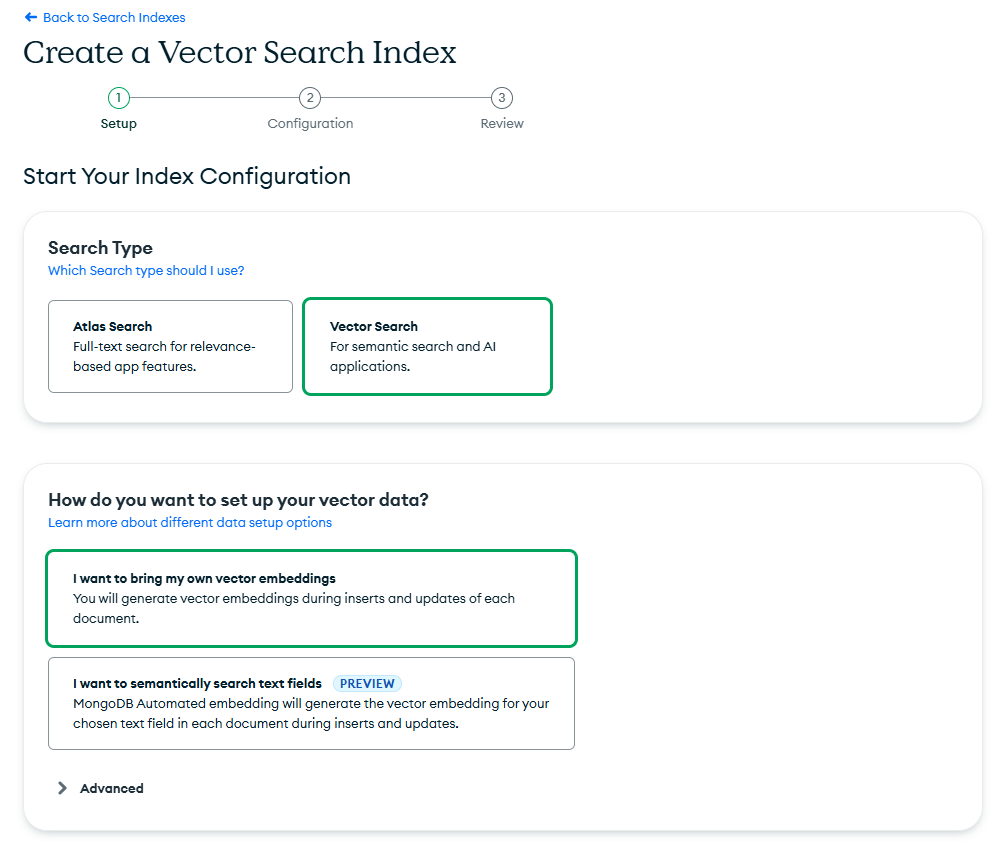
Step 4: In the setup workflow, choose Vector Search as the index type and keep the default option: “I want to bring my own vector embeddings.” Give your index a name—something meaningful that reflects its purpose.
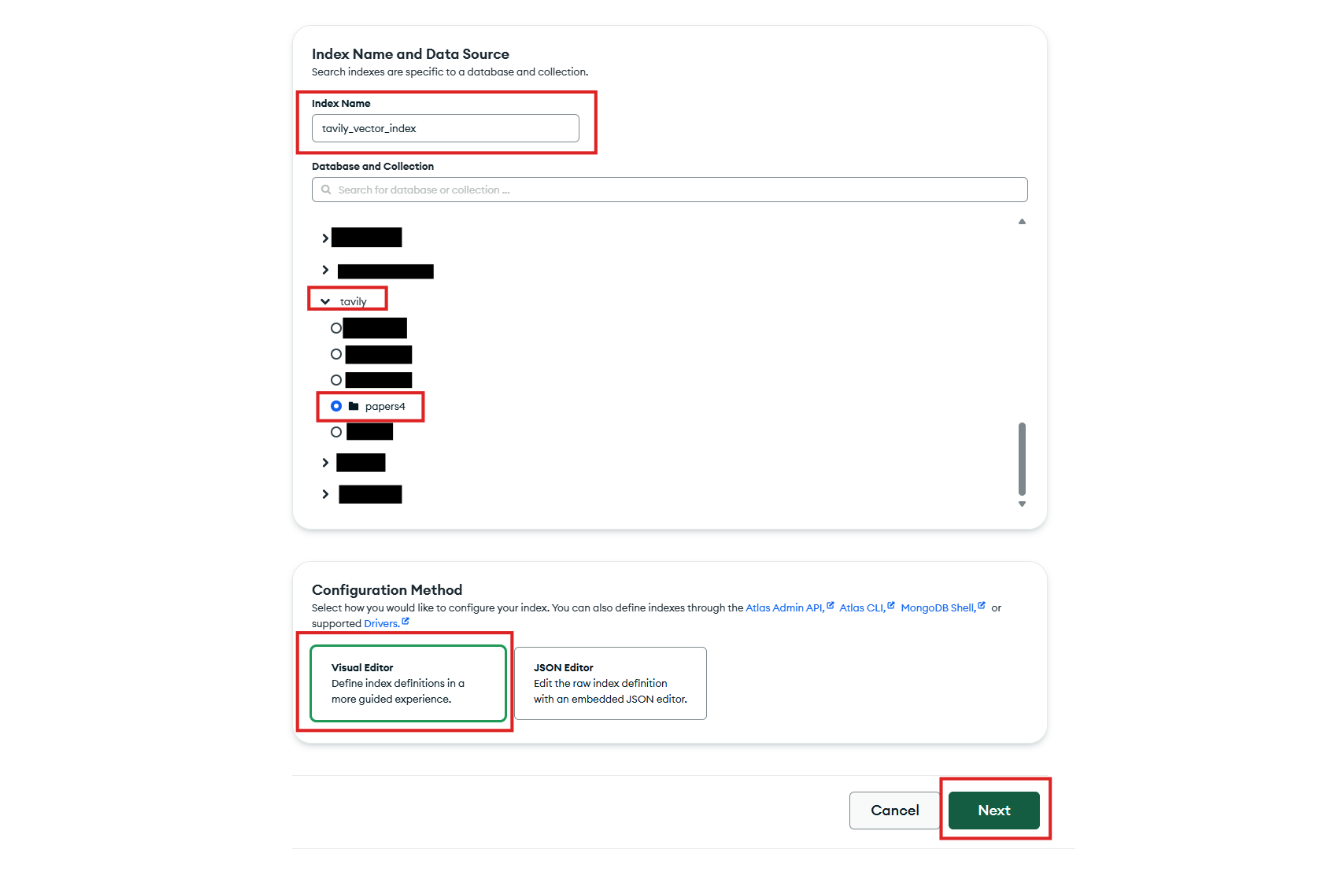
Step 5: Next, select the database and collection that contain the documents with your embeddings. For the configuration method, choose Visual Editor, which makes the setup more intuitive.
Step 6: MongoDB Atlas will likely auto‑detect the embedding field you created earlier. Verify that this is correct, then choose cosine as the similarity metric.
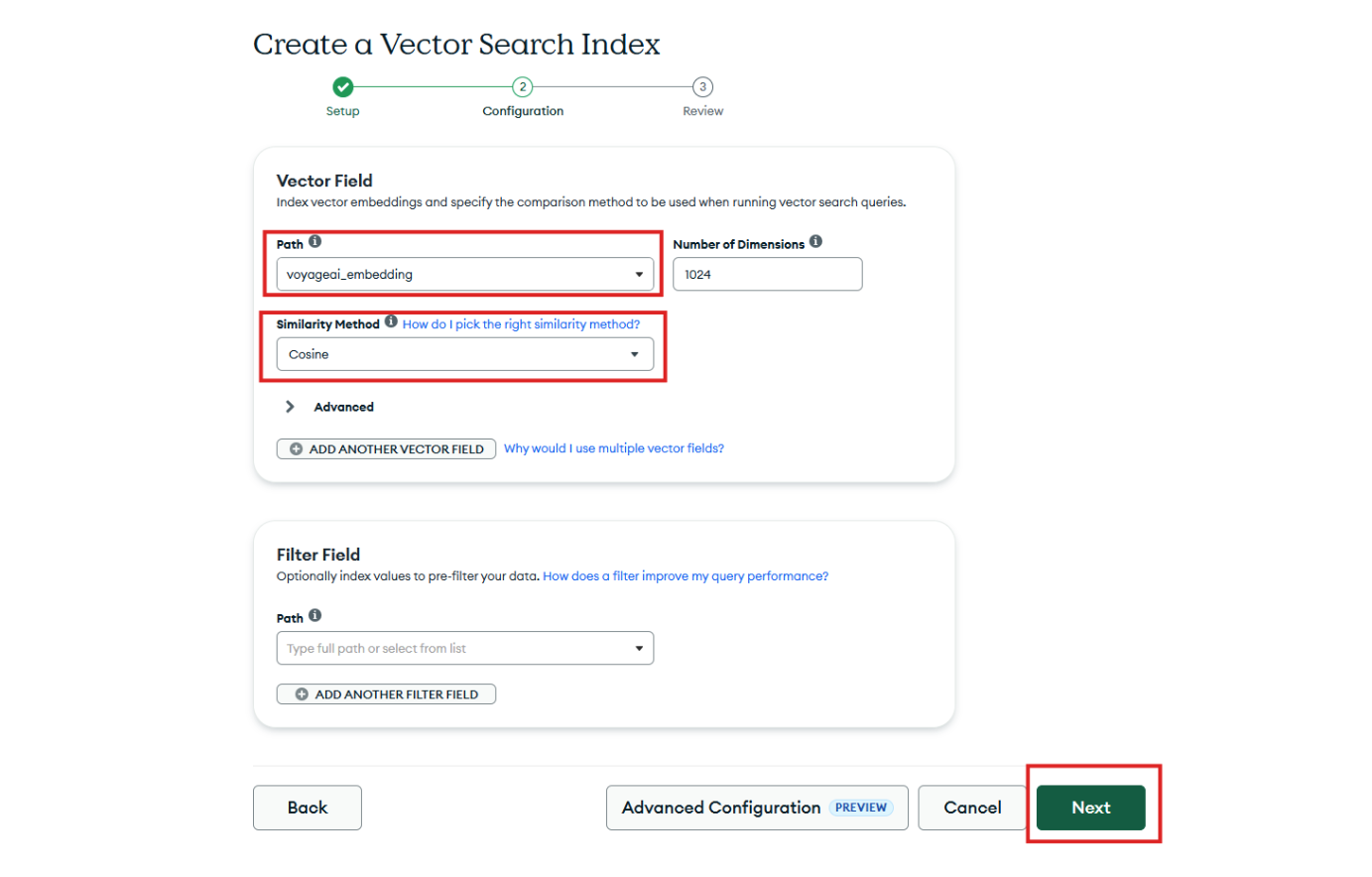
Step 7: Click Next, review the generated configuration, and then select Create Vector Search Index. Once the index finishes building, your hybrid search pipeline is fully ready to support efficient local vector retrieval.
11. How Tavily Hybrid Search Works
Please find below the code used in this demo application
Each parameter plays an important role in shaping the final response:
query: The text you're searching for. Behind the scenes, the system embeds this query using Voyage AI so that MongoDB Atlas can perform semantic vector search.
max_results: The total number of combined results you want back, whether they originate from your database or from the web.
min_local: Ensures that at least this many results come from your MongoDB Atlas documents, giving you reliable, domain‑specific grounding.
min_foreign: Guarantees that the search also includes fresh, up‑to‑date information from the web.
include_domains: Lets you restrict the web search to trusted sources only, which is essential for industries like healthcare, legal, or financial services where data provenance matters.
12. Run the application.
You can now open the web interface and try hybrid RAG queries that blend real clinical research with curated real‑time web data.

Next Steps
Ready to build your own hybrid RAG workflow? Explore the full GitHub repo and start experimenting with MongoDB Atlas, Tavily, and Voyage AI today.