Many of the agent demos published this year are some version of the same thing: connect your agent to a data source, let it get familiar with the data, and get a report back.
We’ll build a coordinator agent and three sub-agents that search a roughly 2,900-page federal rulemaking docket, write their findings to a shared workspace, and hand off to a fourth agent that reconciles the findings into a memo. You'll interrupt the pipeline mid-run, restart it, and confirm it resumes from the last completed stage instead of redoing finished work.
Working through it cost us $2 to $5 in API calls and took about 45 minutes.
Specifically, you will:
Load a mixed-format document corpus into Amazon Simple Storage Service (S3) and index it in MongoDB Atlas.
Watch an agent navigate that corpus incrementally instead of loading it into a prompt.
Build a coordinator that delegates to three sub-agents sharing one workspace.
Interrupt a running pipeline and resume it from saved run state, without redoing completed work.
This tutorial moves from architecture (what's searched vs. what's stored in bytes), to a single-agent search example, to a four-agent pipeline, to failure recovery, to production caveats.
The complete code and corpus are in the companion repository (GenAI-Showcase, partners/langchain/langchain-deepagents).
What is a virtual filesystem?
A virtual filesystem is a path-based interface that abstracts away where file bytes actually live. An agent sees a path such as corpus/rules/88FR21752-final-rule.pdf, but the underlying bytes might sit in object storage, a database, or a LangGraph store. The agent calls the same ls, glob, grep, read, write, and edit operations no matter what's underneath; the configured backend decides where each call actually goes.
That abstraction is what lets an agent work incrementally: list a directory, narrow by filename pattern, search for a concept, read one file, write a finding — without ever loading the whole corpus into its context window.
Background
What are LangChain Deep Agents?
LangChain Deep Agents is an agent harness built on LangChain and LangGraph for complex, multi-step work. It adds planning, sub-agents, and filesystem-oriented tools, so an agent can break a large task into smaller actions rather than solving everything within a single context window.
A Deep Agent works through a small set of filesystem operations: ls for directory structure, glob to find files by path pattern, grep to search content, read to retrieve a file, write and edit to create or modify artifacts. Those tools are exposed through a backend contract, so the agent never knows whether files live on local disk, in a LangGraph store, or in object storage. It calls the same interface, and the configured backend supplies the data.
What the MongoDB VFS backend does
The langchain-mongodb-deepagents-vfs package implements that contract. It lives in the LangChain monorepo at langchain-ai/langchain-mongodb/libs/langchain-mongodb-deepagents-vfs, and is co-maintained by LangChain and MongoDB. It presents an object-store-backed corpus to the agent as a filesystem, and routes each operation to the system built for it:
That separates the source of truth from the search index. Object storage is built for durable, low-cost storage of file bytes; it is not built to maintain live indexes or rank hybrid queries. Atlas is an operational database with built-in Search, Vector Search, and hybrid ranking.
Keeping ranking in the database also removes a client-side reranking round trip: $rankFusion combines the full-text and vector result sets natively, in one query, on the database side.
Figure 1. How the LangChain Deep Agents VFS backend routes file bytes through object storage and search operations through MongoDB Atlas.
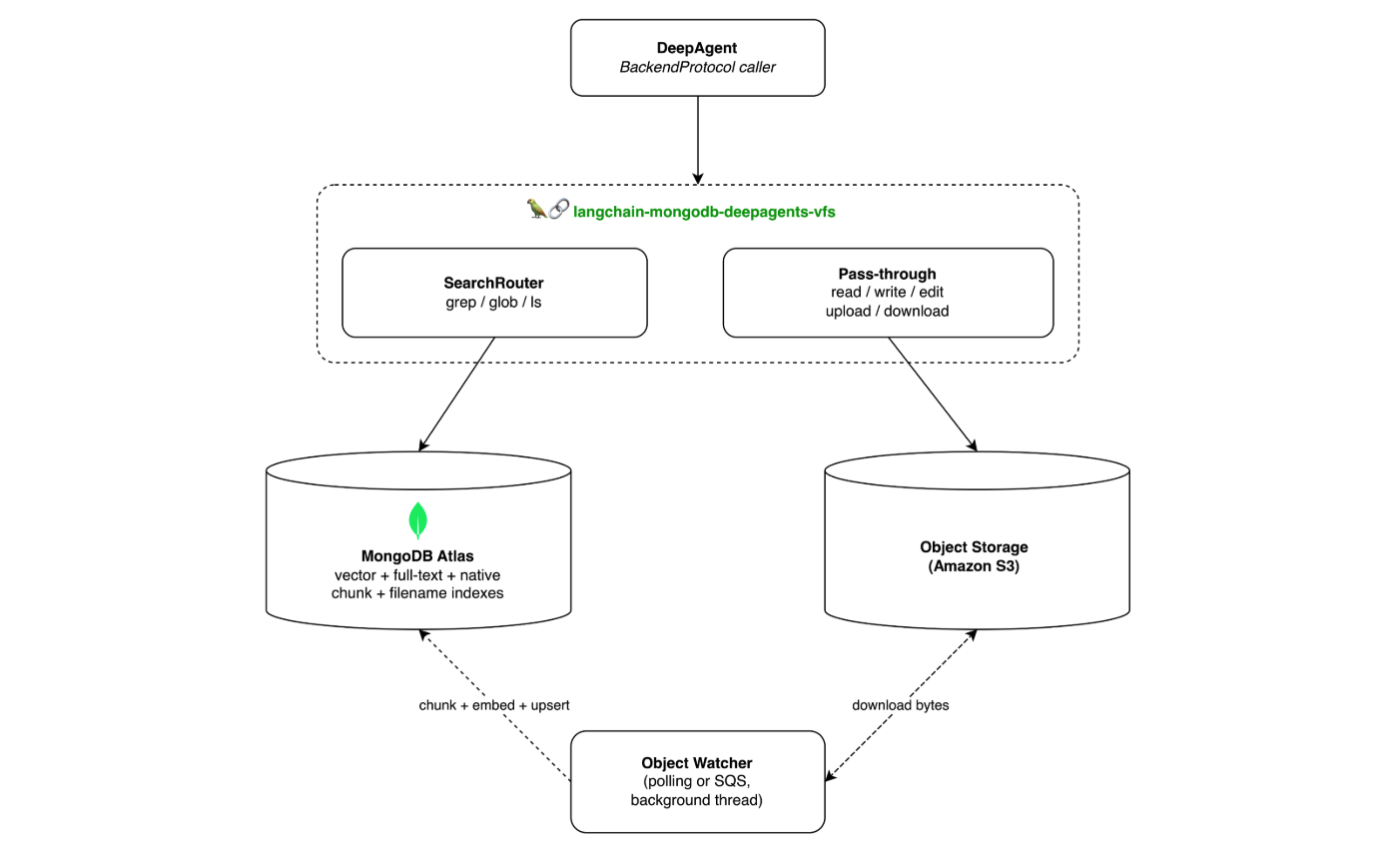
An object watcher keeps the Atlas representation aligned with the bucket. For the full design rationale, see the MongoDB VFS announcement post, which explains how the backend separates storage and search.
Prerequisites
- A MongoDB Atlas cluster running 8.1 or later. $rankFusion requires it. An M0 cluster works for development; MongoDB Search and Vector Search require an M10 or higher cluster for production workloads.
- Your IP address in the project's Network Access list, and a database user with read and write access.
- An AWS account with an S3 bucket, and an IAM policy granting s3:GetObject, s3:PutObject, s3:DeleteObject, and s3:ListBucket on both arn:aws:s3:::
and arn:aws:s3::: bedrock:InvokeModel for amazon.titan-embed-text-v2:0. If you switch to the SQS watcher, also grant sqs:ReceiveMessage and sqs:DeleteMessage on the queue./*. If you use Bedrock embeddings, also grant - An embedding provider. Amazon Bedrock is the default and uses the boto3 credential chain. To use OpenAI instead, install the [openai] extra, set EMBEDDING_PROVIDER=openai, and set OPENAI_API_KEY from the OpenAI API keys page.
- An API key for the model that drives the agents.
- Python 3.11 or later.
This tutorial is written against langchain-mongodb-deepagents-vfs 0.1.0, released 25 August 2026 and still the only release, and langgraph-store-mongodb 0.4.0 if you run the StoreBackend comparison in the hybrid search section.
Note
One setup step fails more often than the rest. aws_region governs S3, SQS, and Bedrock together, and they cannot be split across regions. If the Bedrock embedding model is not enabled in the region where your bucket lives, embedding fails and surfaces as a region error rather than anything to do with embeddings. Enable amazon.titan-embed-text-v2:0 in your bucket's region before you start, or use the [openai] extra.
Additionally, the install extra does not select the embedding provider. EMBEDDING_PROVIDER does, and it defaults to Bedrock, so installing the [openai] extra alone leaves you on Bedrock. Set EMBEDDING_PROVIDER=openai as well, or pass a LangChain Embeddings instance to embedding_model directly. Override the model with EMBEDDING_MODEL, and keep embedding_dimensions matched to whatever you choose.
Set up the environment
1. Install the packages
2. Load the corpus
The corpus is a United States Department of Energy rulemaking: docket EERE-2021-BT-STD-0035 on regulations.gov, the first federal efficiency standards for room air cleaners. The final rule in the Federal Register was published at 88 FR 21752 in April 2023.
The final rule and DOE's own analysis documents are works of the United States government. The comment letters were filed by third parties into a public federal docket and are redistributed here on that basis. The files are committed to the companion repository rather than fetched at runtime, so you need no regulations.gov API key to follow along.
It runs to roughly 2,900 pages across 45 files, in three directories. corpus/rules/ holds five: the final rule as both PDF and XML, the simultaneous NOPR in both formats, and a confirmation-of-dates notice. corpus/analysis/ holds fifteen: the technical support document, five analysis documents committed as .htm and .pdf pairs, and four macro-enabled spreadsheets (lcc.xlsm, nia.xlsm, grim-joint.xlsm, grim-dfr.xlsm). corpus/comments/ holds twenty-five attachments from manufacturers, California utilities, efficiency advocates, and trade associations. By extension that is 32 PDFs, 5 HTML files, 4 .xlsm and 1 .xlsx spreadsheet, 2 XML files, and 1 Word document. Several of the comment letters are Word or PDF files whose body text reads, in full, "please see attached."
A word on formats before you seed. The package documents parsers for .txt, .md, .rst, .csv, .pdf, .docx, .xlsx, .xls, .pptx, and .ppt. This corpus goes past that list: the five analysis documents are committed as .htm alongside their PDFs, the final rule and NOPR carry .xml versions, and the four analysis workbooks are macro-enabled .xlsm rather than .xlsx. In the run shown throughout this tutorial, hybrid grep returned ranked matches from the .htm files with real line numbers, so those reached the index. Whatever you point this at, treat the format list as the documented floor rather than the full set, and check initial_sync_report.failed against your own file count before you trust a search that comes back empty.
Or use the seeder script, which writes through the backend so MongoDB metadata is created alongside the S3 objects:
If you use aws s3 sync instead, the backend's background watcher will index the files on its next polling interval.
3. Set your connection string
Copy the driver connection string from Atlas. It looks something like this:
Change the appName before you use it:
Atlas fills that parameter with your cluster name so its own connection metrics have a label. Replace it rather than adding a second one; the driver keeps the last value it parses. If your string also carries retryWrites or w=majority, leave those alone — they are connection options, not labels.
If your password contains : / ? # [ ] @ or a % sign, those characters have to be percent-encoded, or the driver misreads the URI and reports an authentication failure that has nothing to do with your password being wrong.
4. Create the backend and the agent
Point the backend at a bucket and a cluster, hand it to the agent, and the agent has a filesystem:
s3_prefix is doing real work in that call. It defaults to "mongodb_vfs/" and restricts every operation, including read, write, edit, sync, and watch, to keys under that prefix. Setting it to "corpus/" scopes this backend to the docket and nothing else in the bucket. Passing an empty string opts into whole-bucket access, which you rarely want in a shared bucket.
debug=True changes how failures reach you: methods raise AdapterError instead of returning error DTOs. That catches real bugs. It also turns an expected miss into an exception, so reading a manifest on a fresh run raises instead of returning None. Wrap those reads in try/except AdapterError.
There are no custom MongoDB tools in the reasoning loop, and no retrieval chain. The agent calls grep and read the way it would against a local directory, and the backend decides where each call goes.
5. Verify the initial sync
The constructor returns immediately, whereas index provisioning, the initial sync, and watcher startup run on a background thread. Your first grep blocks until it finishes, so it takes noticeably longer than every subsequent call. On this corpus it took us 5 to 8 seconds.
Checkpoint — what you should see: init_errors is empty and initial_sync_report.failed is 0 before you move on. If either assertion fails, do not continue to the discovery step; the corpus isn't fully searchable yet.
Do not skip this check. Three conditions degrade search without producing an error: pointing at a non-Atlas MongoDB drops grep to a regex query, losing the embedding API drops it to full-text only, and a partially failed sync leaves a collection that looks healthy while missing documents. init_errors and initial_sync_report catch all three.
The readiness gate has one subtlety. It releases between the sync stage and the watcher start, so a search that returns guarantees the index and sync stages finished, but a watcher-start failure is recorded a moment later and can be missed by a check made immediately after that first grep. initial_sync_report is also None outright when the sync raises rather than completing with failures, which is why the assertion tests report before report.failed.
How the agent searches a mixed-format corpus
Ask it something that requires finding a needle in the docket:
Every number in this tutorial comes from a single run against one cluster and one corpus. They show the shape of the thing. Your region, cluster tier, corpus, and model will move them. If you want your own figures, src/vfs_demo/metrics.py tracks tokens, wall clock, and cost per stage, and its compare_runs() prints a cold-versus-resumed table.
Four calls before it reads a single document, and each one narrows the next. The agent never holds the corpus — it holds a directory listing, a filtered path list, a ranked set of chunks with line numbers, and one PDF.
Figure 2. Each step narrows before the next one pulls bytes, which is what keeps a 2,900-page corpus inside a context window.
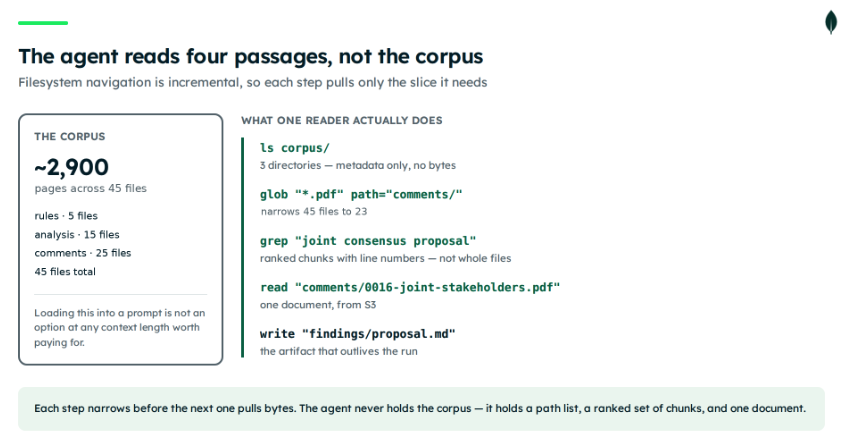
The discovery step calls the backend directly, so no LLM tokens are consumed. Across the three runs above, each hybrid grep came back in under two seconds, and the ranking stayed stable.
Hybrid search reaches vocabularies and formats ripgrep cannot
That grep worked because the parties in this docket do not share vocabulary. State standards and ENERGY STAR measure smoke CADR per watt. DOE measures PM2.5 CADR per watt through an integrated efficiency factor. Both describe the same physical quantity — how much clean air you get per unit of power — and the rule spends pages establishing that they are not interchangeable.
Compare against ripgrep over the same files on the local disk:
Most of these file types are not text, so grep cannot open them at all. Even if you extract the text first, literal matching still misses every passage that says "smoke CADR" when you searched for "IEF."
Here is how using StoreBackend over MongoDBStore, which implements the same protocol, works today:
The limitation here is in StoreBackend rather than in MongoDBStore, which can do vector search. StoreBackend's grep never calls it that way; it fetches every item in the namespace and matches literal substrings in Python. StoreBackend is what the package guarantees for use as an agent scratchpad for small, agent-authored files; it is not built for a large, pre-existing, document-heavy corpus. The VFS backend in this tutorial is built for the latter.
This is not a result of vector search beating keyword search. $rankFusion runs both at equal weight, and lexical retrieval is strong for agentic search. The hybrid index adds two things a ranker cannot: parsing, because a spreadsheet is not a text file, and coverage across parties who describe one measurement four different ways.
How to coordinate sub-agents over a shared corpus
The single agent answered one question. Working out whether DOE adopted the coalition's proposal takes three separate lines of inquiry, reconciled at the end.
In this rulemaking, the manufacturers and the environmental advocates filed together. AHAM, ACEEE, ASAP, CFA, and NRDC submitted a joint consensus proposal with specific efficiency levels in it. The question is whether DOE adopted them.
Give each sub-agent one question and one output path. The shape below is trimmed for readability; the real definitions add typed permissions, shown after the figure:
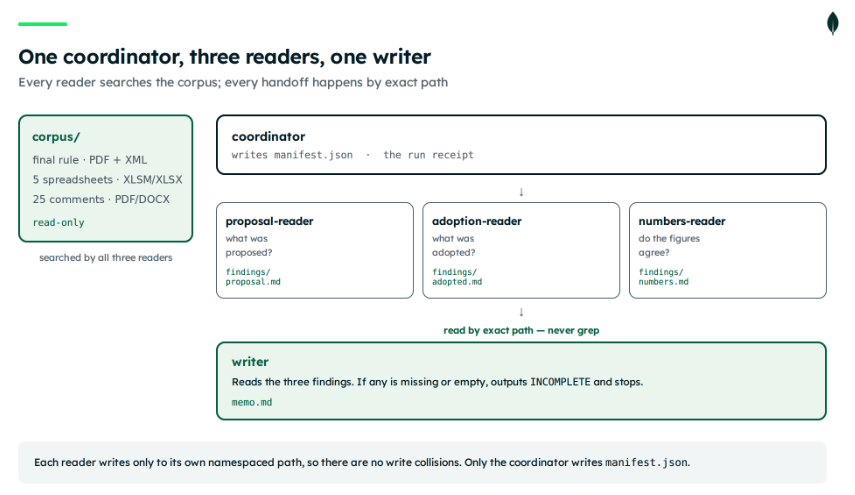
The read-only corpus is enforced rather than merely requested. Each reader carries permission rules, evaluated in declaration order with first match winning:
The trailing deny matters: Deep Agents allows a call when no rule matches, so without that last rule a reader could write anywhere. The writer is scoped tighter still: read and write on /workspace/**, no corpus access at all. That is what stops it grepping for findings instead of reading them by path.
The prompts above are trimmed for readability. The production versions in src/vfs_demo/agents.py are much more prescriptive, and that difference is what makes the pipeline find things. Each reader gets five starter grep queries with varied vocabulary and is told to run at least five before concluding something is absent. The prompt explains that grep here does hybrid semantic search rather than literal matching, and gives short two-to-six word phrases as the good case ("IEF", "CADR per watt", "energy savings quads") against full questions as the bad case. output_mode="content" is required so the agent sees matching text instead of filenames. read_file must always carry offset and limit, a window of thirty to fifty lines around the match, because a PDF or spreadsheet's extracted text can be large enough to error. And each reader is told in capitals to call write_file even when it found nothing, writing NOT FOUND along with what it searched for.
Keep the leading slash on that path. CompositeBackend routes are keyed on "/corpus/", so a relative "corpus/" would miss the route and fall through to the workspace backend. On a bare MongoFilesystemBackend the leading slash is a known bug, and the reason it is safe here is the wrapper shown in the next section. Common problems covers what it looks like when this goes wrong.
The SHARED prompt tells readers to write NOT FOUND and say what they searched for, which is the right discipline. It does not catch a mistyped path, because an empty grep result looks identical whether the corpus was searched or the path selected nothing. Common problems has the detail.
The corpus and the workspace need different guarantees
The backend above is not the same object as the corpus. The readers write their findings somewhere, and that destination needs a different guarantee from the corpus.
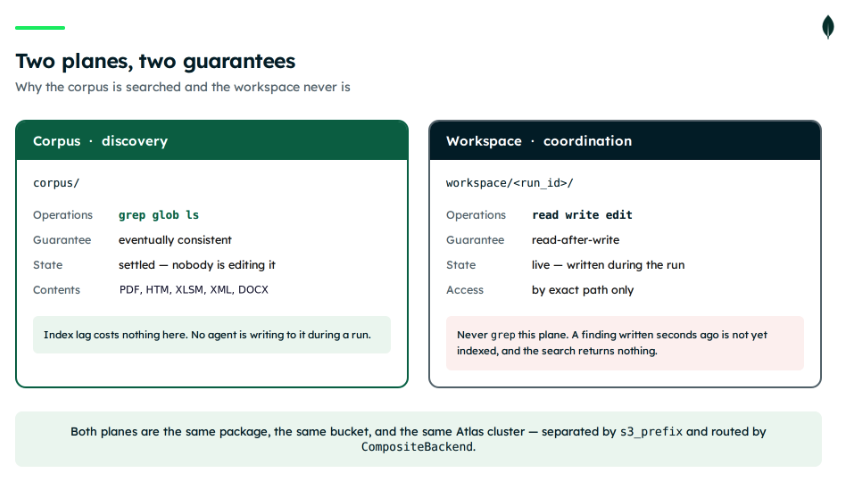
Search on this backend is eventually consistent by design. A write reaches S3 immediately; the polling watcher then notices the object at 10-second intervals, re-chunks it, re-embeds it, and updates the index. That is exactly right for the docket, which nobody is editing. It is exactly wrong for a findings file. The writer needs that file two seconds after a reader produces it, which is run state rather than memory.
So the writer must read the findings by exact path, never grep for them. If it greps, the pipeline fails intermittently: the files are in S3, but the index has not caught up, so the writer finds nothing. When readers run slowly, the watcher wins the race, and everything works, which is worse than failing outright, because it passes testing and produces confident, empty reports later.
So split the two by prefix and give the agent one filesystem over both:
CompositeBackend routes by path prefix, so the agents see one filesystem while two sets of guarantees run underneath. Discovery happens in corpus/ with grep. Coordination happens in workspace/
Two things about this pairing are not optional. CompositeBackend strips the route prefix before passing a path to the routed backend, so an agent reading /corpus/analysis/tsd.pdf reaches the corpus backend as /analysis/tsd.pdf. MongoFilesystemBackend stores paths including its s3_prefix and rejects anything that does not start with it, so reads fail with E2009 and grep returns zero matches. You need a wrapper that re-adds the prefix on the way in and strips it from grep results on the way out.
The second is lifecycle. CompositeBackend is not a context manager, but the MongoFilesystemBackend instances underneath it are, starting and stopping their change-stream watchers in __enter__ and __exit__. The composite has to be yielded from inside a with block that enters both.
Here is the wrapper, from src/vfs_demo/backend.py in the companion repository. Both planes use it:
And the construction, which enters both backends before yielding the composite:
Use it as a context manager: with create_backend() as backend. Both MongoFilesystemBackend instances start and stop their watchers in __enter__ and __exit__. CompositeBackend is not a context manager, so the composite gets yielded from inside the with block rather than constructed and returned.
One thing to set before you run this: create_backend() reads AWS_REGION and falls back to "us-east-1". The package on its own would raise NoRegionError when no region resolves, and the hardcoded fallback removes that signal. If your bucket lives elsewhere, set AWS_REGION explicitly.
Figure 4. The corpus is searched; the workspace never is. Both live in the same bucket and cluster, separated by prefix.
Run it:
That finding is in no single file. It needs the coalition proposal, the final rule, and the national impact spreadsheet, written by different parties in different formats.
Recover an interrupted run
The coordinator keeps a manifest.json at workspace/
Each stage carries name, status (pending, in_progress, complete, or failed), output path, tokens, usd, started_at, completed_at, and error. Resume works by reading the manifest and skipping any stage whose status is complete:
load_manifest() catches AdapterError and returns None, because with debug=True a read of a manifest that does not exist yet raises rather than returning an empty result. This is the expected-not-found case from the setup section. The first run of any new run_id takes that path.
The first command sends SIGKILL after two of four stages. The second restarts with the same run ID. The coordinator lists the workspace, reads the manifest, finds two completed findings, and starts at the third reader.
Figure 5. The manifest records which stages completed, so the resumed run starts at stage three.
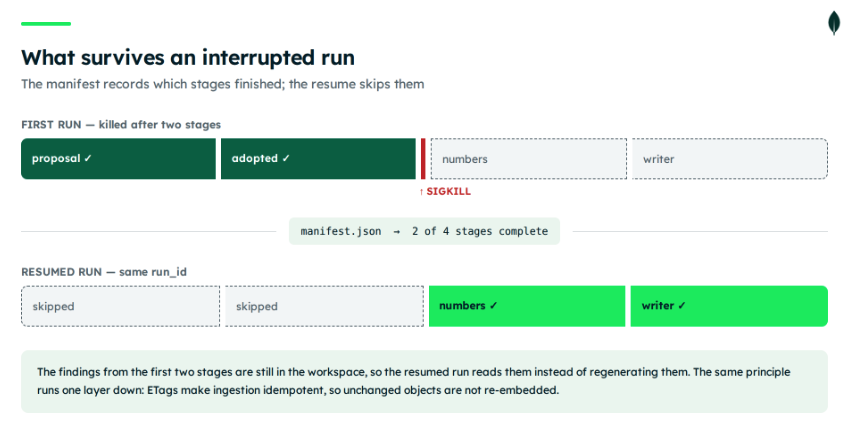
On the run shown here, the cold pipeline took about 90 seconds of wall clock and the resumed one about 55 seconds for its two remaining stages. What the resume skipped was two reader stages, roughly 45 seconds of agent time and the API calls that went with them.
The same principle runs one layer down. ETags make ingestion idempotent, so restarting the backend after a partial sync failure skips unchanged objects rather than re-downloading and re-embedding them.
Common problems
Most failures in this stack are quiet. The pattern to watch for is an agent that reports an empty corpus or writes a confident NOT FOUND, because almost every misconfiguration below surfaces that way rather than as an exception.
grep, ls, and glob return nothing, and the agent says the corpus is empty
Four different causes produce this same symptom, in roughly the order worth checking.
The initial sync has not finished or partially failed. Check init_errors and initial_sync_report.failed. A partially failed sync leaves a collection that looks healthy while missing documents.
The wrapper is missing. If you are routing through CompositeBackend without a path-normalizing subclass, the routed backend receives a path stripped of its s3_prefix and rejects it. Reads fail with E2009 and grep returns zero matches.
A leading slash on a bare backend. Deep Agents' file tools pass absolute paths. SearchRouter builds a ^ regex against source_path and stored keys are relative, so ^/corpus/ matches nothing. Pull request #460 against langchain-ai/langchain-mongodb (INTPYTHON-1101) fixes this and is still open, so it is not in 0.1.0. The wrapper in this tutorial absorbs it with path.lstrip("/").
The path selects no indexed files. A mistyped or non-existent path returns error None and matches [], exactly like a genuine no-match. See below.
An empty result that should have been an error (issue #462)
grep() returns the same thing whether it searched indexed files and found nothing, or the requested path selected no indexed files at all. Both give error None and matches []. In a multi-agent pipeline this compounds: a reader given a bad path writes NOT FOUND, and the writer reconciles that as a verified finding.
Until GrepResult.error carries a path-scope message, the cheap defense is to assert that ls("/corpus/") is non-empty before the readers run, and to treat any all-NOT-FOUND result as a configuration failure rather than a research finding.
Search results are worse than expected but nothing errors
Three conditions degrade grep silently. Pointing at a non-Atlas MongoDB drops it to a regex query. Losing the embedding API at query time drops it to full-text only, so natural-language phrasing stops working while literal terms still hit. And a partially failed sync leaves some documents unsearchable. init_errors and initial_sync_report catch all three. Assert on both at startup in anything long-running.
A region error that has nothing to do with regions
aws_region governs S3, SQS, and Bedrock together, and they cannot be split. If the Bedrock embedding model is not enabled where your bucket lives, embedding fails and surfaces as a region error with nothing in it pointing at embeddings. Enable amazon.titan-embed-text-v2:0 in the bucket's region, or switch providers.
The companion repository's create_backend() compounds this by defaulting AWS_REGION to "us-east-1". The package alone would raise NoRegionError when nothing resolves; the fallback removes that signal. Set AWS_REGION explicitly.
You installed the OpenAI extra and are still being charged for Bedrock
The extra does not select the provider. EMBEDDING_PROVIDER does, and it defaults to Bedrock. Set EMBEDDING_PROVIDER=openai alongside the extra, or pass a LangChain Embeddings instance to embedding_model and bypass the lookup.
A read raises instead of returning empty
With debug=True, methods re-raise rather than returning error DTOs, so reading a file that does not exist yet raises AdapterError. This catches real bugs, but the manifest read on a fresh run is an expected miss. Catch the specific code rather than everything:
The writer reports INCOMPLETE, but only sometimes
This means the writer is greping for the findings rather than reading them by exact path. Search on this backend is eventually consistent: the write reaches S3 immediately, then the polling watcher notices it up to ten seconds later, re-chunks, re-embeds, and updates the index. When the readers run slowly, the watcher wins the race and the pipeline passes. When they run quickly it does not. Read findings by exact path and never grep the workspace plane.
Your agent stopped planning after an upgrade
deepagents 0.7.0 removed TodoListMiddleware from the create_deep_agent defaults, so write_todos, the todos state channel, and the planning prompt are gone unless you pass middleware=[TodoListMiddleware()]. The same applies per sub-agent. Nothing errors; the agent just stops writing a plan. The same release emptied the default authored base prompt and deprecated BASE_AGENT_PROMPT, with removal scheduled for 0.9.0.
A file in the bucket never becomes searchable
Two causes account for most of these. The file exceeds the 64 MiB read cap, in which case it gets skipped rather than failing the run. The initial sync counts those in SyncReport.failed; the watchers only log them. Or the format sits outside the documented parser list, covered in the note on formats in the corpus step.
⬜ Error strings for the skip cases are not documented; add the observed log line here once someone has reproduced it.
What to verify before production
Search freshness: neither this backend nor a LangGraph store gives you read-your-writes for search. Atlas Search and Vector Search are eventually consistent by design, and this package adds a watcher interval on top of that. Ten seconds with the polling watcher; closer to real time with the SQS watcher, which consumes S3 event notifications and needs those configured in AWS.
Silent degradation: the three conditions from the setup check produce no error. Assert on init_errors and initial_sync_report at startup in anything long-running.
Object size: reads cap at 64 MiB (MAX_READ_BYTES in langchain_mongodb_deepagents_vfs.backends.base). S3Backend.read() enforces it, so the cap covers read, edit, download_files, the initial sync, and the watchers, not just the public read API. write and upload_files refuse oversized content too. Skips never fail the run. The initial sync counts them in SyncReport.failed; the watchers only log them, leaving the log as your sole record. Chunking adds further bounds: OOXML archives get checked for entry count, uncompressed size, and expansion ratio before parsing, and PDF extraction caps page count and extracted characters.
AWS coupling: the configuration table exposes no endpoint or endpoint_url parameter, so MinIO and LocalStack cannot be pointed at. You need a real S3 bucket.
Access control: the package's responsibilities are the Deep Agents filesystem contract and the object-store-to-Atlas search path. Tenant isolation, retention, and audit belong to your application and your metadata model, not to the package. For a public docket, that is fine. For a corpus with customer data, that is the part you build.
FAQ
What persists between runs, and what doesn't? Indexed content in Atlas and file bytes in S3 persist across runs and process restarts — that's the corpus. Files under workspace/
Why are S3 and Atlas separate systems instead of one? Object storage is optimized for durable, low-cost byte storage; it doesn't maintain live search indexes. Atlas runs Search, Vector Search, and hybrid ranking as first-class, indexed capabilities on the same data platform.
Is search eventually consistent? Yes. Atlas Search and Vector Search index updates lag the S3 write by the watcher's polling interval (about 10 seconds), or closer to real time with the SQS watcher.
Which package versions does this tutorial require? langchain-mongodb-deepagents-vfs 0.1.0, Python 3.11 or later, and langgraph-store-mongodb 0.4.0 if you run the StoreBackend comparison. The deepagents pin is still open — see the note on the 0.7.0 middleware change in Prerequisites.
Which credentials do I need? An Atlas connection string and database user, AWS credentials with the four S3 permissions listed in Prerequisites, and either the Bedrock boto3 credential chain or an OPENAI_API_KEY, depending on the embedding provider you choose.
Where to find the package and examples
Swap in your own corpus by pointing s3_prefix at a different bucket path and re-running the seed script.
To build a corpus from a different federal docket, the repository includes tools/fetch_docket.py. It needs a free key from the regulations.gov API — read-only access, issued immediately, no approval step. Pass ?include=attachments on both the documents and comments endpoints, or you will get metadata without the spreadsheets and letters, which is most of what makes a docket worth searching.
The MongoDB VFS announcement post covers how the backend separates storage from search. For Deep Agents itself, see the LangChain Deep Agents backends documentation and the MongoDB Atlas LangChain integration docs. The package itself lives at langchain-ai/langchain-mongodb/libs/langchain-mongodb-deepagents-vfs and takes contributions; see the repository-level CONTRIBUTING.md.
Next Steps
Clone the langchain-deepagents example and point s3_prefix at your own bucket path to run the pipeline over a different corpus.
Ready to start building? Register for MongoDB Atlas. An M0 cluster on 8.1 or later runs everything in this tutorial.