Would you trust an AI agent if a database administrator could read every message in its session? For a customer-facing chatbot, that reality already feels unsettling. Even if you trust your internal operators, plaintext checkpoints remain equally readable to anyone who gains database access during a breach.
Deploying agents into production requires more than equipping them with the right tools and context: it also requires securing the state they persist as they operate, to safeguard end-user data and satisfy security and regulatory requirements.
This post demonstrates how MongoDB Client-Side Field Level Encryption (CSFLE) can be leveraged to encrypt LangGraph checkpoints before they are written to the database. The application can decrypt the state when it needs to resume a run, while anyone with no access to the encryption keys will only see ciphertext instead of the sensitive payload.
What you’ll build
By the end of this post, you will have a coding example of how to extend LangGraph’s CipherProtocol to encrypt checkpoint state with MongoDB CSFLE and store the encrypted payload through MongoDBSaver.
The example uses explicit CSFLE with AWS Key Management Service (AWS KMS). You can adapt the KMS provider configuration for Azure Key Vault, Google Cloud KMS, or KMIP by following the provider-specific PyMongo configuration.
What you need before you start
This example assumes that you have:
A MongoDB deployment and a connection string.
A key vault namespace for CSFLE data encryption keys.
A data encryption key (DEK) with the alternate name langgraph_csfle_key.
KMS credentials available through your runtime environment.
For DEK creation, key-vault configuration, credentials, and key rotation, view the PyMongo encryption API and CSFLE encryption key management.
Why encrypt the LangGraph checkpoint state?
In the LangGraph framework, checkpointers persist a snapshot of graph state at each step. That persisted state lets an agent resume a run after a failure and supports human-in-the-loop workflows. Those snapshots can include user messages, tool results, and anything else the agent accumulated on the thread. MongoDBSaver persists that state in collections such as checkpoints, which is how you get resumable sessions when you build an AI agent with LangGraph and MongoDB. MongoDB has also documented why checkpointers matter for production agent applications in Checkpointers and native parent-child retrievers with LangChain and MongoDB.
If those documents contain confidential customer details, employee records, or medical context, the checkpoint collection is a high-value target. Role-based access control, encryption at rest, and TLS still matter, but they do not stop a privileged database user (legitimate or not) from reading the documents if they are stored in plaintext.
What does MongoDB CSFLE protect?
MongoDB Client-Side Field Level Encryption (CSFLE) encrypts data in the application before it leaves the client, so the values of encrypted fields are never visible to the database engine. This gives you a set of practical benefits:
A database user without access to the encryption keys will not be able to read the encrypted fields.
The MongoDB driver integrates with AWS KMS, Azure Key Vault, Google Cloud KMS, or a KMIP-compliant key store, so developers do not have to build and harden a custom KMS client.
Envelope encryption separates a customer master key (CMK) in your KMS from data encryption keys (DEKs) stored in a key vault collection, with APIs for rotation and rewrapping.
MongoDB drivers support two types of CSFLE: automatic encryption, where a JSON schema tells the driver which fields to encrypt and decrypt, and explicit encryption, where the client application calls encrypt and decrypt primitives directly for the fields that need to be encrypted. We will use explicit CSFLE in this example.
Why Base64 encoding doesn’t protect checkpoint state
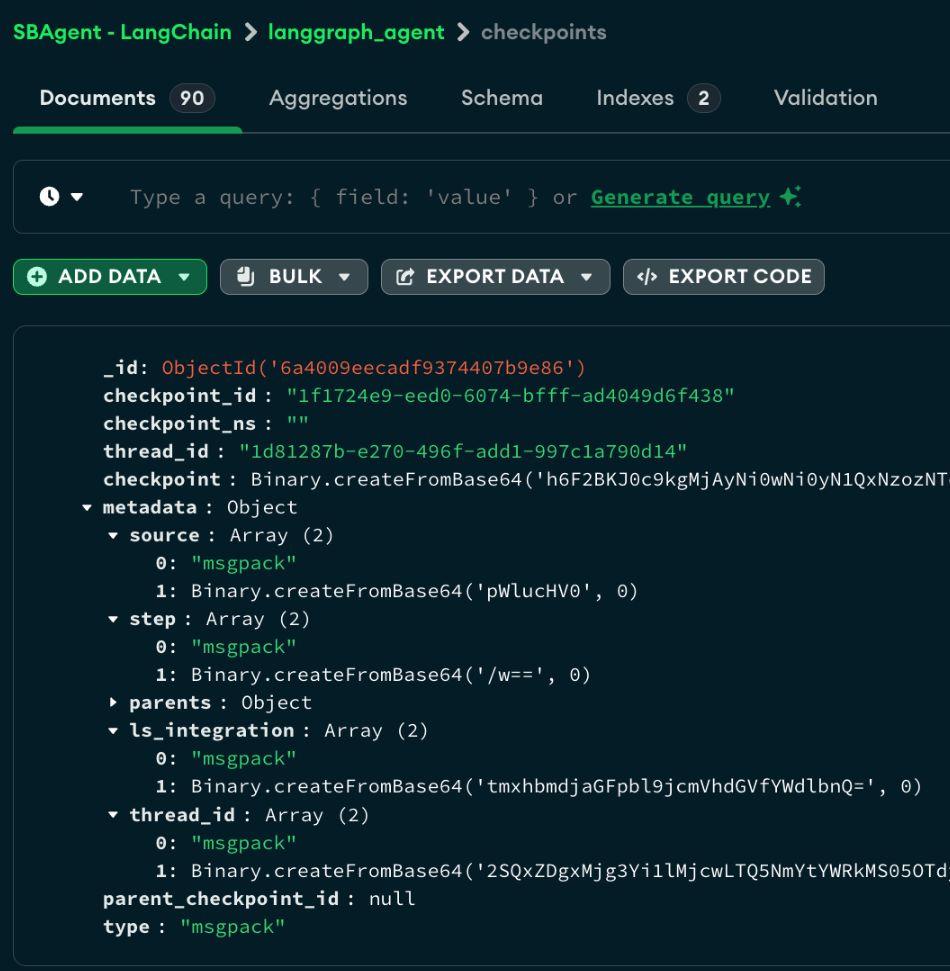
Out of the box, LangGraph serializes checkpoints and MongoDBSaver stores the bytes as BSON Binary. In a database client such as MongoDB Compass, the payload looks like Binary.createFromBase64(...). Base64 is a machine-friendly encoding, but it is not encryption: anyone who can read the document can decode it without a key. The goal of this example is to replace that reversible representation with ciphertext produced by CSFLE.
Figure 1. A LangGraph checkpoint stored by MongoDBSaver without CSFLE.
How to use CSFLE with LangGraph’s EncryptedSerializer
LangGraph’s EncryptedSerializer already provides an extension point for a custom cipher. Its built-in AES factory requires an encryption key as an input. That approach can work for a simple demonstration, but a production design also needs envelope encryption, key-vault storage, KMS integration, and key rotation.
As the LangGraph checkpointer documentation notes, it is possible to change the default AES cipher of an EncryptedSerializer by writing a custom implementation of CipherProtocol: the proposed implementation leverages MongoDB CSFLE to implement checkpoint encryption and decryption.
Configure the MongoDB encryption handler
The handler owns the MongoDB client and the explicit CSFLE client. It reads connection and credential values from environment variables and uses the DEK’s alternate name to encrypt the serialized payload.
When initializing the ClientEncryption object, it is possible to choose between different encryption algorithms. In particular:
Deterministic encryption is appropriate when an application needs equality queries on an encrypted field, but it can reveal frequency patterns;
Randomized encryption produces different ciphertext for the same plaintext and provides stronger confidentiality.
This example encrypts the serialized checkpoint payload as an opaque value and does not query inside it, for this reason it uses randomized encryption.
Implement CipherProtocol
The CipherProtocol adapter is intentionally small. LangGraph passes serialized bytes to encrypt and passes the stored cipher name and ciphertext back to decrypt.
Construct and invoke the encrypted checkpointer
The next block creates the serializer and passes it to MongoDBSaver. The model is shown only to make the example complete; use the model integration appropriate for your agent.
What remains queryable after encryption?
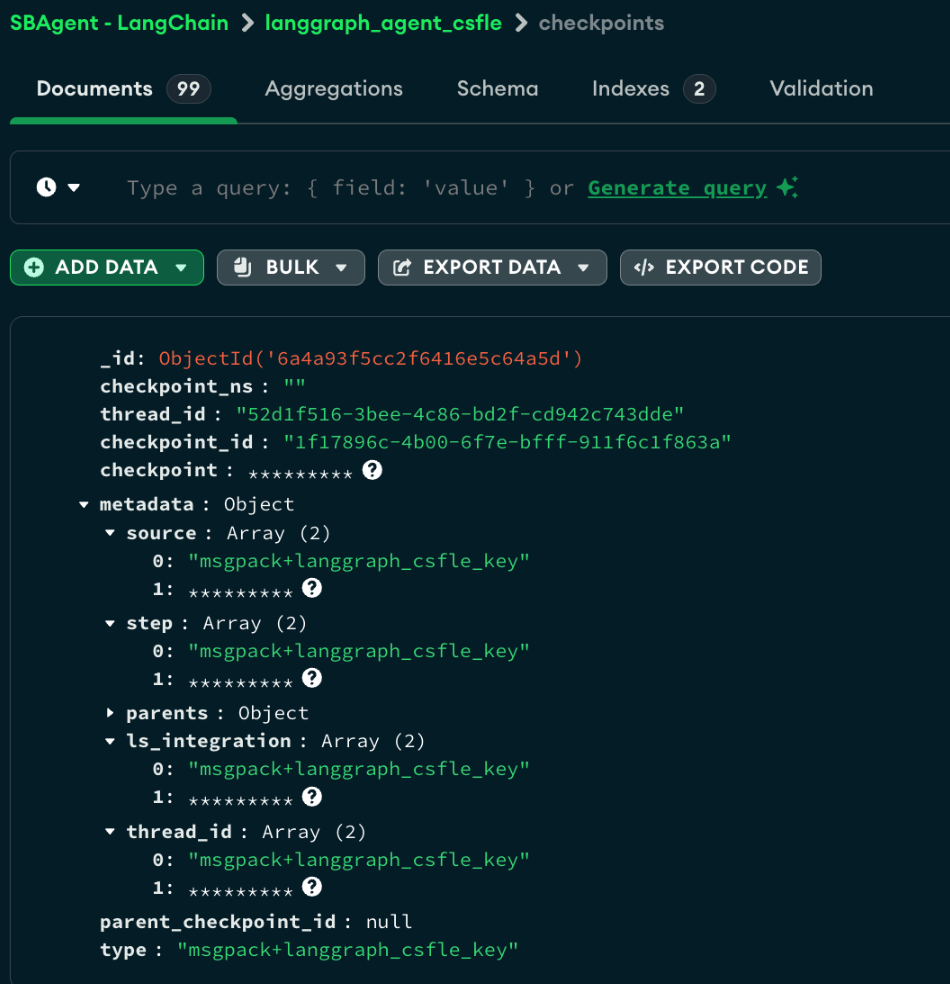
Inspecting the LangGraph checkpoint collection in MongoDB Compass confirms that the checkpoint payload, including user messages and agent responses, is successfully encrypted.
Depending on your LangGraph and MongoDBSaver versions, routing and serializer metadata (such as thread IDs, checkpoint IDs, and namespaces) may remain visible. Because the runtime relies on these fields to locate and resume checkpoints, you must ensure your application does not include Personally Identifiable Information (PII), especially within the thread_id.
Keep in mind that LangGraph always persists checkpoint data as a binary blob, regardless of encryption. By design, this means the payload cannot be used as a query filter. If your use case requires encrypted application data to remain queryable (supporting equality, range, prefix, suffix, or substring queries), you can leverage MongoDB Queryable Encryption instead. See the MongoDB Queryable Encryption documentation for details.
Figure 2. The checkpoint collection after CSFLE is integrated with LangGraph’s EncryptedSerializer.
Key takeaways
LangGraph checkpoint state can contain sensitive messages and tool results, so storing the payload in cleartext (base64 in the default implementation) may not be aligned with the security or compliance requirements of many enterprise use cases.
By connecting EncryptedSerializer to a custom CipherProtocol implementation, the LangChain framework can leverage MongoDB CSFLE to encrypt the checkpoint payload before MongoDBSaver persists it. MongoDB continues to provide durable checkpoint storage and routing metadata, while KMS-backed encryption protects the serialized content from database readers who lack decryption access.
Next Steps
To learn how to build and deploy AI agents with MongoDB, take the AI Agents with MongoDB course.
For implementation details, explore the MongoDB LangChain integration and MongoDB Atlas LangGraph integration.
Ready to start building? Register for Atlas and get started for free today.