Query embedded documents in MongoDBwith the following methods:
Your programming language's driver.
The MongoDB Atlas UI. To learn more, see Query for Null or Missing Fields with MongoDB Atlas.
This page provides examples of query operations on embedded/nested documents using the db.collection.find() method in mongosh.
db.inventory.insertMany( [ { item: "journal", qty: 25, size: { h: 14, w: 21, uom: "cm" }, status: "A" }, { item: "notebook", qty: 50, size: { h: 8.5, w: 11, uom: "in" }, status: "A" }, { item: "paper", qty: 100, size: { h: 8.5, w: 11, uom: "in" }, status: "D" }, { item: "planner", qty: 75, size: { h: 22.85, w: 30, uom: "cm" }, status: "D" }, { item: "postcard", qty: 45, size: { h: 10, w: 15.25, uom: "cm" }, status: "A" } ]);
Query Nested Fields with Dot Notation
Specify query conditions on fields in an embedded/nested document with dot notation "field.nestedField".
Note
When you query with dot notation, the field and nested field must be inside quotation marks.
Specify Equality Match on a Nested Field
The following example selects all documents where the field uom nested in the size field equals "in":
db.inventory.find( { "size.uom": "in" } )
Specify Match using Query Operator
A query filter document can use the query operators to specify conditions in the following form:
{ <field1>: { <operator1>: <value1> }, ... }
The following query uses the less than operator ($lt) on the field h embedded in the size field:
db.inventory.find( { "size.h": { $lt: 15 } } )
Specify AND Condition
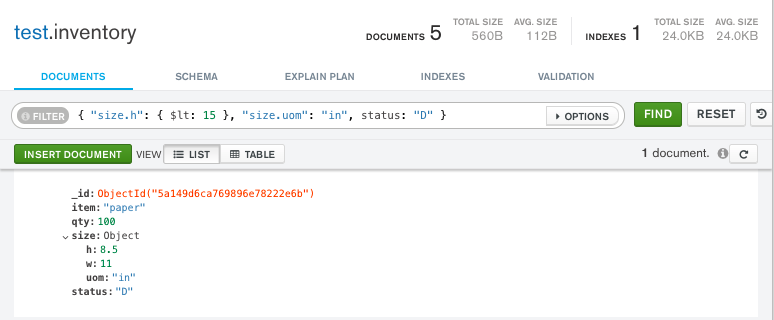
The following query selects all documents where the nested field h is less than 15, the nested field uom equals "in", and the status field equals "D":
db.inventory.find( { "size.h": { $lt: 15 }, "size.uom": "in", status: "D" } )
Match an Embedded/Nested Document
To specify an equality condition on a field that is an embedded/nested document, use the query filter document { <field>: <value> } where <value> is the document to match.
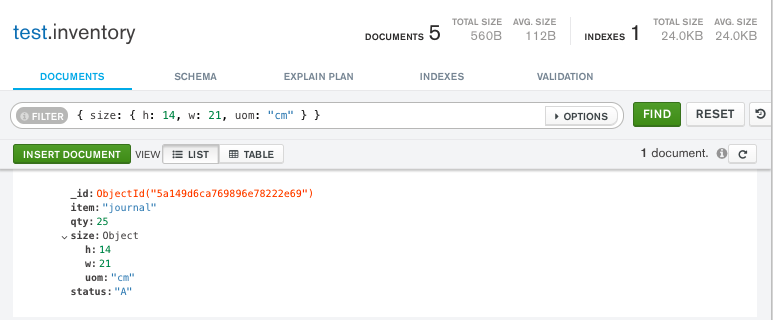
For example, the following query selects all documents where the field size equals the document { h: 14, w: 21, uom: "cm" }:
db.inventory.find( { size: { h: 14, w: 21, uom: "cm" } } )
Warning
MongoDB does not recommend comparisons on embedded documents because the operations require an exact match of the specified <value> document, including the field order.
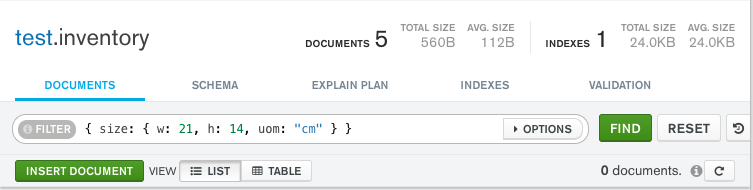
For example, the following query does not match any documents in the inventory collection:
db.inventory.find( { size: { w: 21, h: 14, uom: "cm" } } )
Queries that use comparisons on embedded documents can result in unpredictable behavior when used with a driver that does not use ordered data structures for expressing queries.
This page provides examples of query operations on embedded/nested documents using the pymongo.collection.Collection.find method in the PyMongo Python driver.
The examples on this page use the inventory collection. Connect to a test database in your MongoDB instance then create the inventory collection:
db.inventory.insert_many( [ { "item": "journal", "qty": 25, "size": {"h": 14, "w": 21, "uom": "cm"}, "status": "A", }, { "item": "notebook", "qty": 50, "size": {"h": 8.5, "w": 11, "uom": "in"}, "status": "A", }, { "item": "paper", "qty": 100, "size": {"h": 8.5, "w": 11, "uom": "in"}, "status": "D", }, { "item": "planner", "qty": 75, "size": {"h": 22.85, "w": 30, "uom": "cm"}, "status": "D", }, { "item": "postcard", "qty": 45, "size": {"h": 10, "w": 15.25, "uom": "cm"}, "status": "A", }, ] )
Query Nested Fields with Dot Notation
Specify query conditions on fields in an embedded/nested document with dot notation "field.nestedField".
Note
When you query with dot notation, the field and nested field must be inside quotation marks.
Specify Equality Match on a Nested Field
The following example selects all documents where the field uom nested in the size field equals "in":
cursor = db.inventory.find({"size.uom": "in"})
Specify Match using Query Operator
A query filter document can use the query operators to specify conditions in the following form:
{ <field1>: { <operator1>: <value1> }, ... }
The following query uses the less than operator ($lt) on the field h embedded in the size field:
cursor = db.inventory.find({"size.h": {"$lt": 15}})
Specify AND Condition
The following query selects all documents where the nested field h is less than 15, the nested field uom equals "in", and the status field equals "D":
cursor = db.inventory.find({"size.h": {"$lt": 15}, "size.uom": "in", "status": "D"})
Match an Embedded/Nested Document
To specify an equality condition on a field that is an embedded/nested document, use the query filter document { <field>: <value> } where <value> is the document to match.
For example, the following query selects all documents where the field size equals the document { h: 14, w: 21, uom: "cm" }:
cursor = db.inventory.find({"size": {"h": 14, "w": 21, "uom": "cm"}})
Warning
MongoDB does not recommend comparisons on embedded documents because the operations require an exact match of the specified <value> document, including the field order.
For example, the following query does not match any documents in the inventory collection:
cursor = db.inventory.find({"size": {"w": 21, "h": 14, "uom": "cm"}})
Queries that use comparisons on embedded documents can result in unpredictable behavior when used with a driver that does not use ordered data structures for expressing queries.
This page provides examples of query operations on embedded/nested documents using the pymongo.asynchronous.collection.AsyncCollection.find method in the PyMongo Async API.
The examples on this page use the inventory collection. Connect to a test database in your MongoDB instance then create the inventory collection:
# Subdocument key order matters in a few of these examples so we have # to use bson.son.SON instead of a Python dict. from bson.son import SON await db.inventory.insert_many( [ { "item": "journal", "qty": 25, "size": SON([("h", 14), ("w", 21), ("uom", "cm")]), "status": "A", }, { "item": "notebook", "qty": 50, "size": SON([("h", 8.5), ("w", 11), ("uom", "in")]), "status": "A", }, { "item": "paper", "qty": 100, "size": SON([("h", 8.5), ("w", 11), ("uom", "in")]), "status": "D", }, { "item": "planner", "qty": 75, "size": SON([("h", 22.85), ("w", 30), ("uom", "cm")]), "status": "D", }, { "item": "postcard", "qty": 45, "size": SON([("h", 10), ("w", 15.25), ("uom", "cm")]), "status": "A", }, ] )
Query Nested Fields with Dot Notation
Specify query conditions on fields in an embedded/nested document with dot notation "field.nestedField".
Note
When you query with dot notation, the field and nested field must be inside quotation marks.
Specify Equality Match on a Nested Field
The following example selects all documents where the field uom nested in the size field equals "in":
cursor = db.inventory.find({"size.uom": "in"})
Specify Match using Query Operator
A query filter document can use the query operators to specify conditions in the following form:
{ <field1>: { <operator1>: <value1> }, ... }
The following query uses the less than operator ($lt) on the field h embedded in the size field:
cursor = db.inventory.find({"size.h": {"$lt": 15}})
Specify AND Condition
The following query selects all documents where the nested field h is less than 15, the nested field uom equals "in", and the status field equals "D":
cursor = db.inventory.find({"size.h": {"$lt": 15}, "size.uom": "in", "status": "D"})
Match an Embedded/Nested Document
To specify an equality condition on a field that is an embedded/nested document, use the query filter document { <field>: <value> } where <value> is the document to match.
For example, the following query selects all documents where the field size equals the document { h: 14, w: 21, uom: "cm" }:
cursor = db.inventory.find({"size": SON([("h", 14), ("w", 21), ("uom", "cm")])})
Warning
MongoDB does not recommend comparisons on embedded documents because the operations require an exact match of the specified <value> document, including the field order.
For example, the following query does not match any documents in the inventory collection:
cursor = db.inventory.find({"size": SON([("w", 21), ("h", 14), ("uom", "cm")])})
Queries that use comparisons on embedded documents can result in unpredictable behavior when used with a driver that does not use ordered data structures for expressing queries.
This page provides examples of query operations on embedded/nested documents using the com.mongodb.client.MongoCollection.find method in the MongoDB Java Synchronous Driver.
Tip
The driver provides com.mongodb.client.model.Filters helper methods to facilitate the creation of filter documents. The examples on this page use these methods to create the filter documents.
The examples on this page use the inventory collection. Connect to a test database in your MongoDB instance then create the inventory collection:
collection.insertMany(asList( Document.parse("{ item: 'journal', qty: 25, size: { h: 14, w: 21, uom: 'cm' }, status: 'A' }"), Document.parse("{ item: 'notebook', qty: 50, size: { h: 8.5, w: 11, uom: 'in' }, status: 'A' }"), Document.parse("{ item: 'paper', qty: 100, size: { h: 8.5, w: 11, uom: 'in' }, status: 'D' }"), Document.parse("{ item: 'planner', qty: 75, size: { h: 22.85, w: 30, uom: 'cm' }, status: 'D' }"), Document.parse("{ item: 'postcard', qty: 45, size: { h: 10, w: 15.25, uom: 'cm' }, status: 'A' }") ));
Query Nested Fields with Dot Notation
Specify query conditions on fields in an embedded/nested document with dot notation "field.nestedField".
Note
When you query with dot notation, the field and nested field must be inside quotation marks.
Specify Equality Match on a Nested Field
The following example selects all documents where the field uom nested in the size field equals "in":
findIterable = collection.find(eq("size.uom", "in"));
Specify Match using Query Operator
In addition to the equality condition, MongoDB provides various query operators to specify filter conditions. Use the com.mongodb.client.model.Filters helper methods to facilitate the creation of filter documents. For example:
and(gte(<field1>, <value1>), lt(<field2>, <value2>), eq(<field3>, <value3>))
The following query uses the less than operator ($lt) on the field h embedded in the size field:
findIterable = collection.find(lt("size.h", 15));
Specify AND Condition
The following query selects all documents where the nested field h is less than 15, the nested field uom equals "in", and the status field equals "D":
findIterable = collection.find(and( lt("size.h", 15), eq("size.uom", "in"), eq("status", "D") ));
Match an Embedded/Nested Document
To specify an equality condition on a field that is an embedded/nested document, use the filter document eq( <field1>, <value>) where <value> is the document to match.
For example, the following query selects all documents where the field size equals the document { h: 14, w: 21, uom: "cm" }:
FindIterable<Document> findIterable = collection.find(eq("size", Document.parse("{ h: 14, w: 21, uom: 'cm' }")));
Warning
MongoDB does not recommend comparisons on embedded documents because the operations require an exact match of the specified <value> document, including the field order.
For example, the following query does not match any documents in the inventory collection:
findIterable = collection.find(eq("size", Document.parse("{ w: 21, h: 14, uom: 'cm' }")));
Queries that use comparisons on embedded documents can result in unpredictable behavior when used with a driver that does not use ordered data structures for expressing queries.
This page provides examples of query operations on embedded/nested documents using the com.mongodb.reactivestreams.client.MongoCollection.find method in the MongoDB Java Reactive Streams Driver.
The examples on this page use the inventory collection. Connect to a test database in your MongoDB instance then create the inventory collection:
Publisher<Success> insertManyPublisher = collection.insertMany(asList( Document.parse("{ item: 'journal', qty: 25, size: { h: 14, w: 21, uom: 'cm' }, status: 'A' }"), Document.parse("{ item: 'notebook', qty: 50, size: { h: 8.5, w: 11, uom: 'in' }, status: 'A' }"), Document.parse("{ item: 'paper', qty: 100, size: { h: 8.5, w: 11, uom: 'in' }, status: 'D' }"), Document.parse("{ item: 'planner', qty: 75, size: { h: 22.85, w: 30, uom: 'cm' }, status: 'D' }"), Document.parse("{ item: 'postcard', qty: 45, size: { h: 10, w: 15.25, uom: 'cm' }, status: 'A' }") ));
Query Nested Fields with Dot Notation
Specify query conditions on fields in an embedded/nested document with dot notation "field.nestedField".
Note
When you query with dot notation, the field and nested field must be inside quotation marks.
Specify Equality Match on a Nested Field
The following example selects all documents where the field uom nested in the size field equals "in":
findPublisher = collection.find(eq("size.uom", "in"));
Specify Match using Query Operator
In addition to the equality condition, MongoDB provides various query operators to specify filter conditions. Use the com.mongodb.client.model.Filters helper methods to facilitate the creation of filter documents. For example:
and(gte(<field1>, <value1>), lt(<field2>, <value2>), eq(<field3>, <value3>))
The following query uses the less than operator ($lt) on the field h embedded in the size field:
findPublisher = collection.find(lt("size.h", 15));
Specify AND Condition
The following query selects all documents where the nested field h is less than 15, the nested field uom equals "in", and the status field equals "D":
findPublisher = collection.find(and( lt("size.h", 15), eq("size.uom", "in"), eq("status", "D") ));
Match an Embedded/Nested Document
To specify an equality condition on a field that is an embedded/nested document, use the filter document eq( <field1>, <value>) where <value> is the document to match.
For example, the following query selects all documents where the field size equals the document { h: 14, w: 21, uom: "cm" }:
FindPublisher<Document> findPublisher = collection.find(eq("size", Document.parse("{ h: 14, w: 21, uom: 'cm' }")));
Warning
MongoDB does not recommend comparisons on embedded documents because the operations require an exact match of the specified <value> document, including the field order.
For example, the following query does not match any documents in the inventory collection:
findPublisher = collection.find(eq("size", Document.parse("{ w: 21, h: 14, uom: 'cm' }")));
Queries that use comparisons on embedded documents can result in unpredictable behavior when used with a driver that does not use ordered data structures for expressing queries.
This page provides examples of query operations on embedded/nested documents by using the MongoCollection.find() method in the MongoDB Kotlin Coroutine Driver.
Tip
The driver provides com.mongodb.client.model.Filters helper methods to facilitate the creation of filter documents. The examples on this page use these methods to create the filter documents.
The examples on this page use the inventory collection. Connect to a test database in your MongoDB instance then create the inventory collection:
collection.insertMany( listOf( Document("item", "journal") .append("qty", 25) .append("size", Document("h", 14) .append("w", 21) .append("uom", "cm") ) .append("status", "A"), Document("item", "notebook") .append("qty", 50) .append("size", Document("h", 8.5) .append("w", 11) .append("uom", "in") ) .append("status", "A"), Document("item", "paper") .append("qty", 100) .append("size", Document("h", 8.5) .append("w", 11) .append("uom", "in") ) .append("status", "D"), Document("item", "planner") .append("qty", 75) .append("size", Document("h", 22.85) .append("w", 30) .append("uom", "cm") ) .append("status", "D"), Document("item", "postcard") .append("qty", 45) .append("size", Document("h", 10) .append("w", 15.25) .append("uom", "cm") ) .append("status", "A"), ) )
Query Nested Fields with Dot Notation
Specify query conditions on fields in an embedded/nested document with dot notation "field.nestedField".
Note
When you query with dot notation, the field and nested field must be inside quotation marks.
Specify Equality Match on a Nested Field
The following example selects all documents where the field uom nested in the size field equals "in":
val findFlow = collection .find(eq("size.uom", "in"))
Specify Match using Query Operator
In addition to the equality condition, MongoDB provides various query operators to specify filter conditions. Use the com.mongodb.client.model.Filters helper methods to facilitate the creation of filter documents. For example:
and(gte(<field1>, <value1>), lt(<field2>, <value2>), eq(<field3>, <value3>))
The following query uses the less than operator ($lt) on the field h embedded in the size field:
val findFlow = collection .find(lt("size.h", 15))
Specify AND Condition
The following query selects all documents where the nested field h is less than 15, the nested field uom equals "in", and the status field equals "D":
val findFlow = collection .find(and( lt("size.h", 15), eq("size.uom", "in"), eq("status", "D") ))
Match an Embedded/Nested Document
To specify an equality condition on a field that is an embedded document, use the Document class or eq() method where <value> is the document to match:
eq(<field>, Document() .append("nestedField1", value1) .append("nestedField2", value2))
For example, the following query selects all documents where the field size equals the document { h: 14, w: 21, uom: "cm" }:
val findFlow = collection .find(eq("size", Document.parse("{ h: 14, w: 21, uom: 'cm' }")))
Warning
MongoDB does not recommend comparisons on embedded documents because the operations require an exact match of the specified <value> document, including the field order.
For example, the following query does not match any documents in the inventory collection:
val findFlow = collection .find(eq("size", Document.parse("{ w: 21, h: 14, uom: 'cm' }")))
Queries that use comparisons on embedded documents can result in unpredictable behavior when used with a driver that does not use ordered data structures for expressing queries.
This page provides examples of query operations on embedded/nested documents using the Collection.find() method in the MongoDB Node.js Driver.
The examples on this page use the inventory collection. Connect to a test database in your MongoDB instance then create the inventory collection:
const documentsToInsert = [ { item: 'journal', qty: 25, size: { h: 14, w: 21, uom: 'cm' }, status: 'A', }, { item: 'notebook', qty: 50, size: { h: 8.5, w: 11, uom: 'in' }, status: 'P', }, { item: 'paper', qty: 100, size: { h: 8.5, w: 11, uom: 'in' }, status: 'D', }, { item: 'planner', qty: 75, size: { h: 22.85, w: 30, uom: 'cm' }, status: 'D', }, { item: 'postcard', qty: 45, size: { h: 10, w: 15.25, uom: 'cm' }, status: 'A', }, ]; await collection.insertMany(documentsToInsert);
Query Nested Fields with Dot Notation
Specify query conditions on fields in an embedded/nested document with dot notation "field.nestedField".
Note
When you query with dot notation, the field and nested field must be inside quotation marks.
Specify Equality Match on a Nested Field
The following example selects all documents where the field uom nested in the size field equals "in":
const cursor = db.collection('inventory').find({ 'size.uom': 'in' });
Specify Match using Query Operator
A query filter document can use the query operators to specify conditions in the following form:
{ <field1>: { <operator1>: <value1> }, ... }
The following query uses the less than operator ($lt) on the field h embedded in the size field:
const cursor = db.collection('inventory').find({ 'size.h': { $lt: 15 } });
Specify AND Condition
The following query selects all documents where the nested field h is less than 15, the nested field uom equals "in", and the status field equals "D":
const cursor = db.collection('inventory').find({ 'size.h': { $lt: 15 }, 'size.uom': 'in', status: 'D' });
Match an Embedded/Nested Document
To specify an equality condition on a field that is an embedded/nested document, use the query filter document { <field>: <value> } where <value> is the document to match.
For example, the following query selects all documents where the field size equals the document { h: 14, w: 21, uom: "cm" }:
const cursor = collection.find({ size: { h: 14, w: 21, uom: 'cm' }, });
Warning
MongoDB does not recommend comparisons on embedded documents because the operations require an exact match of the specified <value> document, including the field order.
For example, the following query does not match any documents in the inventory collection:
const cursor = db.collection('inventory').find({ size: { w: 21, h: 14, uom: 'cm' } });
Queries that use comparisons on embedded documents can result in unpredictable behavior when used with a driver that does not use ordered data structures for expressing queries.
This page provides examples of query operations on embedded/nested documents using the MongoDB\\Collection::find() method in the MongoDB PHP Library.
The examples on this page use the inventory collection. Connect to a test database in your MongoDB instance then create the inventory collection:
$insertManyResult = $db->inventory->insertMany([ [ 'item' => 'journal', 'qty' => 25, 'size' => ['h' => 14, 'w' => 21, 'uom' => 'cm'], 'status' => 'A', ], [ 'item' => 'notebook', 'qty' => 50, 'size' => ['h' => 8.5, 'w' => 11, 'uom' => 'in'], 'status' => 'A', ], [ 'item' => 'paper', 'qty' => 100, 'size' => ['h' => 8.5, 'w' => 11, 'uom' => 'in'], 'status' => 'D', ], [ 'item' => 'planner', 'qty' => 75, 'size' => ['h' => 22.85, 'w' => 30, 'uom' => 'cm'], 'status' => 'D', ], [ 'item' => 'postcard', 'qty' => 45, 'size' => ['h' => 10, 'w' => 15.25, 'uom' => 'cm'], 'status' => 'A', ], ]);
Query Nested Fields with Dot Notation
Specify query conditions on fields in an embedded/nested document with dot notation "field.nestedField".
Note
When you query with dot notation, the field and nested field must be inside quotation marks.
Specify Equality Match on a Nested Field
The following example selects all documents where the field uom nested in the size field equals "in":
$cursor = $db->inventory->find(['size.uom' => 'in']);
Specify Match using Query Operator
A query filter document can use the query operators to specify conditions in the following form:
[ <field1> => [ <operator1> => <value1> ], ... ]
The following query uses the less than operator ($lt) on the field h embedded in the size field:
$cursor = $db->inventory->find(['size.h' => ['$lt' => 15]]);
Specify AND Condition
The following query selects all documents where the nested field h is less than 15, the nested field uom equals "in", and the status field equals "D":
$cursor = $db->inventory->find([ 'size.h' => ['$lt' => 15], 'size.uom' => 'in', 'status' => 'D', ]);
Match an Embedded/Nested Document
To specify an equality condition on a field that is an embedded/nested document, use the query filter document [ <field> => <value> ] where <value> is the document to match.
For example, the following query selects all documents where the field size equals the document { h: 14, w: 21, uom: "cm" }:
$cursor = $db->inventory->find(['size' => ['h' => 14, 'w' => 21, 'uom' => 'cm']]);
Warning
MongoDB does not recommend comparisons on embedded documents because the operations require an exact match of the specified <value> document, including the field order.
For example, the following query does not match any documents in the inventory collection:
$cursor = $db->inventory->find(['size' => ['w' => 21, 'h' => 14, 'uom' => 'cm']]);
Queries that use comparisons on embedded documents can result in unpredictable behavior when used with a driver that does not use ordered data structures for expressing queries.
This page provides examples of query operations on embedded/nested documents using the Mongo::Collection#find() method in the MongoDB Ruby Driver.
The examples on this page use the inventory collection. Connect to a test database in your MongoDB instance then create the inventory collection:
client[:inventory].insert_many([ { item: 'journal', qty: 25, size: { h: 14, w: 21, uom: 'cm' }, status: 'A' }, { item: 'notebook', qty: 50, size: { h: 8.5, w: 11, uom: 'in' }, status: 'A' }, { item: 'paper', qty: 100, size: { h: 8.5, w: 11, uom: 'in' }, status: 'D' }, { item: 'planner', qty: 75, size: { h: 22.85, w: 30, uom: 'cm' }, status: 'D' }, { item: 'postcard', qty: 45, size: { h: 10, w: 15.25, uom: 'cm' }, status: 'A' } ])
Query Nested Fields with Dot Notation
Specify query conditions on fields in an embedded/nested document with dot notation "field.nestedField".
Note
When you query with dot notation, the field and nested field must be inside quotation marks.
Specify Equality Match on a Nested Field
The following example selects all documents where the field uom nested in the size field equals "in":
client[:inventory].find('size.uom' => 'in')
Specify Match using Query Operator
A query filter document can use the query operators to specify conditions in the following form:
{ <field1> => { <operator1> => <value1> }, ... }
The following query uses the less than operator ($lt) on the field h embedded in the size field:
client[:inventory].find('size.h' => { '$lt' => 15 })
Specify AND Condition
The following query selects all documents where the nested field h is less than 15, the nested field uom equals "in", and the status field equals "D":
client[:inventory].find('size.h' => { '$lt' => 15 }, 'size.uom' => 'in', 'status' => 'D')
Match an Embedded/Nested Document
To specify an equality condition on a field that is an embedded/nested document, use the query filter document { <field> => <value> } where <value> is the document to match.
For example, the following query selects all documents where the field size equals the document { h: 14, w: 21, uom: "cm" }:
client[:inventory].find(size: { h: 14, w: 21, uom: 'cm' })
Warning
MongoDB does not recommend comparisons on embedded documents because the operations require an exact match of the specified <value> document, including the field order.
For example, the following query does not match any documents in the inventory collection:
client[:inventory].find(size: { h: 21, w: 14, uom: 'cm' })
Queries that use comparisons on embedded documents can result in unpredictable behavior when used with a driver that does not use ordered data structures for expressing queries.
This page provides examples of query operations on embedded/nested documents using the collection.find() method in the MongoDB Scala Driver.
The examples on this page use the inventory collection. Connect to a test database in your MongoDB instance then create the inventory collection:
collection.insertMany(Seq( Document("""{ item: "journal", qty: 25, size: { h: 14, w: 21, uom: "cm" }, status: "A" }"""), Document("""{ item: "notebook", qty: 50, size: { h: 8.5, w: 11, uom: "in" }, status: "A" }"""), Document("""{ item: "paper", qty: 100, size: { h: 8.5, w: 11, uom: "in" }, status: "D" }"""), Document("""{ item: "planner", qty: 75, size: { h: 22.85, w: 30, uom: "cm" }, status: "D" }"""), Document("""{ item: "postcard", qty: 45, size: { h: 10, w: 15.25, uom: "cm" }, status: "A" }""") )).execute()
Query Nested Fields with Dot Notation
Specify query conditions on fields in an embedded/nested document with dot notation "field.nestedField".
Note
When you query with dot notation, the field and nested field must be inside quotation marks.
Specify Equality Match on a Nested Field
The following example selects all documents where the field uom nested in the size field equals "in":
findObservable = collection.find(equal("size.uom", "in"))
Specify Match using Query Operator
In addition to the equality condition, MongoDB provides various query operators to specify filter conditions. Use the com.mongodb.client.model.Filters_ helper methods to facilitate the creation of filter documents. For example:
and(gte(<field1>, <value1>), lt(<field2>, <value2>), equal(<field3>, <value3>))
The following query uses the less than operator ($lt) on the field h embedded in the size field:
findObservable = collection.find(lt("size.h", 15))
Specify AND Condition
The following query selects all documents where the nested field h is less than 15, the nested field uom equals "in", and the status field equals "D":
findObservable = collection.find(and( lt("size.h", 15), equal("size.uom", "in"), equal("status", "D") ))
Match an Embedded/Nested Document
To specify an equality condition on a field that is an embedded/nested document, use the filter document equal( <field1>, <value> ) where <value> is the document to match.
For example, the following query selects all documents where the field size equals the document { h: 14, w: 21, uom: "cm" }:
var findObservable = collection.find(equal("size", Document("h" -> 14, "w" -> 21, "uom" -> "cm")))
Warning
MongoDB does not recommend comparisons on embedded documents because the operations require an exact match of the specified <value> document, including the field order.
For example, the following query does not match any documents in the inventory collection:
findObservable = collection.find(equal("size", Document("w" -> 21, "h" -> 14, "uom" -> "cm")))
Queries that use comparisons on embedded documents can result in unpredictable behavior when used with a driver that does not use ordered data structures for expressing queries.
This page provides examples of query operations on embedded/nested documents using the MongoCollection.Find() method in the MongoDB .NET/C# Driver.
The examples on this page use the inventory collection. Connect to a test database in your MongoDB instance then create the inventory collection:
var documents = new[] { new BsonDocument { { "item", "journal" }, { "qty", 25 }, { "size", new BsonDocument { { "h", 14 }, { "w", 21 }, { "uom", "cm" } } }, { "status", "A" } }, new BsonDocument { { "item", "notebook" }, { "qty", 50 }, { "size", new BsonDocument { { "h", 8.5 }, { "w", 11 }, { "uom", "in" } } }, { "status", "A" } }, new BsonDocument { { "item", "paper" }, { "qty", 100 }, { "size", new BsonDocument { { "h", 8.5 }, { "w", 11 }, { "uom", "in" } } }, { "status", "D" } }, new BsonDocument { { "item", "planner" }, { "qty", 75 }, { "size", new BsonDocument { { "h", 22.85 }, { "w", 30 }, { "uom", "cm" } } }, { "status", "D" } }, new BsonDocument { { "item", "postcard" }, { "qty", 45 }, { "size", new BsonDocument { { "h", 10 }, { "w", 15.25 }, { "uom", "cm" } } }, { "status", "A" } }, }; collection.InsertMany(documents);
Query Nested Fields with Dot Notation
Specify query conditions on fields in an embedded/nested document with dot notation "field.nestedField".
Note
When you query with dot notation, the field and nested field must be inside quotation marks.
Specify Equality Match on a Nested Field
The following example selects all documents where the field uom nested in the size field equals "in":
var filter = Builders<BsonDocument>.Filter.Eq("size.uom", "in"); var result = collection.Find(filter).ToList();
Specify Match using Query Operator
In addition to the equality filter, MongoDB provides various query operators to specify filter conditions. Use the FilterDefinitionBuilder methods to create a filter document. For example:
var builder = Builders<BsonDocument>.Filter; builder.And(builder.Eq(<field1>, <value1>), builder.Lt(<field2>, <value2>));
The following query uses the less than operator ($lt) on the field h embedded in the size field:
var filter = Builders<BsonDocument>.Filter.Lt("size.h", 15); var result = collection.Find(filter).ToList();
Specify AND Condition
The following query selects all documents where the nested field h is less than 15, the nested field uom equals "in", and the status field equals "D":
var builder = Builders<BsonDocument>.Filter; var filter = builder.And(builder.Lt("size.h", 15), builder.Eq("size.uom", "in"), builder.Eq("status", "D")); var result = collection.Find(filter).ToList();
Match an Embedded/Nested Document
To specify an equality condition on a field that is an embedded/nested document, construct a filter using the Eq method, where <value> is the document to match:
Builders<BsonDocument>.Filter.Eq(<field>, <value>)
For example, the following query selects all documents where the field size equals the document { h: 14, w: 21, uom: "cm" }:
var filter = Builders<BsonDocument>.Filter.Eq("size", new BsonDocument { { "h", 14 }, { "w", 21 }, { "uom", "cm" } }); var result = collection.Find(filter).ToList();
Warning
MongoDB does not recommend comparisons on embedded documents because the operations require an exact match of the specified <value> document, including the field order.
For example, the following query does not match any documents in the inventory collection:
var filter = Builders<BsonDocument>.Filter.Eq("size", new BsonDocument { { "w", 21 }, { "h", 14 }, { "uom", "cm" } }); var result = collection.Find(filter).ToList();
Queries that use comparisons on embedded documents can result in unpredictable behavior when used with a driver that does not use ordered data structures for expressing queries.
This page provides examples of query operations on embedded/nested documents using mongoc_collection_find_with_opts.
The examples on this page use the inventory collection. Connect to a test database in your MongoDB instance then create the inventory collection:
mongoc_collection_t *collection; mongoc_bulk_operation_t *bulk; bson_t *doc; bool r; bson_error_t error; bson_t reply; collection = mongoc_database_get_collection (db, "inventory"); bulk = mongoc_collection_create_bulk_operation_with_opts (collection, NULL); doc = BCON_NEW ( "item", BCON_UTF8 ("journal"), "qty", BCON_INT64 (25), "size", "{", "h", BCON_DOUBLE (14), "w", BCON_DOUBLE (21), "uom", BCON_UTF8 ("cm"), "}", "status", BCON_UTF8 ("A")); r = mongoc_bulk_operation_insert_with_opts (bulk, doc, NULL, &error); bson_destroy (doc); if (!r) { MONGOC_ERROR ("%s\n", error.message); goto done; } doc = BCON_NEW ( "item", BCON_UTF8 ("notebook"), "qty", BCON_INT64 (50), "size", "{", "h", BCON_DOUBLE (8.5), "w", BCON_DOUBLE (11), "uom", BCON_UTF8 ("in"), "}", "status", BCON_UTF8 ("A")); r = mongoc_bulk_operation_insert_with_opts (bulk, doc, NULL, &error); bson_destroy (doc); if (!r) { MONGOC_ERROR ("%s\n", error.message); goto done; } doc = BCON_NEW ( "item", BCON_UTF8 ("paper"), "qty", BCON_INT64 (100), "size", "{", "h", BCON_DOUBLE (8.5), "w", BCON_DOUBLE (11), "uom", BCON_UTF8 ("in"), "}", "status", BCON_UTF8 ("D")); r = mongoc_bulk_operation_insert_with_opts (bulk, doc, NULL, &error); bson_destroy (doc); if (!r) { MONGOC_ERROR ("%s\n", error.message); goto done; } doc = BCON_NEW ( "item", BCON_UTF8 ("planner"), "qty", BCON_INT64 (75), "size", "{", "h", BCON_DOUBLE (22.85), "w", BCON_DOUBLE (30), "uom", BCON_UTF8 ("cm"), "}", "status", BCON_UTF8 ("D")); r = mongoc_bulk_operation_insert_with_opts (bulk, doc, NULL, &error); bson_destroy (doc); if (!r) { MONGOC_ERROR ("%s\n", error.message); goto done; } doc = BCON_NEW ( "item", BCON_UTF8 ("postcard"), "qty", BCON_INT64 (45), "size", "{", "h", BCON_DOUBLE (10), "w", BCON_DOUBLE (15.25), "uom", BCON_UTF8 ("cm"), "}", "status", BCON_UTF8 ("A")); r = mongoc_bulk_operation_insert_with_opts (bulk, doc, NULL, &error); bson_destroy (doc); if (!r) { MONGOC_ERROR ("%s\n", error.message); goto done; } /* "reply" is initialized on success or error */ r = (bool) mongoc_bulk_operation_execute (bulk, &reply, &error); if (!r) { MONGOC_ERROR ("%s\n", error.message); }
Query Nested Fields with Dot Notation
Specify query conditions on fields in an embedded/nested document with dot notation "field.nestedField".
Note
When you query with dot notation, the field and nested field must be inside quotation marks.
Specify Equality Match on a Nested Field
The following example selects all documents where the field uom nested in the size field equals "in":
mongoc_collection_t *collection; bson_t *filter; mongoc_cursor_t *cursor; collection = mongoc_database_get_collection (db, "inventory"); filter = BCON_NEW ("size.uom", BCON_UTF8 ("in")); cursor = mongoc_collection_find_with_opts (collection, filter, NULL, NULL);
Specify Match using Query Operator
A query filter document can use the query operators to specify conditions in the following form:
{ <field1>: { <operator1>: <value1> }, ... }
The following query uses the less than operator ($lt) on the field h embedded in the size field:
mongoc_collection_t *collection; bson_t *filter; mongoc_cursor_t *cursor; collection = mongoc_database_get_collection (db, "inventory"); filter = BCON_NEW ( "size.h", "{", "$lt", BCON_INT64 (15), "}"); cursor = mongoc_collection_find_with_opts (collection, filter, NULL, NULL);
Specify AND Condition
The following query selects all documents where the nested field h is less than 15, the nested field uom equals "in", and the status field equals "D":
mongoc_collection_t *collection; bson_t *filter; mongoc_cursor_t *cursor; collection = mongoc_database_get_collection (db, "inventory"); filter = BCON_NEW ( "size.h", "{", "$lt", BCON_INT64 (15), "}", "size.uom", BCON_UTF8 ("in"), "status", BCON_UTF8 ("D")); cursor = mongoc_collection_find_with_opts (collection, filter, NULL, NULL);
Match an Embedded/Nested Document
To specify an equality condition on a field that is an embedded/nested document, use the query filter document { <field>: <value> } where <value> is the document to match.
For example, the following query selects all documents where the field size equals the document { h: 14, w: 21, uom: "cm" }:
mongoc_collection_t *collection; bson_t *filter; mongoc_cursor_t *cursor; collection = mongoc_database_get_collection (db, "inventory"); filter = BCON_NEW ( "size", "{", "h", BCON_DOUBLE (14), "w", BCON_DOUBLE (21), "uom", BCON_UTF8 ("cm"), "}"); cursor = mongoc_collection_find_with_opts (collection, filter, NULL, NULL);
Warning
MongoDB does not recommend comparisons on embedded documents because the operations require an exact match of the specified <value> document, including the field order.
For example, the following query does not match any documents in the inventory collection:
mongoc_collection_t *collection; bson_t *filter; mongoc_cursor_t *cursor; collection = mongoc_database_get_collection (db, "inventory"); filter = BCON_NEW ( "size", "{", "w", BCON_DOUBLE (21), "h", BCON_DOUBLE (14), "uom", BCON_UTF8 ("cm"), "}"); cursor = mongoc_collection_find_with_opts (collection, filter, NULL, NULL);
Queries that use comparisons on embedded documents can result in unpredictable behavior when used with a driver that does not use ordered data structures for expressing queries.
This page provides examples of query operations on embedded/nested documents using the Collection.Find function in the MongoDB Go Driver.
The examples on this page use the inventory collection. Connect to a test database in your MongoDB instance then create the inventory collection:
docs := []any{ bson.D{ {"item", "journal"}, {"qty", 25}, {"size", bson.D{ {"h", 14}, {"w", 21}, {"uom", "cm"}, }}, {"status", "A"}, }, bson.D{ {"item", "notebook"}, {"qty", 50}, {"size", bson.D{ {"h", 8.5}, {"w", 11}, {"uom", "in"}, }}, {"status", "A"}, }, bson.D{ {"item", "paper"}, {"qty", 100}, {"size", bson.D{ {"h", 8.5}, {"w", 11}, {"uom", "in"}, }}, {"status", "D"}, }, bson.D{ {"item", "planner"}, {"qty", 75}, {"size", bson.D{ {"h", 22.85}, {"w", 30}, {"uom", "cm"}, }}, {"status", "D"}, }, bson.D{ {"item", "postcard"}, {"qty", 45}, {"size", bson.D{ {"h", 10}, {"w", 15.25}, {"uom", "cm"}, }}, {"status", "A"}, }, } result, err := coll.InsertMany(context.TODO(), docs)
Query Nested Fields with Dot Notation
Specify query conditions on fields in an embedded/nested document with dot notation "field.nestedField".
Note
When you query with dot notation, the field and nested field must be inside quotation marks.
Specify Equality Match on a Nested Field
The following example selects all documents where the field uom nested in the size field equals "in":
cursor, err := coll.Find( context.TODO(), bson.D{{"size.uom", "in"}}, )
Specify Match using Query Operator
In addition to the equality filter, MongoDB provides various query operators to specify filter conditions. Use the bson package to create query operators for filter documents. For example:
filter := bson.D{ {"$and", bson.A{ bson.D{{"field1", bson.D{{"$eq", value1}}}}, bson.D{{"field2", bson.D{{"$lt", value2}}}}, }}, }
The following query uses the less than operator ($lt) on the field h embedded in the size field:
cursor, err := coll.Find( context.TODO(), bson.D{ {"size.h", bson.D{ {"$lt", 15}, }}, })
Specify AND Condition
The following query selects all documents where the nested field h is less than 15, the nested field uom equals "in", and the status field equals "D":
cursor, err := coll.Find( context.TODO(), bson.D{ {"size.h", bson.D{ {"$lt", 15}, }}, {"size.uom", "in"}, {"status", "D"}, })
Match an Embedded/Nested Document
To specify an equality condition on a field that is an embedded document, use the bson.D type to create a filter where <value> is the document to match:
filter := bson.D{ {<field>, bson.D{ {"nestedField1", value1}, {"nestedField2", value2}, }}, }
For example, the following query selects all documents where the field size equals the document { h: 14, w: 21, uom: "cm" }:
cursor, err := coll.Find( context.TODO(), bson.D{ {"size", bson.D{ {"h", 14}, {"w", 21}, {"uom", "cm"}, }}, })
Warning
MongoDB does not recommend comparisons on embedded documents because the operations require an exact match of the specified <value> document, including the field order.
For example, the following query does not match any documents in the inventory collection:
cursor, err := coll.Find( context.TODO(), bson.D{ {"size", bson.D{ {"w", 21}, {"h", 14}, {"uom", "cm"}, }}, })
Queries that use comparisons on embedded documents can result in unpredictable behavior when used with a driver that does not use ordered data structures for expressing queries.
This page provides examples of query operations on embedded/nested documents using MongoDB Compass.
The examples on this page use the inventory collection. Connect to a test database in your MongoDB instance then create the inventory collection:
[ { "item": "journal", "qty": 25, "size": { "h": 14, "w": 21, "uom": "cm" }, "status": "A" }, { "item": "notebook", "qty": 50, "size": { "h": 8.5, "w": 11, "uom": "in" }, "status": "A" }, { "item": "paper", "qty": 100, "size": { "h": 8.5, "w": 11, "uom": "in" }, "status": "D" }, { "item": "planner", "qty": 75, "size": { "h": 22.85, "w": 30, "uom": "cm" }, "status": "D" }, { "item": "postcard", "qty": 45, "size": { "h": 10, "w": 15.25, "uom": "cm" }, "status": "A" } ]
For instructions on inserting documents in MongoDB Compass, see Insert Documents.
Query Nested Fields with Dot Notation
Specify query conditions on fields in an embedded/nested document with dot notation "field.nestedField".
Note
When you query with dot notation, the field and nested field must be inside quotation marks.
Specify Equality Match on a Nested Field
The following example selects all documents where the field uom nested in the size field equals "in":
Copy the following filter into the Compass query bar and click Find:
{ "size.uom": "in" }
Specify Match using Query Operator
A query filter document can use the query operators to specify conditions in the following form:
{ <field1>: { <operator1>: <value1> }, ... }
The following query uses the less than operator ($lt) on the field h embedded in the size field:
Copy the following filter into the Compass query bar and click Find:
{ "size.h": { $lt: 15 } }
Specify AND Condition
The following query selects all documents where the nested field h is less than 15, the nested field uom equals "in", and the status field equals "D":
Copy the following filter into the Compass query bar and click Find:
{ "size.h": { $lt: 15 }, "size.uom": "in", status: "D" }
Match an Embedded/Nested Document
To specify an equality condition on a field that is an embedded/nested document, use the query filter document { <field>: <value> } where <value> is the document to match.
For example, the following query selects all documents where the field size equals the document { h: 14, w: 21, uom: "cm" }:
Copy the following filter into the Compass query bar and click Find:
{ size: { h: 14, w: 21, uom: "cm" } }
Warning
MongoDB does not recommend comparisons on embedded documents because the operations require an exact match of the specified <value> document, including the field order.
For example, the following query does not match any documents in the inventory collection:
Queries that use comparisons on embedded documents can result in unpredictable behavior when used with a driver that does not use ordered data structures for expressing queries.
Query Embedded Documents with MongoDB Atlas
This example uses the sample movies dataset. To load the sample dataset into your MongoDB Atlas deployment, see Load Sample Data.
To query an embedded document in MongoDB Atlas, follow these steps:
In the MongoDB Atlas UI, go to the Clusters page for your project.
If it's not already displayed, select the organization that contains your desired project from the Organizations menu in the navigation bar.
If it's not already displayed, select your project from the Projects menu in the navigation bar.
In the sidebar, click Clusters under the Database heading.
The Clusters page displays.
Specify the query filter document
Specify the query filter document in the Filter field. A query filter document uses query operators to specify search conditions.
Copy the following query filter document into the Filter search bar:
{ "awards.wins": 1 }
Additional Query Tutorials
For additional query examples, see: