This tutorial shows you how to set up a Claude Routine to review Pull Requests (PRs) against MongoDB's official Agent Skills, and posts a review evaluating the changes against MongoDB best practices.
Anti-patterns sneak in through PRs
Most MongoDB performance and correctness problems aren't exotic. They're the same handful of patterns, introduced one well-intentioned PR at a time:
- An unbounded array field that grows forever and marches a document toward the 16MB limit.
- A new query path with no supporting index — a find() or aggregate() whose filter or sort forces a COLLSCAN.
- A MongoDB client is instantiated per request instead of once at module scope.
Each one of these could pass review easily. The code is clean, the tests pass, and the reviewer is checking whether the feature works, not whether the schema or query will hold up at scale. The cost arrives months later, in production.
Figure 1. Common MongoDB anti-patterns that bypass manual code reviews.
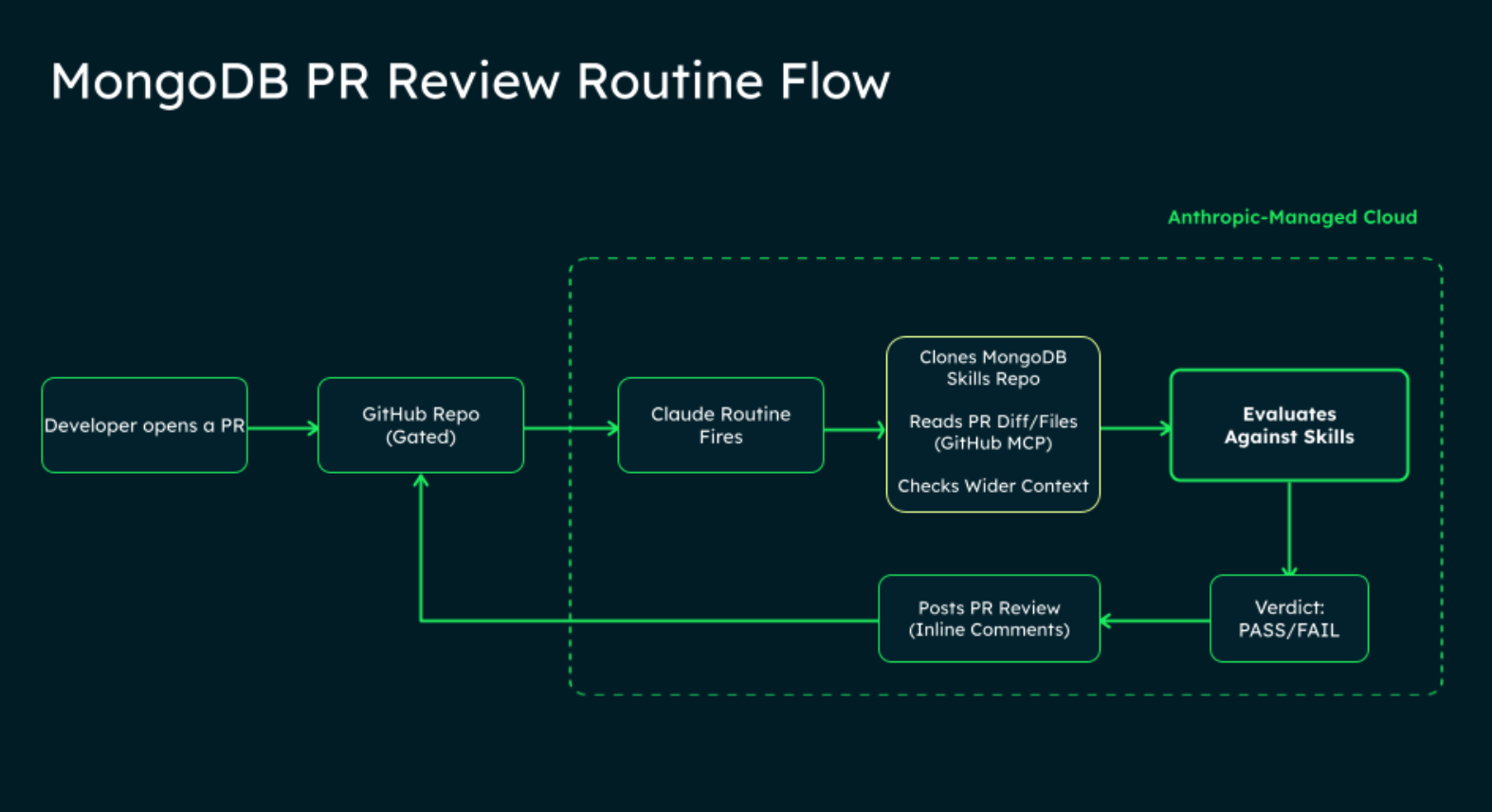
Two pieces do the work:
- A GitHub repo with MongoDB code, with the Claude GitHub App installed (this enables the PR trigger).
- Claude Routines — a saved Claude Code session that triggers on a GitHub event and runs on Anthropic-managed cloud infrastructure (set up via Claude Desktop or Web; the CLI creates scheduled routines only). Requires a Claude subscription (Pro / Max / Team & Enterprise).
- Our prompt written for this tutorial; you can find it here in the Instructions.md file.
Before you start, make sure your Claude account is connected to GitHub (CLI: run /web-setup; or claude.ai → Connectors → GitHub). If it isn't, Claude will prompt you to do this when you create the routine.
What you'll build
- A Routine at claude.ai/code/routines that fires on pull_request.opened.
- A short prompt that clones the official skills repo at runtime and reviews the PR against it.
- Inline PR comments plus a verdict summary on every new PR.
Step 1 — Create the routine
- Web: visit claude.ai/code/routines → New routine.
- Desktop: Routines in the sidebar → New routine → choose Remote (Local creates a Desktop scheduled task that runs on your machine).
Fields to set (same on any surface):
- Name: MongoDB PR review
- Prompt: paste prompt.md (covered in Step 2).
- Repositories: add the GitHub repo you want gated.
- Environment: Keep as Default — diff-only review needs nothing beyond GitHub access.
- Connectors: remove every pre-attached connector. The review skills arrive via the git clone in the prompt, not as connectors, so this section should be empty when you click Create.
- Trigger: GitHub event → PR opened tab. Then add a filter. For example:
- Is draft equals false — recommended baseline; keeps drafts from triggering reviews.
- (optional) Base branch equals main — only review PRs targeting main.
- (optional) Labels is one of needs-mongo-review — make reviews opt-in per PR via a label.
- Permissions: leave Allow unrestricted branch pushes off. The gate only comments; it doesn't push.
- Create. The Claude GitHub App install prompt appears if you haven't installed it on the repo yet.
Step 2 — The prompt:
The prompt ships in the repo as prompt.md. This section walks through what it does, so you can trust the output and know what's safe to change. It does four things.
Finding the pull request: The session fires on pull_request.opened.It reads the PR and its diff, then reads the full files at the PR head. (All PR interaction goes through the GitHub MCP tools, not git/gh — see Known gaps.)
Reading the skills: It reads each skill (and its conditional references) before forming a finding, and a finding without a citation to a specific rule is not considered valid. (In cloud routines, the skills install to disk but aren't invocable as slash commands, so the prompt reads their content directly. See Known gaps.)
Checking the wider repository: When a finding depends on something outside the diff, such as an existing index, the surrounding model, or a shared connection helper, it reads those files first. For example, a find().sort({ x: -1 }) is not a missing-index issue if the repository already defines that index elsewhere.
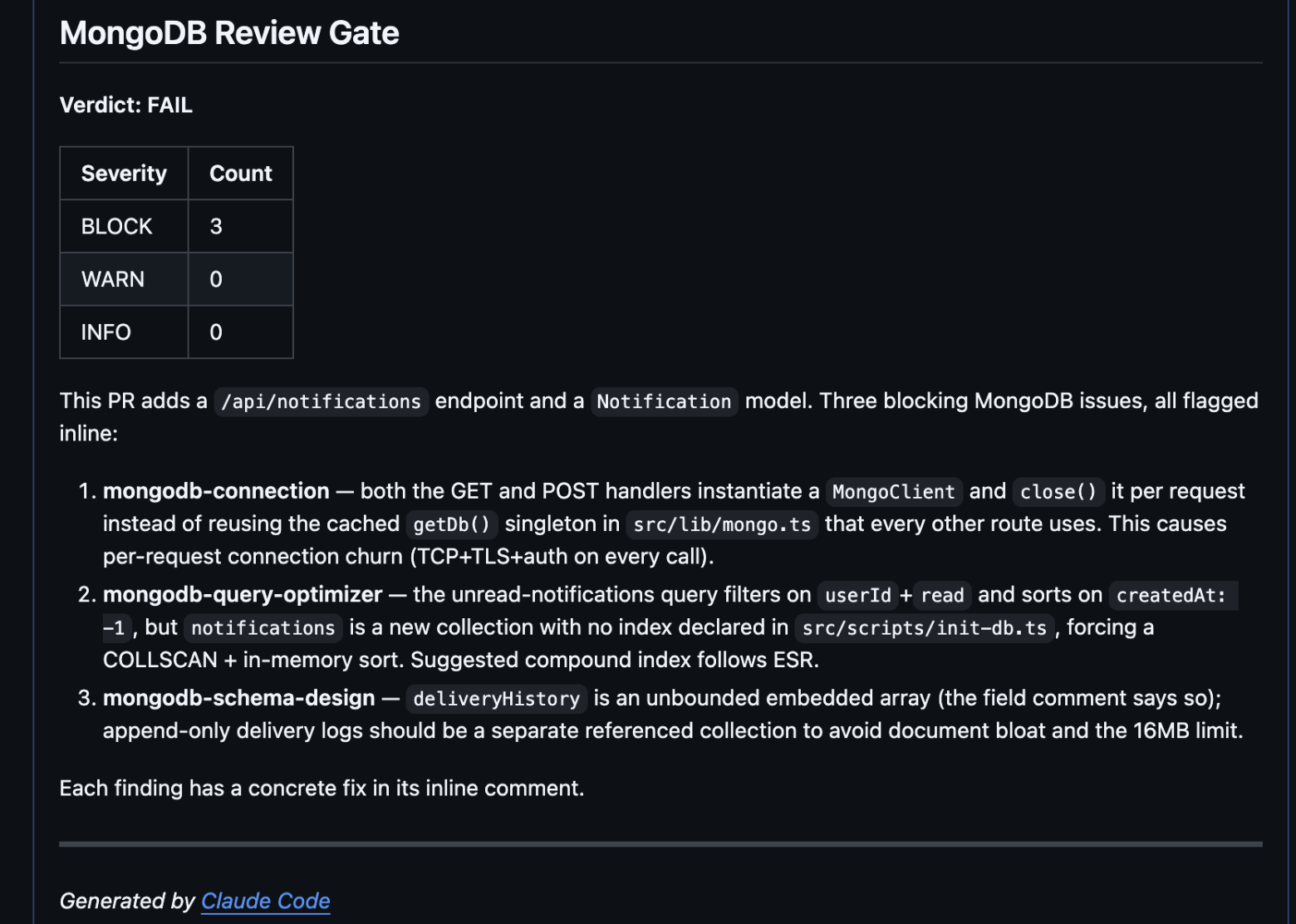
Posting the review: All findings go into a single PR review rather than scattered comments. Each inline comment carries:
- Severity: one of BLOCK, WARN, or INFO
- Skill: the skill name the finding cites
- Why: one or two sentences in plain English
- Fix: a concrete suggestion (embed vs. reference, add this compound index, hoist the client to module scope)
Verdict is FAIL if there's at least one BLOCK; otherwise PASS. WARN and INFO alone don't fail it. A clean PR gets a PASS summary and no inline noise.
Paste it as-is to start. Three parts are safe to tune once you've seen a run:
- Severity. Map your own bar to BLOCK / WARN / INFO. Demote missing indexes to WARN if you don't want them to fail the verdict.
- Verdict logic. The default fails on any BLOCK. Make it stricter or looser.
- Scope. The gate is limited to MongoDB correctness and operability. Widen or narrow it as you see fit.
We recommend that you leave the core contract intact: read the skills first, cite a specific rule, and post one review.
With the routine saved, open a pull request against your repo. Within a minute or so, it fires, and the inline comments and Verdict summary appears on the PR.
Figure 2. Example of an automated PR review and verdict summary.
Known gaps
Skills install but aren't invocable as slash commands. Locally, register skills as slash commands (e.g. /mongodb:mongodb-connection). The skills install at session start, but invoking via the Skill tool returns Unknown skill. The prompt works around this by having the model read the skill content directly. The rubric is in context before findings form, but the routing differs from local behavior.
Tradeoffs to weigh before committing:
- Daily run cap. Pro 5 / Max 15 / Team & Enterprise 25 routines per day during the preview, plus per-routine and per-account hourly webhook caps. Not for a high-volume monorepo without overage credits.
- Acts as you. Comments carry your GitHub identity via your linked GitHub App install. Scope the routine to repos where that attribution is right.
- Research preview. Routines ship under the experimental-cc-routine-2026-04-01 beta header. Surface area, limits, and token semantics may change. See the routines docs.
Next Steps
Ready to optimize your development workflow? Explore the full library of MongoDB Agents Skills to see how you can automate best practices and build more efficiently.