This can get more complex as more information is added. But you can easily validate the JSON syntax using online JSON validators.
Serialization and deserialization
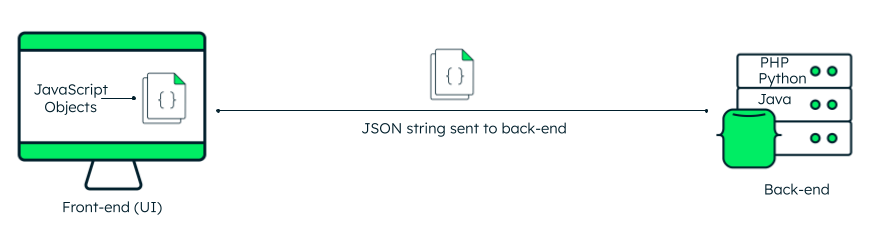
JavaScript natively supports switching between JavaScript objects and JSON string using the in-built global object: JSON.
json.stringify() method
Use the JSON.stringify() method to convert JS objects to JSON strings that can be easily sent to the server. This is called serialization.
Use the JSON.stringify() method to convert JS objects to JSON strings that can be easily sent to the server. This is called serialization.
Output:
json.parse() method
On the client side, you need to deserialize the string back so that it can be presented to the user. For deserialization—i.e., converting JSON string to JS object—you can use the JSON.parse() method:
You can then get the individual items as userDetails.name, userDetails.age, and so on. If you want to get all the details, you can use a loop and iterate through it:
Similarly, other languages like Python, Java, and C# also provide code for parsing and generating JSON data.
JSON validator
There are many tools to validate JSON. You can use online tools, IDE plugins, text editors, or programming language libraries to ensure that your JSON data follows the right standards and is correctly formatted. It is useful to utilize the validator when there is a huge amount of data. The validations can be:
The basic syntax of opening and closing curly braces, and usage of square brackets for arrays.
Using double quotation marks for keys and string values, and commas to separate each key-value pair.
Data type validation and correct formatting for data types—for example, numbers should not be enclosed in double quotes, boolean values cannot be anything other than true/false, and so on.
Structural validation of arrays, objects, and nested structures.
Optionally, supportive of JSON schema validation, ensuring that the JSON documents follow the specified type and constraints as per the schema.
Displaying errors wherever applicable so that the user can easily correct them.