LAUNCHMongoDB 8.3 is built for the sub-100ms retrieval & zero downtime AI demands. Read blog >
AI DATAStop fighting your data layer. Get the memory & retrieval agents need to scale. Read blog >

Cloud Explained — What It Is and How It Works

Try Atlas Free

Cloud computing has revolutionized the way businesses work. Businesses are able to share their work, collaborate across the globe, save big time on infrastructure costs, easily scale their applications, and securely store huge volumes of data — thanks to cloud storage and computing.

But what is it?

Cloud explained

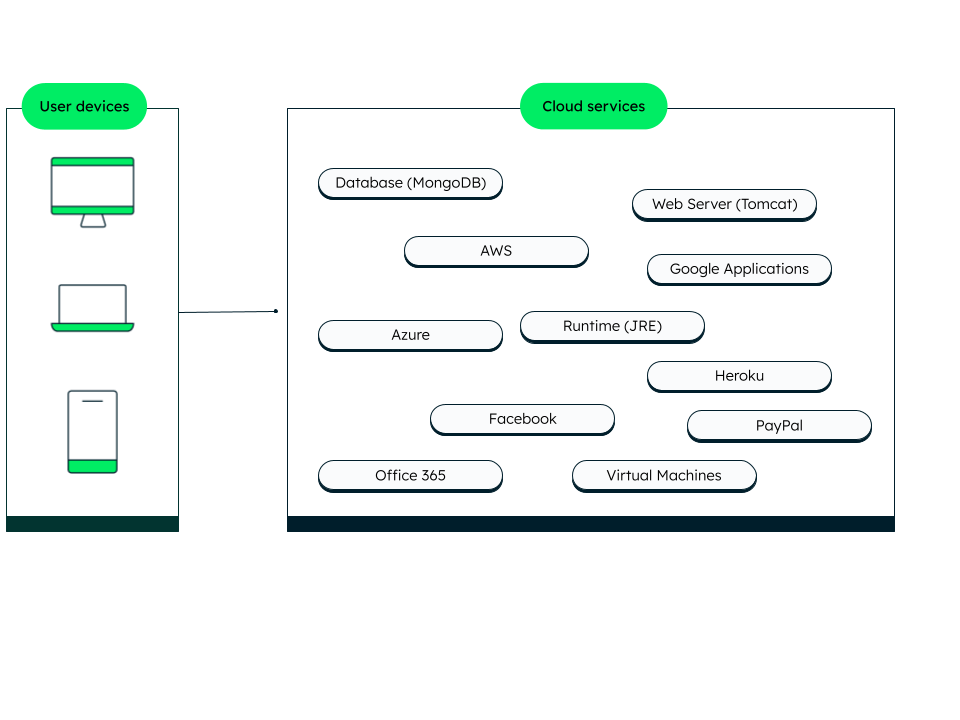
If you had a file saved on your local machine and wanted to access it from your phone or tablet, that wouldn't be possible. But if you store the same document on OneDrive or Google Docs, you can use WiFi or mobile data to access it from anywhere.

Accessing services like Google Docs is possible because it is hosted on a server that’s located _elsewhere — _i.e., on a cloud server. Google Docs is an example of cloud storage.

Likewise, you can run the MongoDB database on the cloud using MongoDB Atlas, which means you don’t have to install MongoDB on your machine, but can still use all of its features that your project needs.

Therefore, businesses can run any application, software, infrastructure, platform, or database as service on the cloud and access them from anywhere via the internet.

Simply explained, cloud computing is a set of distributed resources across servers that can be accessed as a _service _over the internet.

Having high-end applications, infrastructure, platforms, software, and many other resources on cloud means that you can get the benefits of these at a low cost, even if your physical machine has limited capabilities.
Why use the cloud?

Many companies are moving towards cloud migration as cloud computing offers several benefits:

  • Better collaboration and resource sharing: As infrastructure and services are available over the network in a shared location, many people can conveniently work together.
  • Managed: You focus on your business problem while the services are managed for you by the cloud provider.
  • Cost-effective: With cloud, businesses do not need to invest heavily in hardware and infrastructure. Cloud technology provides all these as a service on demand and businesses pay only for the services they use.
  • Easy backup and restore: Data saved on cloud is easy to recover and back up. For example, in case of a failure or crash of one system, data can be easily recovered from other servers.
  • Reliable data: Data on cloud is easy to update, and any changes can be viewed in real time, thus giving reliability.
  • Easy to scale: As your business grows, your resources can be expanded easily.
  • Highly available: Data stored on the cloud is easily accessible and available at all times over the internet.

Cloud architecture

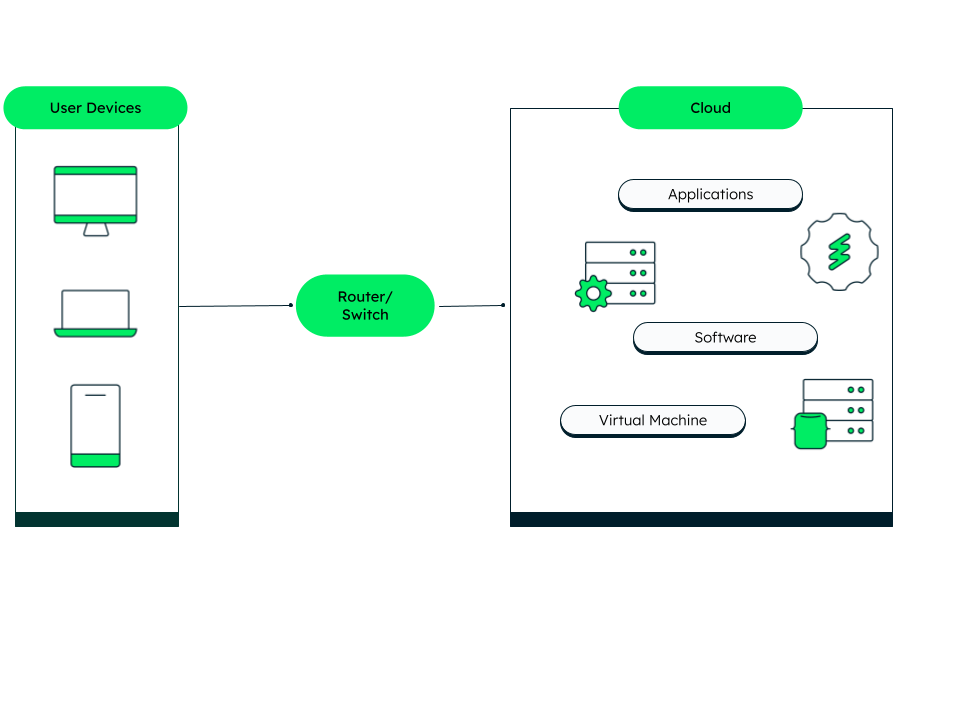
Cloud architecture consists of various components like applications, software, databases, infrastructure, etc., and signifies the relationships between these components. All the cloud components together build the “cloud,” where the backend resources are pooled and accessed over a _network _by the front end (client).


The components of cloud architecture are:

  • Front end: The client platform, infrastructure, or user interface. Users access data stored in the cloud using a browser or a cloud computing software via the network.
  • Back end: The back end consists of servers, storage, runtime, security, network devices, management, and web services. It forms the “cloud,” where data is safely stored. Cloud service providers keep multiple copies of the data to combat data loss, breach, and other risks.
  • Network (Router): The router or switch refers to internet access, public or private network, and intranet. The routers are used to exchange information between two cloud networks or between an on-premise and cloud network.

How does the cloud work?

Cloud is based on the concept of virtualization. With virtualization, users can access a virtual machine as if it were a physical machine with on-premise hardware. Each virtual machine is invisible to others but shares the computing power, storage, and memory of the host machine.

The data operations are taken care of by a central server that follows a standard protocol to connect between the devices linked through cloud computing. Resources like network, database, and software can be shared efficiently across the cloud environment. If one server goes down, the other cloud servers take the load and keep the data and services available.

Cloud providers pre-package a combination of resources into a delivery model. There are four main cloud-based delivery models, namely, Software-as-a-Service (SaaS), Database-as-a-Service (DBaas), Infrastructure-as-a-Service (IaaS), and Platform-as-a-Service (PaaS).

Cloud database

Cloud database is a database accessed as a service on the cloud. You don't have to buy any additional hardware to host the database. Cloud databases can be accessed via a web interface or a vendor’s API. Reduced cost, flexibility, scalability, disaster recovery, and security are some important benefits of a cloud database.

MongoDB Atlas is a fully managed database as a service that offers features like multi-cloud clusters, automated data tiering, continuous backups, and many more.

MongoDB Atlas works seamlessly with major public cloud platforms like Google Cloud, AWS, and Azure.

Cloud computing

Cloud computing is the availability of computer resources, like computing power and data storage on demand to create cloud-native applications. Cloud computing enables businesses to pay for the services as they need, thus lowering operating costs and scaling their business as required. Also, huge amounts of computing resources can be provisioned within minutes, enhancing speed and business productivity.

The different types of cloud computing services are:

Serverless framework

Serverless framework is a cloud computing model where the application runs on a stateless container triggered by events. In case of an event, the cloud provider dynamically provisions the containers.

The pricing of a serverless computing model is based on the number of executions and the workload is handled by the serverless platform, further reducing costs.

Serverless framework also provides improved scalability, flexibility, and latency. Atlas App Services is a good example of serverless architecture.

Cloud computing trends

With the increased usage of digital services, cloud computing has gained more popularity. Research shows that the cloud computing market will grow at a rate of 19.1% between 2021 and 2028. A Forbes report suggests that use cases of cloud will further expand and will play a major role in making key business decisions and strategies. The key upcoming trends in cloud computing are:

  • Businesses will spend more on cloud services and cloud gaming platforms, cloud virtual, and augmented reality.
  • Hybrid clouds will gain more popularity, narrowing the gap between public and private clouds.
  • Cloud computing will play an important role in developing AI-based algorithms and systems, as ML and AI systems need high computing power and resources.
  • Serverless cloud will find more applications and provide another layer of abstraction between the user and PaaS, adding Function-as-a-Service to the list of cloud-based delivery models.
  • There will be more innovations to curb carbon footprint and energy consumption by high-power computing engines and huge storage requirements.

Conclusion

Through this article, we explained cloud computing basics and how cloud computing has changed the way resources are used across the globe. With more digitization, cloud technology will find more use cases for improved business decisions and strategies. MongoDB Atlas and Atlas App Services are two popular cloud-based technologies provided by MongoDB and are widely adopted by businesses to build scalable, flexible, and secure applications.

FAQs

Get started with Atlas today

Get started in seconds. Our free clusters come with 512 MB of storage so you can play around with sample data and get oriented with our platform.
Try FreeContact sales
GET STARTED WITH:
  • 125+ regions worldwide
  • Sample data sets
  • Always-on authentication
  • End-to-end encryption
  • Command line tools