The global transition toward a digital-first economy has a critical blind spot: the assumption of continuous, high-speed internet. From subterranean transit systems to rural geographies with spotty coverage, network dependency leaves users stranded and halts commerce.
Yet for mobile banking apps to work, they assume a network exists and is accessible. If you lose signal on a subway, in a rural area, or on a flaky connection, most wallet apps simply stop working. Balances won't load, payments can't be reviewed, and support chat goes silent. Unlike death and taxes, connectivity is not guaranteed.
For financial services, that's a real gap. Money doesn't stop being useful just because the phone loses bars. A new wallet solution that combines MongoDB Atlas with an on-device ObjectBox shows that connectivity can be treated as an enhancement rather than a requirement that keeps working,even when the device briefly stops talking to the network.
What the wallet solution can offer
This solution is a full personal-wallet experience built on MongoDB Atlas: Users can sign in with SSO, check balances and transaction history, send and request money, manage contacts, receive payment notifications, and chat with an AI assistant that answers questions about spending and drafts payments for confirmation.
Rather than treating network connectivity as a strict requirement, the solution treats it as an enhancement. MongoDB Atlas serves as the core foundation of the application, allowing the experience to remain operational during brief periods of disconnection, with local data access and seamless synchronization when connectivity returns.
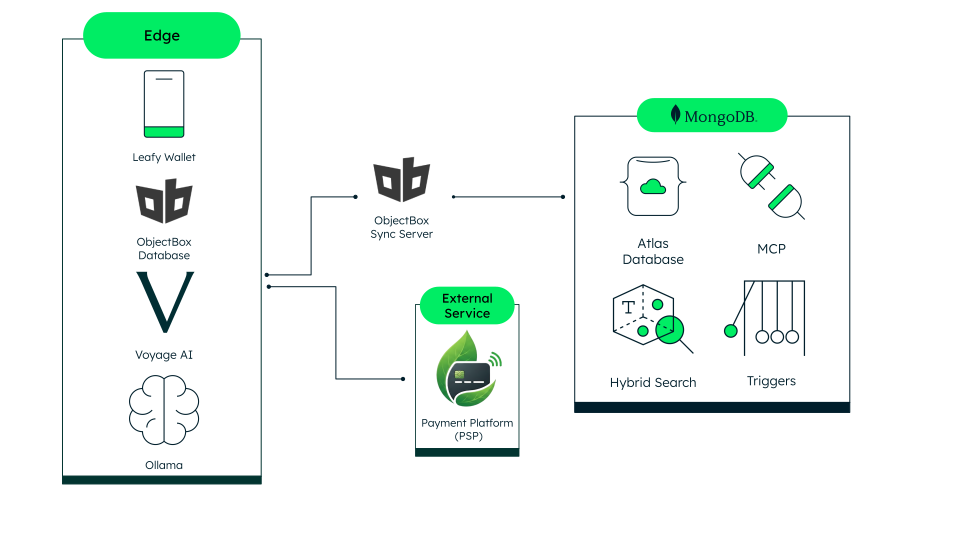
Figure 1. High-level architecture of the solution.
Why offline-first is hard for a mobile wallet
Payments aren't like a to-do list; you can't just let a write happen locally and figure out consistency later. A wallet has to answer three hard questions while offline:
Where does the data live if the network is gone?
What happens to money movements made while offline, once you're back online—do they get lost, duplicated, or replayed twice?
How does an AI assistant answer questions about my spending if the device suddenly has no internet connection?
The answer to all three starts with one idea: Don't fake offline support by caching a few screens. Give the device a real, queryable database that mirrors MongoDB Atlas.
Wallet solution architecture: PSP, MongoDB Atlas, and Objectbox working as one system
The architecture of this offline-first wallet demo brings together three core technologies: an external payment platform (PSP), MongoDB Atlas, and ObjectBox. Each plays a distinct role in the system:
The PSP executes real transactions in a BIAN-compliant way and protects sensitive payment data.
MongoDB Atlas provides the cloud data foundation and source of truth for the application’s enrichment layer.
ObjectBox powers the on-device operational store, so the wallet remains responsive and usable even when connectivity is limited.
Together, these three components form a mirror architecture. This design works well for three reasons:
MongoDB Atlas acts as a replicated database that powers the chatbot when online, leveraging MongoDB’s full performance to deliver accurate, optimized responses.
ObjectBox is a full local database running on the device, with the exact same schema as MongoDB Atlas. That means all the data—every screen, the balance, the transaction list, and the contacts—looks and works exactly the same whether it came from the phone (offline) or from the cloud (online).
The ObjectBox Sync Server bridges these two components continuously in the background. The syncing device writes up to MongoDB Atlas and streams cloud changes back down via its native MongoDB connector.
Because ObjectBox and MongoDB Atlas remain in sync, the data stays up to date no matter which platform answers a question. That's what lets the AI assistant respond with high accuracy without merging collections or transforming data to piece together the full context of a user's wallet. MongoDB's document model is built to support smart queries like that out of the box.
Where MongoDB Atlas actually shines
There are two key ways in which MongoDB really works to make this offline model successful. First, it ensures atomic writes with the document model.
Each transfer's core data and its enrichment, the note, its embedding, and the sync status live in a single MongoDB document instead of being split across collections that need to be kept in lockstep. That single-document write is atomic. You'll never see a transfer marked settled with a stale note or embedding, or the reverse. It also keeps reads simple: the AI assistant pulls one document per transfer instead of joining several.
Next, MongoDB allows for hybrid search to work online and vector search to perform on the device. For example, when sending money, users can attach a short note to the transaction, like “dinner with Luis,” or “rent split.” Finding a note later isn't always a matter of exact keywords. You might remember “that dinner with Luis last month,” without recalling how you phrased it, or you might type the exact word you used.
Instead of choosing between keyword search and semantic search, the solution combines both. Every note is embedded with a local embedding model, and when the user is online, MongoDB Atlas runs a hybrid search. This is a single $rankFusion stage that blends a semantic match against the note's embedding with a lexical, full-text match against its exact words, weighted equally.
When a connection is lost, however, ObjectBox falls back to its on-device HNSW vector search alone, since the device has no lexical index to fall back on. Either way, the user and the AI assistant never have to know which one to run.
The edge engine: Why ObjectBox?
Traditional mobile apps are often entirely dependent on the cloud, causing them to stall or crash the moment they lose a connection. To eliminate this connectivity gap, the solution is integrated with ObjectBox to ensure full functionality stays available in offline mode. Through that, it offers four guarantees:
- Personal data guardrails by design. ObjectBox runs natively on the device, holding a local copy of the user's balance, contacts, chat history, and transaction log, all keyed by design to avoid raw personally identifiable information (PII). Contacts, for example, are matched by a blind index rather than a stored email address, so what lives on the phone is enrichment data, not identity data.
- Always-on functionality. This solution is designed to keep working without a network, which means the device can read and write its own data at any time, with no round-trip to the cloud required. Therefore, it feels fast and keeps functioning flawlessly in airplane mode, not just sort of working with a spinner.
- A safeguard against overspending offline. Before any send, online or offline, the wallet checks the requested amount against the last-synced balance and blocks the send if funds don’t exist. It's a simple check: Don't let the device authorize money it can't yet confirm the user has.
- Automatic, conflict-aware sync. Once the user regains a signal, the ObjectBox Sync Server automatically picks up where it left off. Queued sends, new contacts, and chat messages all stream up to MongoDB Atlas without any action from the user. No refresh button, no manual retry, just a quiet catch-up.
Integration with the payment provider ensures consistent compliance
The demo solution doesn't move money or own identity. Balances, transfers, and registered users remain in the external, BIAN-compliant payment platform (PSP). The application connects only as an OAuth merchant client and never holds a copy of the ledger.
This boundary applies online and offline: The solution does not expose sensitive financial data. MongoDB Atlas and on-device ObjectBox store only non-financial enrichment data, notes, aliases, embeddings, and sync metadata, linked to PSP reference IDs rather than balances or card data.
Contact lookups also preserve privacy. Instead of storing raw email addresses, the demo uses MongoDB Queryable Encryption to protect lookup data and query it without exposing plaintext addresses.
All of these security and compliance features are seamless from the user's perspective. The solution remains focused on making everyday payments and requests easier, even when the user is offline.
What security best practices are implemented?
The system enforces end-to-end security measures across authentication, session management, and data storage:
OAuth 2.0 with PKCE (S256): The solution uses the PSP's hosted login and never sees or stores passwords. PKCE prevents intercepted authorization codes from being reused.
Short-lived encrypted sessions: The app keeps only an HTTP-only cookie encrypted with AES-256-GCM, avoiding a long-lived server-side session store.
Passwordless re-entry: A non-extractable WebCrypto key is generated on-device; only its public key is registered with the PSP. OpenID CIBA enables re-authentication without passwords or OTPs.
Scoped access: The app receives only the read/write access required for beneficiaries, transfers, accounts, and transactions.
Encrypted enrichment data: MongoDB Atlas and ObjectBox contain no financial data, and lookup values are protected with MongoDB Queryable Encryption rather than stored in plaintext.
Next Steps
See how MongoDB supports offline-first mobile and edge architectures with MongoDB for Edge and Mobile.
Explore how MongoDB Atlas Vector Search powers semantic search across financial data, online, and on-device.
Ready to start building? Register for MongoDB Atlas and spin up a free cluster today.