LAUNCHMongoDB 8.3 is built for the sub-100ms retrieval & zero downtime AI demands. Read blog >
AI DATAStop fighting your data layer. Get the memory & retrieval agents need to scale. Read blog >

What is Database Architecture?

Get Started Free

When designing a modern application, you will almost always need a database not just to store data, but also to efficiently transform and retrieve data when required. From the time of inception, database architecture and database management systems have evolved from traditional, rigid systems to more modern, horizontally scalable systems, more suited to today’s digitized universe.

Table of contents

What is database architecture?

The term "database architecture" refers to the structural design and methodology of a database system, which forms the core of a database management system (DBMS). This architecture dictates how data is stored, organized, and retrieved, playing a crucial role in effective and efficient data management.

The first step while designing any DBMS architecture is to decide on the type of database to use. The database could be centralized or decentralized.

A centralized database is stored and managed at a single location, typically on a server or a computer. Users access the database through networks such as Local Area Network (LAN) or Wide Area Network (WAN).

In contrast, a decentralized or distributed database consists of data stored across multiple physical locations (nodes), typically managed by different systems or servers. While each node or site operates independently, they are interconnected through communication channels to ensure data consistency and enable distributed operations.

Once you’ve decided the type of database you want to use, you can determine the type of architecture you want to use. The architecture of a database varies significantly based on the needs of the organization, the type of data being managed, and the specific applications that interact with the database.

Database management system

A database management system acts as an intermediary between the user and the database, ensuring that the data is easily accessible, consistently organized, and securely maintained. The effectiveness of a DBMS hinges on its underlying architecture, which must be robust, scalable, and capable of handling various data-related tasks with efficiency.

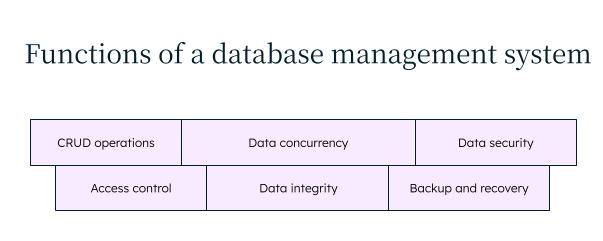
The primary functions of a DBMS include:

  • CRUD operations (create, read, update, delete): These are basic operations to efficiently manipulate and manage data.
  • Data security: DBMS must ensure the confidentiality, integrity, and availability of the data, by preventing unauthorized access, and implementing encryption and backup strategies.
  • Access control: A robust DBMS provides mechanisms to control who can access and modify the data, by implementing user authentication, access control mechanisms like permissions and roles, and tracking user activities for monitoring and compliance.
  • Overall database management: DBMS must ensure data integrity, concurrency control, and backup and recovery.

Functions of a database management system

Evolution of database architecture

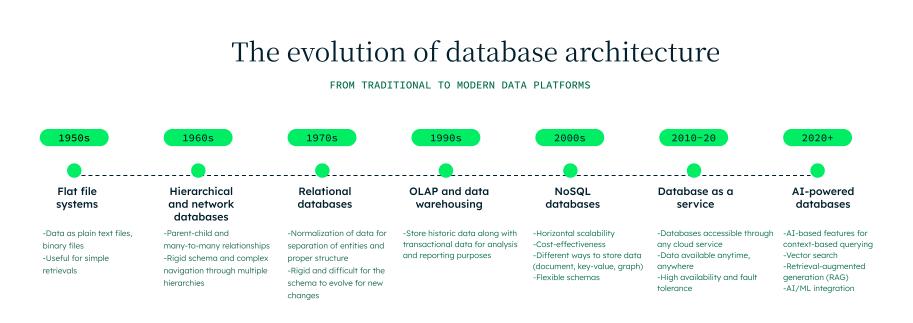
From simple structures that manage daily transactions in a small business to complex architectures that handle more unstructured and real-time data in large enterprises, the spectrum of database architecture is broad and diverse, and has evolved rapidly over time.

It started with flat file systems as early as the 1950s, where data was stored as plain text or binary files for simple retrieval. There were no established relationships between the different entities, which made it somewhat difficult to query.

To cater to this, hierarchical and network databases came around the late 1960s. These databases introduced the parent-child and many-to-many relationships. However, due to rigid schema and complex navigation (tree), it was still not easy to query the data.

Next came the relational databases that introduced the normal form of data—i.e., first normal form, second normal form, and third normal form. This ensured that the data was separated and structured correctly. These systems dominated the enterprise systems in the 1970s and 1980s for their reliability and consistency.

As businesses started going digital, there arose a need for analysing historical data and analytical processing, for which traditional databases offered OnLine Analytical Processing (OLAP) and data warehousing. This helped with business intelligence and reporting.

With the increase of social media and web users, there was a need for more flexibility in storing and handling huge amounts of data (big data), which traditional relational databases could not provide.

This led to the rise of modern NoSQL databases in the 2000s. These databases introduced horizontal scalability and enabled flexible storage for unstructured/semi-structured data.

Further enhancements in the database architecture were inevitable due to the increasing number of use cases for data, catering to real-time and streaming data, and cloud-native and serverless databases that revolutionized the usage of databases, from merely performing CRUD operations to transforming and analysing data with the data layer itself.

Further trends include support for AI-optimized databases that can perform vector search, AI/ML integration, and augmented querying and retrieval.

Evolution of database architecture

Basic database system architecture (components)

The four basic components of all types of database architecture, SQL or NoSQL, include a user (web user, application, business analyst, database administrator), query processor, storage manager, and the physical database itself. The query processor, storage manager, and other subsystems—like indexing, transaction management, concurrency control, and logging—constitute the database management system.

Database architecture components

A user can be a web/internet user, a developer wanting to extract data from the database, a business analyst trying to pull statistics, or a database administrator monitoring logs and access control.

A query processor performs the following functions:

  • Parsing and query interpretation: Convert the query into an internal format, check for syntax errors in the query, and interpret and process the query language for execution.
  • Query optimization and execution: Generate the best possible execution plan (strategy) for the query, taking the resource usage and time into consideration.
  • Indexing: Use indexes when required for better query performance.

A storage manager performs the following tasks:

  • Buffer manager: Manages the buffer pool, ensuring only the required data is kept in the memory for quick access, and balances the disk space and I/O operations
  • Transaction manager: Takes care of the concurrency, and implements recovery mechanisms in case of a failure
  • File manager: Manages the storage and retrieval of data on the physical database device, creates and maintains indexes, allocates or deallocates space, and compresses data to improve performance and save storage space
  • Authorization and integration manager: Ensures that only authorized users are able to access specific parts of the database and maintains data integrity throughout

The physical storage is the layer where the actual database resides to store the data, important statistics about that data and queries, execution plans, logs, and indexes.

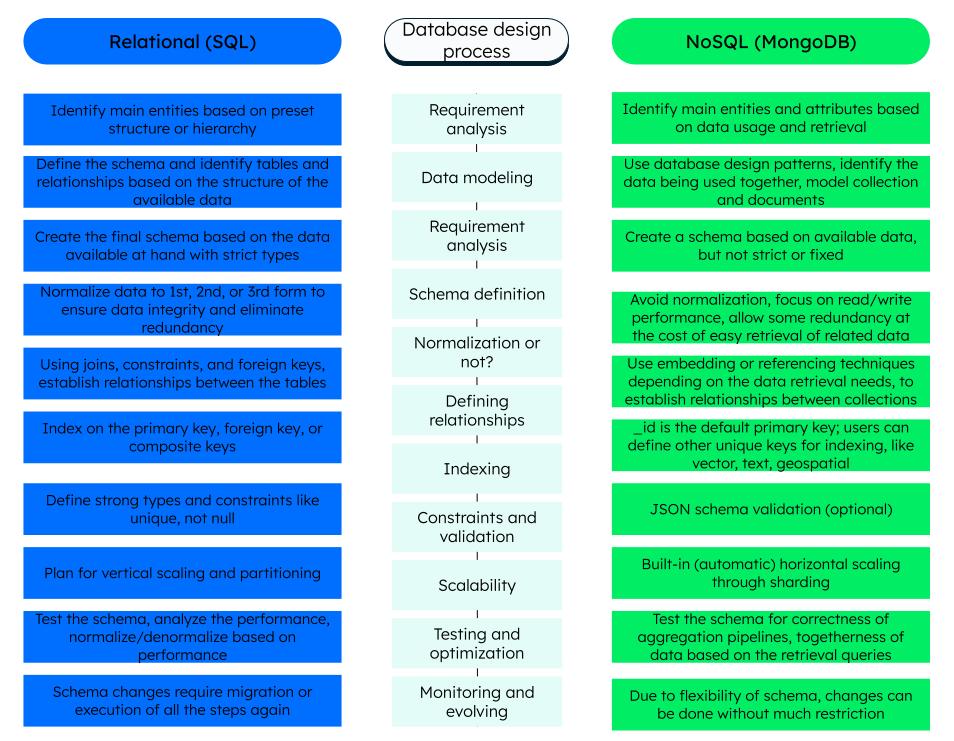
The database design process, from concept to implementation, involves a set of meticulous steps:

  • Define the database structure as per requirements and identify the entities.
  • Determine the relationships between various entities by understanding the data needs and whether to use embedding or referencing (using first normal form, second normal form, or third normal form, in case of a relational database).
  • Design the collections (tables) and specify primary key (only applicable for relational databases). NoSQL databases like MongoDB automatically generate the primary key, if not specified.
  • Define the indexes and constraints.
  • Plan for vertical (relational) and horizontal (NoSQL) scaling.
  • Test and monitor the schema.

Note that as business requirements change, the database schema needs to evolve to accommodate the changes without having to make too many edits to the application’s code as well as the existing schema. For this, a database like MongoDB, with a flexible and evolving schema, is a much more suitable option.

Database design process

Types of database models

One of the fundamental aspects of database architecture is how the data is organized, stored, accessed, and retrieved within a database system.

Broadly, we split the types of database architecture models into two categories:

  1. Logical: Logical architecture focuses on the abstract representation of data and emphasizes the structure and relationships between the data—for example, a document model, hierarchical model, and object-oriented model.
  2. Physical: The physical architecture defines how the system is deployed or scaled physically across the infrastructure.

In this section, let’s understand the physical or tier architecture, along with some more modern DBMS architecture models.

The most basic architecture is the client server architecture, which includes one-tier, two-tier, and three-tier architecture. In a client server architecture, there is a client (end user or application) that requests services from the server (backend or database). The server in turn processes the request and returns the appropriate response.

One-tier architecture

In the one-tier architecture, the database, user interface, and application logic all reside on the same machine (local machine) or single server itself. It's typically used for small-scale applications where simplicity and cost-effectiveness are priorities. Because there are no network delays involved, this type of tier architecture is generally a fast way to access data.

Two-tier architecture

In a two-tier architecture, one or more clients connect directly with a database server—for example, a desktop application connecting to a single database hosted on an on-premises database server like an in-house customer relationship management (CRM) that connects to a Microsoft Access database.

Three-tier architecture/N-tier architecture

Most modern web applications use a three-tier architecture. In a three-tier architecture, the clients connect to a backend application server, which in turn connects to the database. The application is split into three or more layers—i.e., a presentation layer, business application layer, and data layer—creating a separation of responsibility. Using this approach ensures more security, scalability, and faster deployment.

  • Security: Keeping the database connection open to a single back end reduces the risks of being hacked.

  • Scalability: Because each layer operates independently, it is easier to scale parts of the application.

  • Faster deployment: Having multiple tiers makes it easier to have a separation of concerns and to follow cloud-native best practices, including better continuous delivery processes.

Client server architecture

Distributed architecture

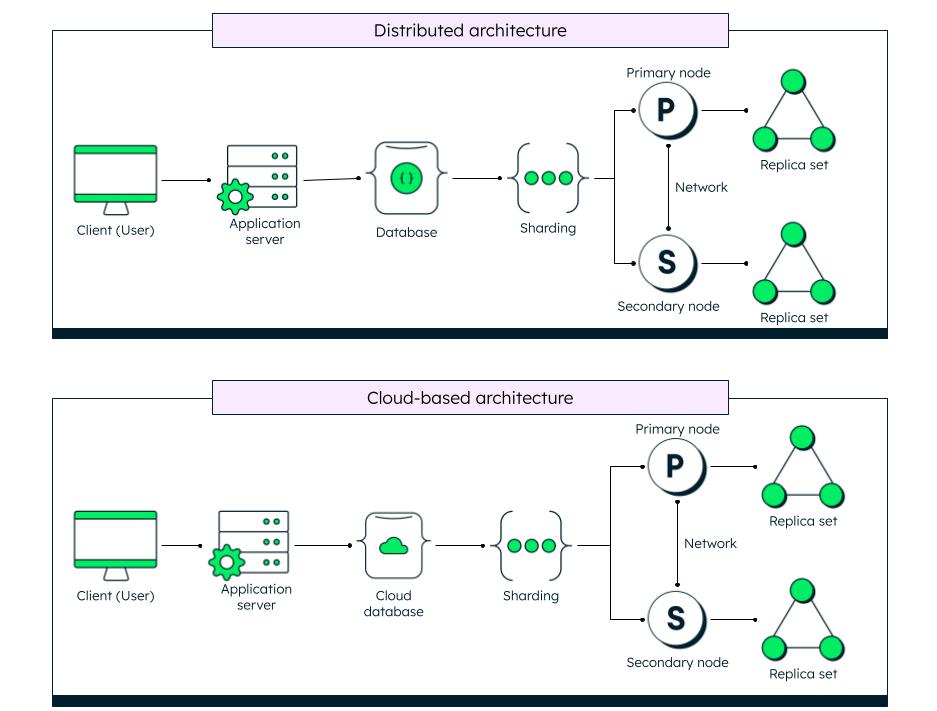
Much suited for modern applications, a distributed database architecture distributes the data across multiple nodes, through various methods like replication and sharding, to ensure high availability and fault tolerance.

Cloud-based architecture

Further enhancing the distributed architecture is the cloud-based architecture, where the database acts as a service provided over the cloud and offers more flexibility and scalability, and is cost effective. MongoDB Atlas is a good example of a cloud-based data platform.

Distributed and Cloud-based architecture

Federated architecture

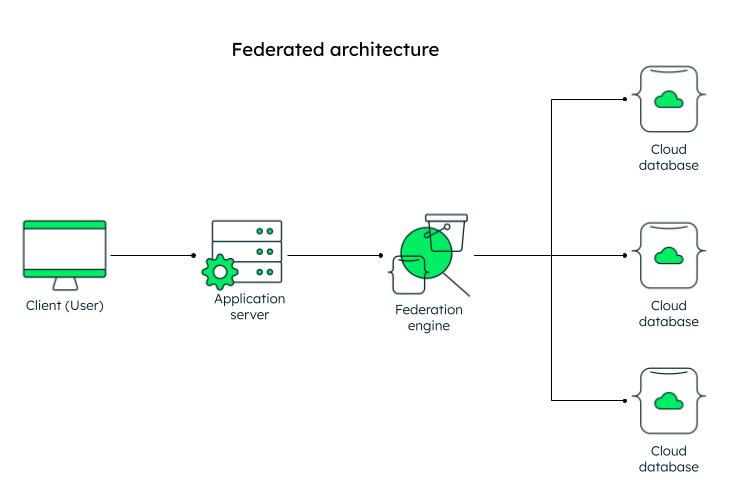
In a federated architecture, multiple autonomous databases can be integrated into a single view, thus integrating data from multiple diverse sources into one database. MongoDB Atlas provides Data Federation, where you can access and query multiple Atlas databases and get the result into the desired platform.
Featured architecture

Database architecture in MongoDB Atlas

MongoDB was launched in 2009 and became a trailblazer for modern distributed applications that would eventually work in tandem with the modern technologies, be it cloud or AI. MongoDB is built on the document model and retains the best of relational and NoSQL databases.

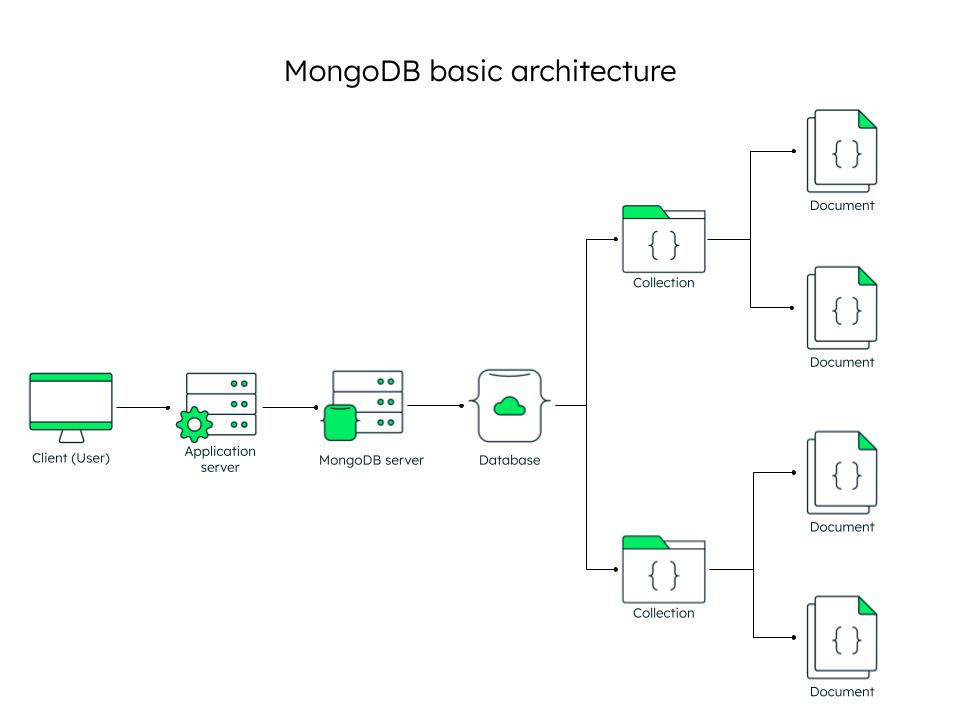
MongoDB replaced rows in tables of a relational database, with flexible documents that are easy for data retrieval and querying. In MongoDB, data that is accessed together is stored together. Some prominent features of the MongoDB database are:

MongoDB’s distributed architecture makes it scalable, resilient, and mission critical. Further, MongoDB Atlas, the software as a service offered by MongoDB, supports additional services, including real-time analytics data workloads, stream processing, and vector search.

Almost all modern distributed applications today follow a three-tier architecture, and MongoDB fits naturally into it. Full technology stacks, like the MEAN stack, MERN stack, and FARM stack, use MongoDB as their backend database.

MongoDB basic architecture

For detailed architecture, refer to the MongoDB Architecture Guide.

Explore the work of the MongoDB Systems Research Group.

FAQs

Get started with Atlas today

Get started in seconds. Our free clusters come with 512 MB of storage so you can play around with sample data and get oriented with our platform.
Try FreeContact sales
GET STARTED WITH:
  • 125+ regions worldwide
  • Sample data sets
  • Always-on authentication
  • End-to-end encryption
  • Command line tools