Role-based access control (RBAC) is designed to protect a company’s digital assets from security breaches, cyberattacks, data leaks, and unauthorized tampering by assigning permissions based on predefined roles rather than individual users. RBAC is part of identity and access management (IAM)—it simplifies compliance and enforces security principles, such as least privilege.
Key takeaways
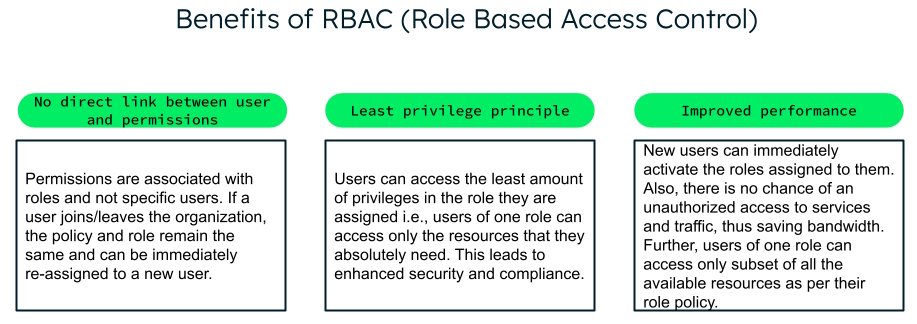
RBAC is a popular access control method because it’s secure, easy to manage, and scales well across large organizations.
RBAC assigns permissions to organizational roles rather than individual users.
RBAC is based on the principle of least privilege—assigning only the essential permissions to a role.
Since roles are not tied to users with RBAC, if a user is replaced, it’s easy to re-assign the role to another user.
MongoDB provides built-in roles, as well as provisions for custom roles within an organization.
RBAC, or role-based access control, is a security mechanism based on the design principle of least privilege: granting only the permissions that are absolutely required, and nothing more. RBAC is not an authentication mechanism, but a security mechanism to manage access after a user has been authenticated.
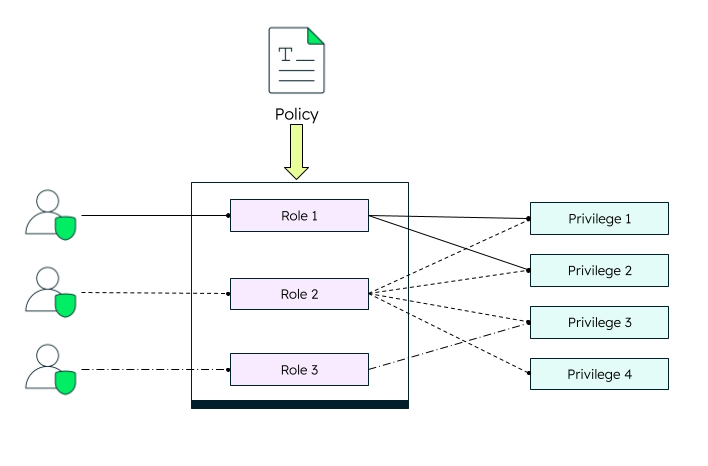
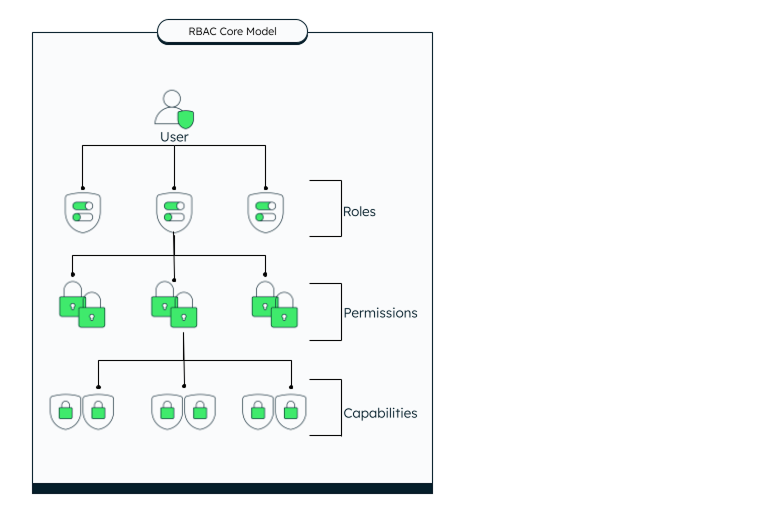
In RBAC, a user can hold one or more roles, defined by organizational policies. A role can have multiple privileges (permissions). Each permission can impact multiple capabilities.
For example, a customer service representative (CSR), at a minimum, needs viewing access to basic customer information, such as product or service details, profile information, etc. When a customer calls and asks the CSR if their new service is activated, the CSR can see that data. However, they may not be able to modify any of the information because their permissions are set at “”read-only.” If a customer's product or service details are stored in one database and personal details are on a different database, the CSR will need read-only permissions for both databases.
Why is RBAC important?
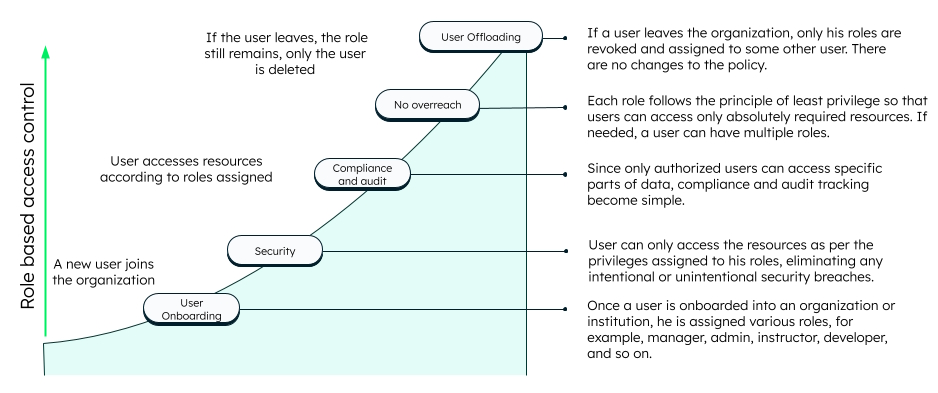
Role-based access is important because it limits each user’s access to only what their role requires, which reduces the risk of attacks, data breaches, and exposure of sensitive data. Below is an illustration that shows how RBAC helps secure resources, following one user from the day they join an organization to the day they leave.
User onboarding
When a new user joins an organization, one or more roles are assigned to them based on their designation.
Consider an example of a corporate office, where a new employee joins as a team leader to five employees. They all report to a senior manager, who handles three teams—A, B, and C—with four, five, and three members respectively.
The senior manager has the role “manager” which allows them to access the data of all the teams and their team leads. Additionally, they can access project data of all three teams.
The team leader has the role “team lead” which allows them to access the data of their team members and the project data of the project they’re leading.
Each team member has the role “member” which allows them to access their own details and the project data of their project.
Security
For daily operations, each user can only access their resources as per their role assignments. If they need more privileges, they will be assigned additional roles. Each role has specific privileges. RBAC allows roles and privileges to be customized as per an organization's policies.
Let's say Team A needs to access specific resources from Team B's project. Since they do not have access by default, one of the team members or the team lead can be given the specific role for a particular time limit to access the required files. This makes access control and security simple and effective.
Regulatory compliance and audit
A user has no direct link with privileges, ensuring compliance with laws and policies. The policy remains the same, irrespective of the user's roles. For example, if the team lead is promoted to a manager post, those roles will change. Thus, the role that was previously given to the senior manager will now be assigned to the team lead, without any changes to the policies.
Further, if a user tries to knowingly or unknowingly access resources that he is not authorized for, it also becomes easy to track and audit, as each user's roles can be easily monitored. For example, if a member from Team A tries to access the project details of Team B, this activity will be logged and any suspicious activities can be tracked. This ensures that security is maintained at all times.
User offboarding
RBAC also makes it easy to revoke access when employees leave the organization. The roles and policies still remain the same, with only the user being deleted from the system.
Why is RBAC popular?
Role-based access control is often favored by large organizations because it's straightforward and scalable. You can assign roles with specific permissions and then assign users to these roles, making it easy to manage access as your organization grows.
How does RBAC work?
RBAC works by assigning permissions to roles rather than individual users. It follows three primary rules:
Role assignment: A user gains access to resources only once they are assigned a role.
Role authorization: A user must be authorized to access the actions and privileges allowed for that role.
Permission authorization: Since permissions are tied to specific roles (read-only for a tester role or edit permission for a developer role), users can perform only the actions permitted by their assigned roles.
Example scenario
Consider an organization, ABC Widgets, where many employees were recently hired for two new projects—Project A and Project B. Each project has a team of three members who report to a team leader. The project manager oversees the business process of both projects and teams, and the team leaders directly report to the project manager.
The challenge: protect sensitive information while giving each role the access it needs—including employees at the same level on different projects who sometimes need limited access to each other’s work.
With RBAC, users assigned to roles automatically inherit the permissions required for their job functions. For example, team members in Project A only get access to certain parts of that project—and the user interface team members may not have edit access to the backend and vice versa. The team leader will have full access to Project A, but not Project B.
How does RBAC compare to other access control methods?
Besides RBAC, the main access management methods are discretionary access control (DAC), mandatory access control (MAC), attribute-based access control (ABAC), and access control list (ACL). All of them fall under the umbrella of identity and access management (IAM).
Discretionary access control (DAC)
DAC, discretionary access control, allows resource owners to control access to their own resources. In RBAC, on the other hand, permissions are centrally managed, avoiding owner‑centric control, thus improving consistency and security.
Mandatory access control (MAC)
MAC, mandatory access control, enforces access policies based on fixed security labels. RBAC is more flexible, allowing custom granular permissions.
Attribute-based access control (ABAC)
ABAC, attribute-based access control, grants access based on user and environmental attributes, like location, time, and so on. RBAC is much simpler to manage and implement, eliminating the complexity of attribute-based rule sets.
Access control list (ACL)
ACL, access control lists, specify individual user permissions for accessing each resource. RBAC assigns permissions to roles, thus avoiding configuring access for every resource separately.
ABAC is powerful but complex, ACL is simple but not suitable for large organizations, MAC is centralized and more rigid. RBAC is powerful and user-friendly for admins, striking a balance between security, granularity, and usability.
What are the different RBAC models?
RBAC models build on the core model, in which users are assigned roles and each role carries a set of permissions.
Roles and privileges (permissions)
Privileges are a set of actions that are allowed on a capability. For example, if the capability is to “inform the customer about their bill cycle details,” then the user privileges (let's say a customer service representative) could be read-only. If the capability is to update the phone number, the privileges could be read and write.
A role is a set of privileges assigned to the user. For example, a “viewer” role could have read-only privileges, while an “editor” role could have read and write privileges, and the “owner” role can have read, write, and delete privileges to a particular item (a database, a document, etc). An “admin” role that has to manage access rights will have all the privileges.
The privileges of a particular role are governed by a set of rules, known as policy.
Applying policies
Policies are a set of rules defined to manage roles and privileges (permissions). Policy ensures security as well as operational efficiency, as a user can perform only those actions assigned to the particular role as per the policy.
Role-based access control is a “policy-neutral” mechanism, because an organization can set the rules based on its own requirements—there are no rigid, pre-defined rules or access control policies.
Granting access
To grant or revoke access, a user should have the necessary role that allows for the grant privilege. This would most probably be a database admin or database owner.
Other RBAC models
Some role-based access control models have added new features or capabilities to the core model, such as:
Role hierarchy
In this model, a higher role automatically inherits the permissions of the roles below it, along with its own permissions. For example, a manager will have permissions that team members have, plus additional permissions that a manager needs.
Constrained RBAC
In addition to being role-based, constrained RBAC is also based on other factors, like time, location, and specific jobs, enhancing the security. For example, a contractor or a temporary staff can have access to certain resources for a limited period of time.
Symmetric RBAC
In this model, two different designations or positions can have similar or equal roles. For example, a manager and team lead can have access to the data of all the members in their team.
Role-based access control in MongoDB
MongoDB provides role-based access control to manage MongoDB databases and services. A user can access all of MongoDB's systems only using the assigned roles. MongoDB does not enable access control by default for self-managed deployments. View our documentation to learn how to enable access control on various MongoDB deployments.
In MongoDB Atlas, access controls are enabled by default and cannot be disabled.
If access control is enabled (self-managed deployments), users must authenticate themselves to perform actions that they are authorized to.
MongoDB provides built-in roles for the most commonly used privileges and also gives an option to create custom (user-defined) roles if the built-in roles are not sufficient.
Managing built-in roles
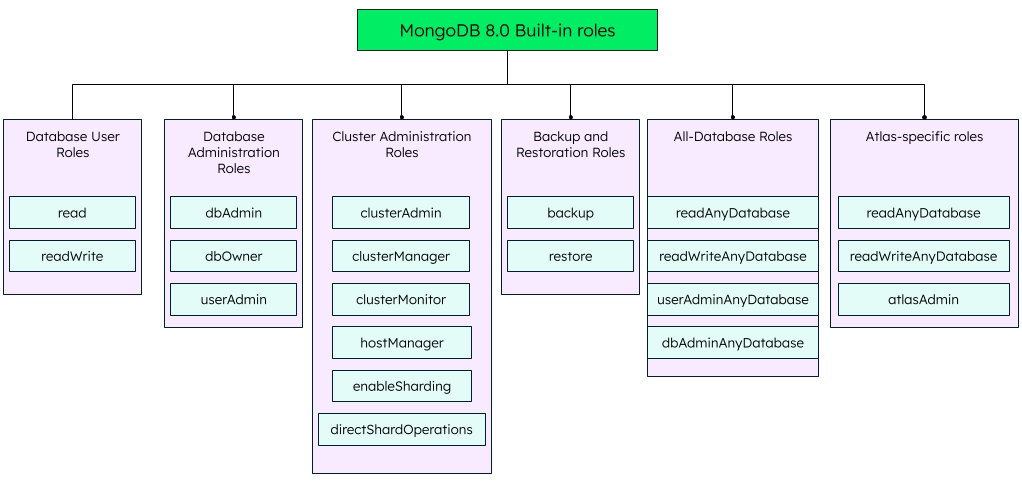
MongoDB provides built-in roles and privileges for self-managed deployments. Some common built-in roles are read, readWrite, and dbAdmin/atlasAdmin roles. Database admin roles have higher privileges compared to any other database user roles, including the privilege to control the privilege of other roles.
The database user and database administration roles are applicable for all databases. However, other access control roles are available only for admin databases. For example, read, readWrite, dbAdmin are available for all databases. However, cluster administration roles like clusterAdmin, clusterMonitor, and backup roles like backup or restore are available only for admin databases.
The internal databases like local and config are read-only for all users, except the clusterAdmin, who has the highest privileges to monitor access control on clusters.
MongoDB Atlas additionally supports the atlasAdmin, readWriteAnyDatabase, and readAnyDatabase roles, each having a subset of privileges from the roles specified for self-managed deployments. Atlas also provides the organizational and project roles for user access control.
MongoDB also supports creating custom roles to grant access to users when the pre-defined roles do not provide the necessary access. You can create custom roles on both MongoDB Atlas and other self-managed deployments.
Modifying access for existing users
To update the role assignments of any user, you need to have the userAdmin role. This role gives you privileges to grant a role (grantRole) or revoke a role access (revokeRole) on the database. You should also have the viewRole privilege to know the role information.
Conclusion
Role-based access control keeps security manageable as an organization grows by tying permissions to roles instead of people, so access stays consistent whether someone joins, changes jobs, or leaves. It's the balance of security, simplicity, and scale that makes RBAC the default choice for most large organizations. MongoDB applies the same model through its built-in and custom roles, giving teams a familiar way to control who can do what across their databases.
ACL assigns permissions directly to individual users or groups for each resource, whereas RBAC assigns permissions to roles that are then assigned to users.
The three primary RBAC rules are role assignment, role authorization, and permission authorization.
A simple example would be an organization, where engineers may have access only to their assigned project modules, team leaders may have access to the entire project, and the project manager may have access to both projects based on their assigned roles and permissions.