默认默认下, Atlas使用高级加密标准 (AES)-256 对所有集群存储和快照卷进行静态加密。您的云提供商自动执行此磁盘加密并管理加密密钥。您可以通过启用使用客户托管密钥的数据库级静态加密来增加另一个安全层。您拥有并控制存储在云提供商的KMS中的加密密钥。
通过密钥管理配置静态加密会对 Atlas 项目产生额外费用。要了解更多信息,请参阅高级安全。
注意
The MongoDB Atlas Shared Responsibility Model defines the complementary duties of MongoDB and its customers in maintaining a secure and resilient data environment. Under this framework, MongoDB manages the security and operational integrity of the underlying platform, while customers are responsible for the configuration, management, and data policies of their specific deployments. For a detailed breakdown of ownership across security and operational excellence, see Shared Responsibility Model.
要强制在项目中的所有集群和专用搜索部署上启用静态加密的客户管理密钥,请使用Atlas 资源策略。您可以使用资源策略在创建或更改集群或搜索部署之前要求使用 CMK。
为 Atlas 项目配置静态加密时,您可以使用以下一个或多个客户密钥管理提供商:
为 Atlas 项目配置至少一个密钥管理提供商后,您可以为需要加密的每个 Atlas 集群启用客户密钥管理。密钥管理提供商无需与集群云服务提供商匹配。
注意
当您启用或禁用客户密钥管理时, Atlas会执行初始同步以重新加密您的集群数据。它还会在集群上重建MongoDB Search 和MongoDB Vector Search 索引。
Alternatively, for projects with M10 or larger Atlas clusters deployed on only Azure regions, you can use the Atlas Administration API to automatically create Azure Private Link in your AKV that enables Atlas to securely communicate with your AKV over Azure's private network interfaces. To learn more, see Manage Customer Keys with Azure Key Vault.
Atlas 无法轮换客户托管的加密密钥。有关密钥轮换的指导,请参阅密钥管理提供商的文档。当您在项目中设置客户数密钥管理时,Atlas 会创建 90天密钥轮换警报。
如果您的 KMS 提供商不可用,仍在运行的集群不会因此被禁用。如果您决定重启集群,您的集群会因缺少 KMS 提供商而被禁用。
要学习;了解加密建议,包括数据分类级别和要使用的加密类型,请参阅Atlas架构中心的Atlas数据加密建议。
注意
For clusters with encryption at rest using customer-managed keys, Atlas data validation requires extra access to your KMS to decrypt data. To learn more, see Data Validation KMS Usage.
必需的访问权限
要配置客户密钥管理,您必须拥有对项目的 Project Owner 访问权限。
拥有 Organization Owner 访问权限的用户必须将自己作为 Project Owner 添加到项目中。
通过客户密钥管理配置 Atlas
使用密钥管理进行静态加密需要有效的密钥管理提供商凭证和加密密钥。要提供这些详细信息并启用客户密钥管理:
AtlasGoAdvanced在Atlas中,Go项目的 页面。
如果尚未显示,请从导航栏上的 Organizations 菜单中选择包含项目的组织。
如果尚未显示,请从导航栏的 Projects 菜单中选择您的项目。
在侧边栏中,单击 Security 标题下的 Database & Network Access。
在侧边栏中,单击 Advanced。
显示“高级”页面。
(可选)将 Search Node Data Encryption 旁边的按钮切换为 On。
You can optionally enable encryption for all data on Search Nodes. You can also enable this feature later.
如要了解更多信息,请参阅启用搜索节点的客户密钥管理。
(可选)支持访问 Atlas 控制面或从 Atlas 控制面进行访问。
要了解更多信息,请参阅允许从 Atlas 控制平面访问。
支持从 Atlas 控制平面进行访问
Depending on your KMS configuration, you might have to add the following IP addresses to your KMS access list so that Atlas can communicate with your KMS:
Atlas控制平面出站IP地址
Atlas 集群节点的公共IP地址(数据平面)
要启用 Atlas 和 KMS 之间的通信:
为 Atlas 集群启用客户密钥管理
After you Configure Atlas with Customer Key Management, you must enable customer key management for each Atlas cluster that has data that you want to encrypt.
注意
您必须拥有 Project Owner 角色才能为该项目中的集群启用客户密钥管理。
对于新集群:
可选:从新集群节点添加 IP 地址。
根据密钥管理配置,您可能需要将 Atlas 集群节点 IP 地址添加到云提供商 KMS 访问列表, 以便集群与 KMS 通信。 要启用集群与 KMS 之间的通信,请执行以下操作:
向
ipAddresses端点发送 GET 请求。returnAllIpAddresses API 端点返回新集群节点的 IP 地址列表,类似于以下内容:{ "groupId": "xxx", // ObjectId "services": { "clusters": [ { "clusterName": "Cluster0", "inbound": [ "3.92.113.229", "3.208.110.31", "107.22.44.69" ], "outbound": [ "3.92.113.229", "3.208.110.31", "107.22.44.69" ] } ] } }
对于现有群组:
AtlasGoClusters在Atlas中,Go项目的 页面。
如果尚未显示,请从导航栏上的 Organizations 菜单中选择包含所需项目的组织。
如果尚未显示,请从导航栏的Projects菜单中选择所需的项目。
在侧边栏中,单击 Database 标题下的 Clusters。
会显示集群页面。
启用集群加密。
展开 Additional Settings 面板。
将 Manage your own encryption keys 设置切换为 Yes。
验证您的集群的 Require Private Networking 设置的状态。
If you configured Encryption at Rest Using CMK (Over Private Networking) for Atlas at the project level, the status is Active. If you haven't configured any private endpoint connection for your project, the status is Inactive.
为搜索节点启用客户密钥管理
When configuring Customer Key Management for your project, you can also enable encryption with Customer Key Management for your Search Nodes. This ensures that your MongoDB Search and MongoDB Vector Search workloads, including indexes, are fully encrypted with your customer-managed keys.
This feature is available across KMS providers.
如要使用客户管理密钥对搜索节点启用数据加密:
AtlasGoAdvanced在Atlas中,Go项目的 页面。
如果尚未显示,请从导航栏上的 Organizations 菜单中选择包含项目的组织。
如果尚未显示,请从导航栏的 Projects 菜单中选择您的项目。
在侧边栏中,单击 Security 标题下的 Database & Network Access。
在侧边栏中,单击 Advanced。
显示“高级”页面。
使用客户密钥管理启用静态加密或编辑您的配置。
如果您尚未配置客户密钥管理,请按照通过客户密钥管理配置 Atlas 中的步骤进行操作。
否则,请单击 Encryption at Rest using your Key Management 旁边的 Edit 按钮。
单击 Save(保存并关闭)。
在项目级别启用搜索节点数据加密后,当您使用搜索节点为任何新的或现有的集群配置集群加密 时, Atlas 会在集群级别启用它。Atlas 使用客户管理密钥对搜索节点进行加密,并重建所有搜索索引。这个过程的长短取决于索引的大小和数量。
注意
如果您在项目级别禁用客户密钥管理,或者如果您的客户管理密钥变得无效,Atlas 将暂停您的集群并删除搜索节点,使数据库查询不可用。
When you re-enable Customer Key Management or fix your key configuration, Atlas unpauses your cluster, provisions new Search Nodes, and performs an initial sync. Search functionality resumes when the initial sync completes.
向加密 Atlas 集群添加节点
向副本集集群或分片集群添加节点或分片。
您可以向 M10+ 集群添加可选举节点或增加分片集群中的分片数量。
可选:从新的集群节点或分片添加 IP 地址。
根据密钥管理配置,您可能需要将 Atlas 集群节点 IP 地址添加到云提供商 KMS 访问列表, 以便集群与 KMS 通信。 要启用集群与 KMS 之间的通信,请执行以下操作:
向
ipAddresses端点发送 GET 请求。此 returnAllIpAddresses API 端点会返回新集群节点或分片的 IP 地址列表,类似于以下内容:{ "groupId": "xxx", // ObjectId "services": { "clusters": [ { "clusterName": "Cluster0", "inbound": [ "3.92.113.229", "3.208.110.31", "107.22.44.69" ], // List<String> "outbound": [ "3.92.113.229", "3.208.110.31", "107.22.44.69" ] } ] } }
验证您的 KMS 配置:
Atlas 验证 KMS 配置:
添加或更新档案时。
每隔 15 分钟。
使用静态加密 API 终结点按需验证。
Atlas shuts down all mongod and mongos processes on the next scheduled validity check if one of the following conditions exist:
您的密钥管理提供程序档案将变为无效
有人删除或禁用您的加密密钥
如果 Atlas 无法连接到密钥管理提供商,或者 Atlas 检测到可能的误报,则 Atlas 不会关闭进程。默认情况下,所有新项目都会启用 Encryption at Rest KMS network access denied 警报,用于通知任何 KMS 网络访问故障。您可以配置警报设置。
如果 Atlas 关闭集群,则会发生以下事件:
Atlas 向
Project Owner发送一封电子邮件,列出所有受影响的集群。Clusters 页面反映 Atlas 由于静态加密设置无效而禁用了您的集群。
您无法在已禁用的集群上读取或写入数据。您可以提交对已禁用集群的更新,例如磁盘和实例大小更改。一旦有人恢复您的加密密钥,Atlas 就会处理这些更改。Atlas 会继续执行维护并应用安全补丁。已禁用的集群会保留您的所有数据,因此仍会继续计费。
注意
虚拟机电源
当集群被禁用时,Atlas 不会停止集群正在运行的虚拟机 (VM)。Atlas 可能会执行重启服务器的修补程序,但 VM 电源不会循环。
要重新获得数据访问权限:
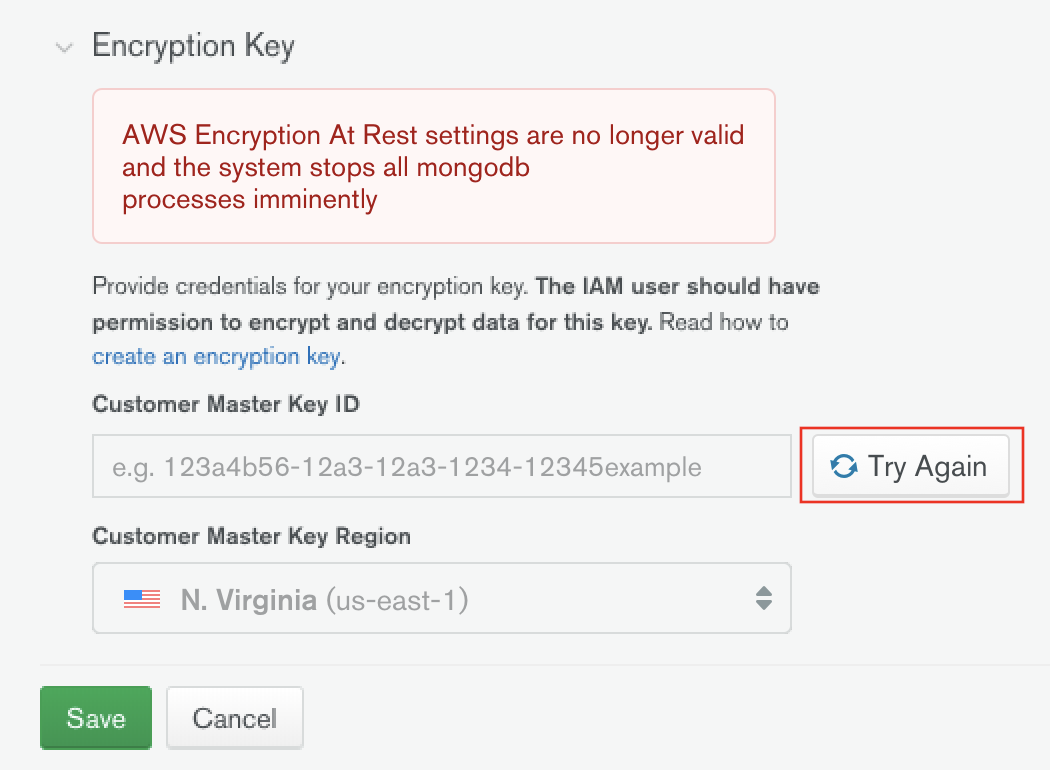
更新配置后,点击 Try Again 进行验证。如果您不这样做,Atlas 将在下一次预定检查时进行验证。Atlas 确定您的配置有效后,所有 mongod 和 mongos 进程都会重启。
警告
如果您的密钥已删除,请恢复该密钥,以重新获得对集群的访问权限。在没有有效密钥的情况下,您无法使用客户密钥管理更改密钥或禁用静态加密。
恢复已删除的密钥
要恢复已删除的密钥,请参阅密钥管理提供商的文档:
数据验证 KMS 使用情况
For clusters with encryption at rest using customer-managed keys, Atlas data validation requires extra KMS access to decrypt data during validation checks.
所有项目默认启用数据验证。如果额外的 KMS 费用、请求或安全考虑不符合您的要求,您可以选择退出。
KMS 使用
When data validation is enabled, validation instances make more requests to your KMS to decrypt data from encrypted clusters.
请求量:
Atlas 在验证过程中,每小时为每个副本集节点发出一个解密请求。具有七天验证窗口的标准三节点副本集会生成大约 500 个更多的 KMS 请求。
估计费用:
对于大多数集群,验证相关的 KMS 费用可忽略不计。有关当前定价,请参阅云提供商的文档。
安全注意事项:
验证实例在 KMS 额外的 Atlas 审核日志中显示为额外主体。
If you use IP allowlists for your KMS, you might need to add validation instance IP ranges to your allowlist.
验证实例使用与集群节点相同的客户数托管密钥。
For the current list of validation instance IP ranges, contact MongoDB Support.
加密集群的 IP 允许列表配置
Most KMS configurations don't require extra IP allowlist changes for data validation. However, if your KMS uses IP-based access controls (for example, Azure Key Vault with firewall restrictions), you must add validation instance IP ranges to your allowlist. Otherwise, validation fails.
To configure IP allowlists for your KMS:
AWS KMS typically allows access by IAM role. No additional IP allowlist configuration is required for validation instances if your IAM policy permits the Atlas role.
Azure Key Vault 通常使用严格的 IP 允许列表。如果验证失败并且出现 KMS 访问错误,请将 Atlas 验证 IP 范围添加到 Azure Key Vault 网络规则中。
在 Azure 门户中,导航到您的 Key Vault。
从左侧菜单中选择 Networking。
在 Firewalls and virtual networks 下,添加 Atlas 验证 IP 范围。
单击 Save(连接)。
Google Cloud KMS typically allows access by service account. No additional IP allowlist configuration is required for validation instances if your IAM policy permits the Atlas service account.
要了解有关数据验证的更多信息,请参阅 集群一致性的数据验证。
加密备份
Atlas 会加密所有快照卷。此举可保护磁盘上的集群数据。通过使用云提供商的 KMS,您可以:
您无法恢复使用已失效的密钥加密的快照。
要了解有关客户密钥管理和云备份的更多信息,请参阅: