Key takeaways
- Sharding involves scaling the required database collections horizontally to meet growing data needs.
- MongoDB supports sharding by strategically moving collections on dedicated shards, to distribute workloads effectively and optimize hardware for specific needs.
- Sharding is not always the right solution—you need to know when you need sharding and when you should do without it.
- You can choose range-based sharding, hashed sharding, or zone sharding, depending on workload and data distribution requirements.
- Choosing the right shard key is critical to the success of data sharding as the wrong shard key may worsen the query performance.
Table of contents
- Database architecture and scaling
- When to choose sharded clusters
- MongoDB sharded clusters
- MongoDB database sharding strategies
- Moving collections
- Distribution options to implement sharding
- When to shard a collection across multiple shards
- How to pick a good shard key for even data distribution
- When to unshard a collection
- MongoDB sharded database architecture
- Conclusion
- FAQs
Database architecture and scaling
Database scaling is a fundamental challenge for applications with large datasets. Organizations typically choose between vertical scaling (upgrading a single server's resources) and horizontal scaling (distributing workloads across multiple machines). While vertical scaling works up to a point, horizontal scaling provides a more sustainable path for modern applications.
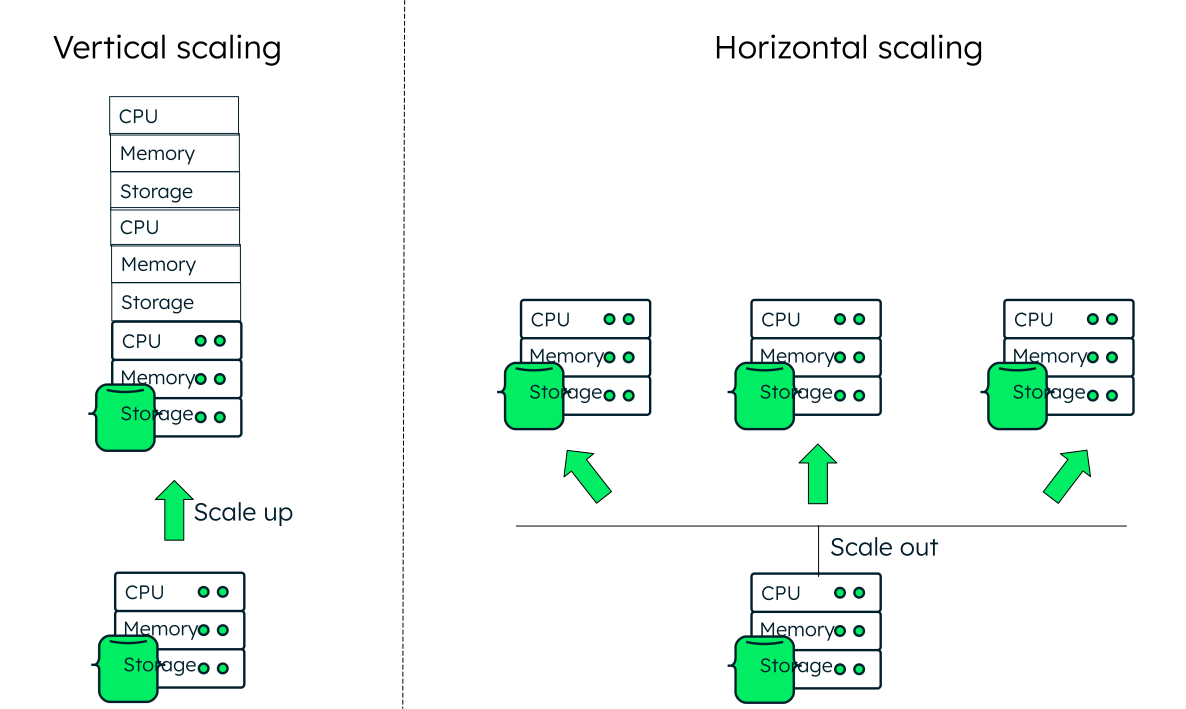
Traditional database management systems like a relational database architecture typically added a database server as the application requirements grew, limiting scalability of database systems.
Modern databases provision data replication and horizontal scaling—i.e., adding multiple servers as the data volume goes up. The data is partitioned across shards, hosted on multiple nodes, to improve scalability and performance. For example, MongoDB creates database shards (a subset of data on a separate server) and routes incoming queries to the appropriate shard through a router (mongos).
Database sharding for data distribution and availability
Sharding is a mechanism where data is divided into smaller chunks, called logical shards. Logical shards are distributed across various independent database nodes, known as physical shards, that hold the logical shards. Often, database sharding is done alongside data replication across the shards, so that if a particular shard goes down, data is still available on another shard.
When to choose sharded clusters
There is an upper limit to the number of resources (CPU, RAM, storage) you can add—i.e., after a certain extent, vertical scaling is not possible on a machine. Consider adding shards when your database reaches 60-70% of resource utilization (RAM, vCPUs, or storage) of a sizable machine. For example, in MongoDB Atlas, consistent 60-70% resource utilization of an M60 machine with a 4 TB disk signals it's time to distribute your workload. Here are some prominent reasons for database sharding:
Need for high availability
Applications with multiple collections actively accessed at the same time benefit from sharded architecture, as it distributes collections across dedicated hardware and prevents resource contention. High read/write workloads gain from distributing data across multiple servers, improving performance and reducing bottlenecks. Large data sets that exceed single server memory capacity are sustained through horizontal partitioning, which distributes data across multiple servers. Global deployments with geographically positioned shards reduce latency and enhance the user experience.
Cost optimization
Vertical scaling often reaches diminishing returns as hardware requirements increase. Adding more resources such as CPU, RAM, or storage to a single server becomes prohibitively expensive compared to adding multiple commodity servers. Horizontal scaling provides predictable, linear cost scaling.
Multi-tenant architecture
Applications serving multiple customers benefit from dedicated shards per tenant, ensuring performance isolation and customized resource allocation. MongoDB’s database sharding features enable efficient multi-tenant architectures by balancing workloads and isolating customer data.
When your application faces challenges with data size, processing speed, or availability requirements, MongoDB's sharding architecture offers a flexible, powerful solution.
MongoDB sharded clusters
MongoDB supports horizontal scaling through its sharding architecture, which distributes data and workloads across multiple servers (shards). If you're building for scale, it's crucial to consider database sharding proactively to ensure seamless growth.
We recommend starting with a one shard cluster when you are building a new application regardless of your immediate need for multiple shards. This proactive approach offers:
- Effortless horizontal partitioning: You can easily add shards as your application grows, without the complexity of data migration from a replica set.
- Cost-effective infrastructure: MongoDB 8.0 introduces config shards, allowing you to set up a sharded cluster on a single replica set infrastructure without dedicated config servers. In MongoDB Atlas, sharded clusters with up to three shards in version 8.0 use config shards by default.
This architectural decision provides immediate benefits:
- Scale cost-effectively with commodity hardware rather than expensive custom hardware.
- Optimize performance by matching hardware to specific collection requirements.
- Improve resilience by isolating potential failures to specific shards.
- Preserve operational simplicity with a gradual adoption path.
MongoDB database sharding strategies
In a sharded cluster, multiple replica sets (each shard is a replica set) function cohesively as part of the same cluster. Your application accesses all the resources transparently by connecting to the mongos (router), which handles the complexity of routing requests to the right place. See MongoDB sharded database architecture below.
There are two primary ways to distribute workloads in a sharded cluster:
- Moving collections on dedicated shards: Entire collections are assigned to specific shards, optimizing performance by distributing workloads strategically.
- Partitioning a collection across multiple shards: A single collection is split across shards using a shard key, distributing data more evenly for scalability.
These approaches can be used independently or combined, depending on your application's requirements. In the next sections, we will explore each strategy in detail.
Moving collections
When multiple collections share the same replica set, they compete for finite resources, often leading to performance bottlenecks. As data grows beyond available RAM, increased disk I/O introduces latency and strains system resources, degrading overall application performance. A strategic solution is to move unsharded collections on dedicated shards within your MongoDB sharded cluster.
MongoDB 8.0 introduced a significant improvement in unsharded collection management that expands your scaling options. In previous versions, every unsharded collection within a database was restricted to that database’s primary shard, creating resource bottlenecks and forcing administrators into difficult trade-offs. MongoDB 8.0 eliminates this constraint entirely. With the new moveCollection command, administrators can now strategically place any unsharded collection on any shard in the cluster, regardless of its database's primary shard location. This change enables precise workload distribution and optimized resource allocation across the entire cluster.
Benefits of moving collections to dedicated shards:
- Workload separation: Prevent resource contention by assigning collections to specific shards.
- Hardware optimization: Configure asymmetric shard with hardware tailored to specific collection requirements.
- Independent scaling: Scale collections individually based on workload growth.
- Improved resilience: Reduce recovery time by isolating potential failures.
You can achieve these benefits while maintaining a single connection point for your application.
MongoDB’s moveCollection command allows you to easily relocate unsharded collections to specific shards of your choice. This is an online operation that does not disrupt application workloads, enabling you to horizontally scale your database without the complexity of sharding individual collections.
When to move unsharded collections
While not every collection needs to be sharded, deploying a sharded cluster provides horizontal scaling advantages even for unsharded collections. This approach maintains a single connection point for all data access, simplifying application architecture.
Here are the key scenarios where moving unsharded collections across shards delivers clear benefits:
- Workload isolation
When multiple collections serve different workloads within the same cluster, moving unsharded collections across different shards helps prevent resource contention. This separation eliminates the "noisy neighbor" problem, where one workload's performance negatively impacts others.
- Multi-tenant architecture
In environments hosting collections for different tenants, MongoDB's moveCollection command enables seamless distribution of collections across shards without downtime. This flexibility optimizes resource allocation based on each tenant’s specific needs.
- Geographic data distribution
To comply with data sovereignty regulations, organizations often need to store user data in specific geographic regions. With moveCollection, you can place unsharded collections on shards in different regions and relocate them as regulatory requirements evolve.
- Cost optimization
Before MongoDB 8.0, all unsharded collections within a database were restricted to the primary shard. This limitation often forced upgrades to larger, more expensive instance tiers. MongoDB 8.0 removes this constraint, allowing movement of unsharded collections across all available shards in the cluster. Moving unsharded collections across asymmetric shard hardware delivers significant benefits for resource optimization. This capability allows you to place specific collections on hardware tailored to their requirements—storage-optimized instances for historical data, memory-optimized nodes for frequently accessed data, or CPU-intensive nodes for complex aggregation workloads. By matching collections to appropriate hardware resources, you can scale different workloads independently based on their actual demands. This targeted approach improves performance while avoiding the cost of over-provisioning resources across the entire cluster.
- Reduced collection density
While MongoDB has no hard limit on collection count per instance, performance degrades when a node manages too many collections and indexes (advised limits can be found in the MongoDB documentation). By distributing unsharded collections across different shards, you can reduce collection density on any single node while maintaining a unified access point for applications.
- Strategic co-location
Consider co-locating unsharded collections on the same shard to minimize distributed operations such as cross-collection transactions or join operations ($lookup). Keeping related operations confined to a single shard eliminates network overhead, reduces latency, and improves overall performance. This approach is particularly effective for collections that are frequently joined or accessed together in the same transaction.
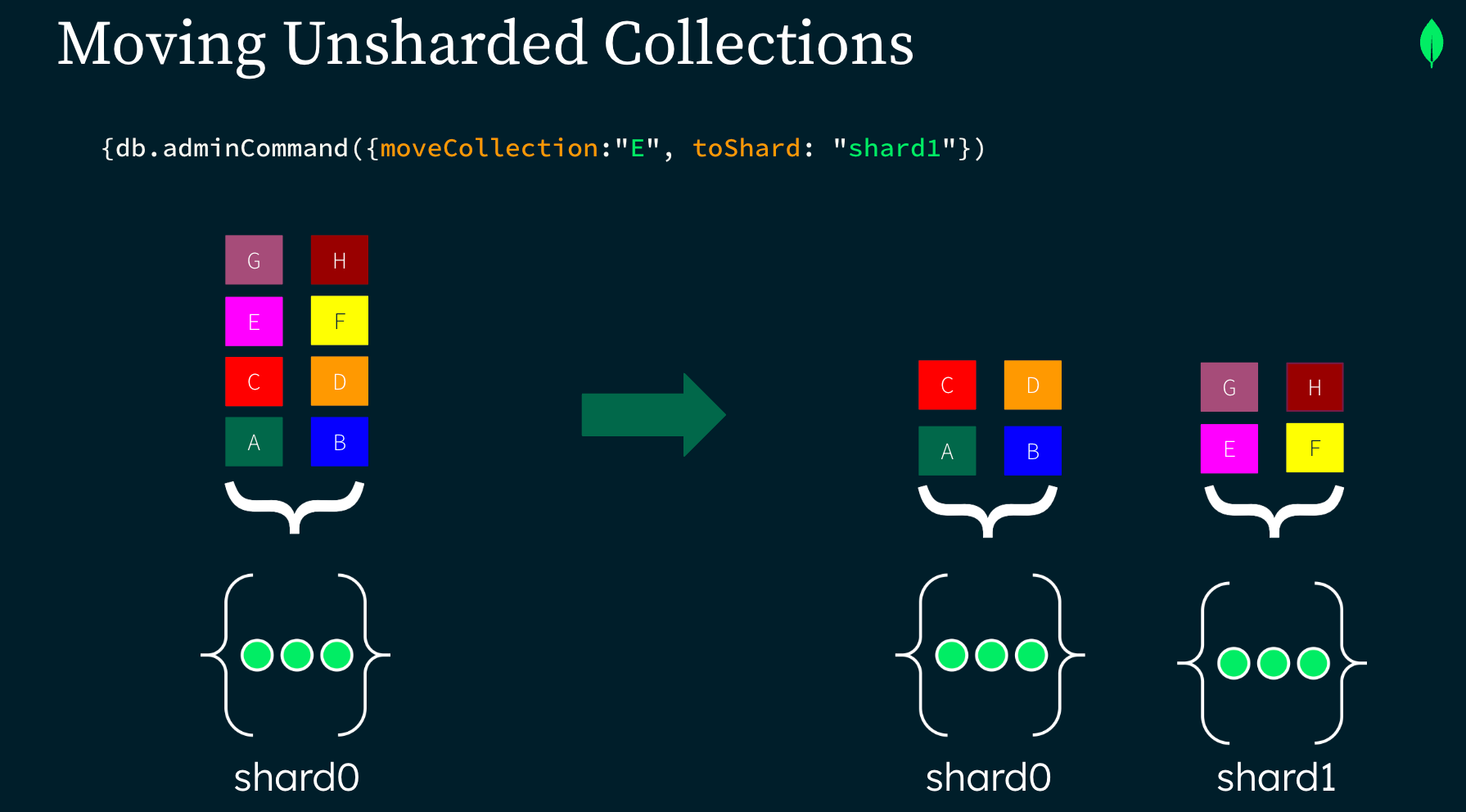
In this example, collection "E" was moved to shard1 using moveCollection command.
When to avoid using moveCollection
While moveCollection offers significant flexibility, there are specific scenarios where it may not be the optimal solution:
- Large collections: Don’t use moveCollection when a collection is too large for a single shard. Consider sharding a collection when it is approaching 3 TB in size. Sharding a collection distributes the data across shards, providing better performance and scalability for large datasets.
- Collections with Atlas Search indexes: If a specific collection uses MongoDB Atlas Search, be aware that moveCollection uses resharding to rewrite the collection on a different shard. After moving the collection, you will need to manually rebuild its Atlas Search indexes. Until the indexes are fully rebuilt, Atlas Search functionality will be unavailable for this specific collection, though the rest of your application will function normally.
Before using moveCollection, evaluate these limitations against your application requirements to determine if it's the appropriate solution for your specific use case.
MongoDB sharded clusters offer a flexible approach to database scaling. You don't need to immediately shard collections; you can start by simply moving collections between shards to distribute workloads and optimize resources.
Remember that sharding isn't an all-or-nothing proposition. Implement the architecture first, strategically move collections as needed, and only shard collections when necessary.
Distribution options to implement sharding
Sharding a collection distributes its documents across multiple shards in your MongoDB cluster. The system uses your specified shard key to determine precisely where each document belongs. Choosing an effective shard key is critical as it ensures even data distribution and workload balancing across all available shards. This approach becomes essential when collections grow too large for a single shard to handle efficiently. Once sharded, MongoDB automatically distributes the collection across all available shards according to your chosen sharding strategy.
When sharding a collection in MongoDB, you have three main distribution options to choose from:
Range-based sharding
Range-based sharding uses one or more document fields to determine data placement. Data with similar shard key values is stored on the same shard, optimizing range-based queries. This approach works best when your access patterns include range operations.
Hashed sharding
Hashed sharding computes a hash value from your specified field and distributes data randomly across shards. While useful for write scalability, this approach can impact performance for range-based queries since logically adjacent data may reside on different shards.
Zone sharding
Zone sharding distributes collections across a specific subset of shards rather than the entire cluster. This approach is ideal when collections exceed single-shard capacity but require strategic placement, whether for geographic proximity to users, optimizing for distinct access patterns with specialized hardware, or maintaining regulatory compliance by controlling data location.
When to shard a collection across multiple shards
You should consider database sharding when you approach certain resource limits or performance thresholds. Here are key indicators that suggest it's time to implement sharding:
- High resource utilization: If a collection’s working set fits in RAM, MongoDB can serve queries from memory, providing the fastest query response times. When the working set grows beyond available memory, you will observe higher query latency due to increased disk access. Sharding the collection can improve query performance by distributing the data across shards, with each shard maintaining indexes for only the data it owns.
- Large data size: If a collection is approaching 3 TB data size, it’s advisable to begin planning for sharding sooner rather than later to ensure a smooth implementation.
When sharding a collection, you need to make two important decisions:
- Choose an appropriate shard key.
- Select a sharding method (balancer for automatic data migration or reshard to the same shard key for complete redistribution).
How to pick a good shard key for even data distribution
MongoDB shards at the collection level. You choose which collection(s) you want to shard. MongoDB uses the shard key to distribute a collection's documents across shards. To evenly distribute data, MongoDB splits collection by data size among the shards in the cluster.
Shard keys are based on fields inside each document. The values in those fields will determine on which shard the document will reside, according to the shard ranges and amount of data per collection per shard. This data is stored and maintained in the config server replica set or a config shard.
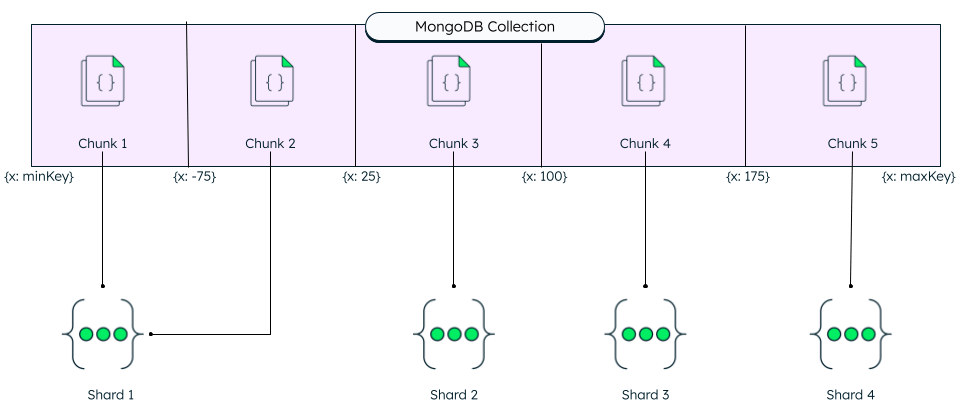
The shard key value has a direct impact on the cluster's performance and should be chosen carefully. A poorly chosen shard key can lead to performance or scaling issues due to uneven data distribution. You can always change your data distribution strategy by refining a shard key or changing your shard key using resharding.
Tools to find a good shard key
You can use the shard key analyzer as a first step.The analyzeShardKey command analyzes the key characteristics of your shard key choice along with its read and write distribution. This command uses sampled queries from configureQueryAnalyzer to calculate the read and write distribution of your shard key and make a data-driven decision.
When to unshard a collection
Starting in 8.0, users can unshard their collections using the unshardCollection command and specify which shard to locate the unsharded collection on.
Here are three key scenarios where moving unsharded collections across shards delivers clear benefits:
- Correcting unintentional sharding of a collection: Prior to 8.0, sharding a collection was an irreversible action. The ability to unshard a collection gives you peace of mind that you can reverse this decision if you discover the sharding was unnecessary or causing performance issues. Users can run unshardCollection and unshard the collection to a shard of your choice. The command rewrites the entire collection as an unsharded collection.
- Simplifying zone-based isolation: If you are using zones to keep a sharded collection on a single shard, you can now unshard the collection and reduce the complexity in your cluster. This provides easier management and potentially improved performance without the overhead of sharding infrastructure.
- Consolidating previously sharded small collections: If you previously sharded small collections to efficiently utilize resources on shards, you can now unshard those collections and move them to a shard of your choice. This allows you to reduce the complexity of your deployment while maintaining appropriate resource allocation.
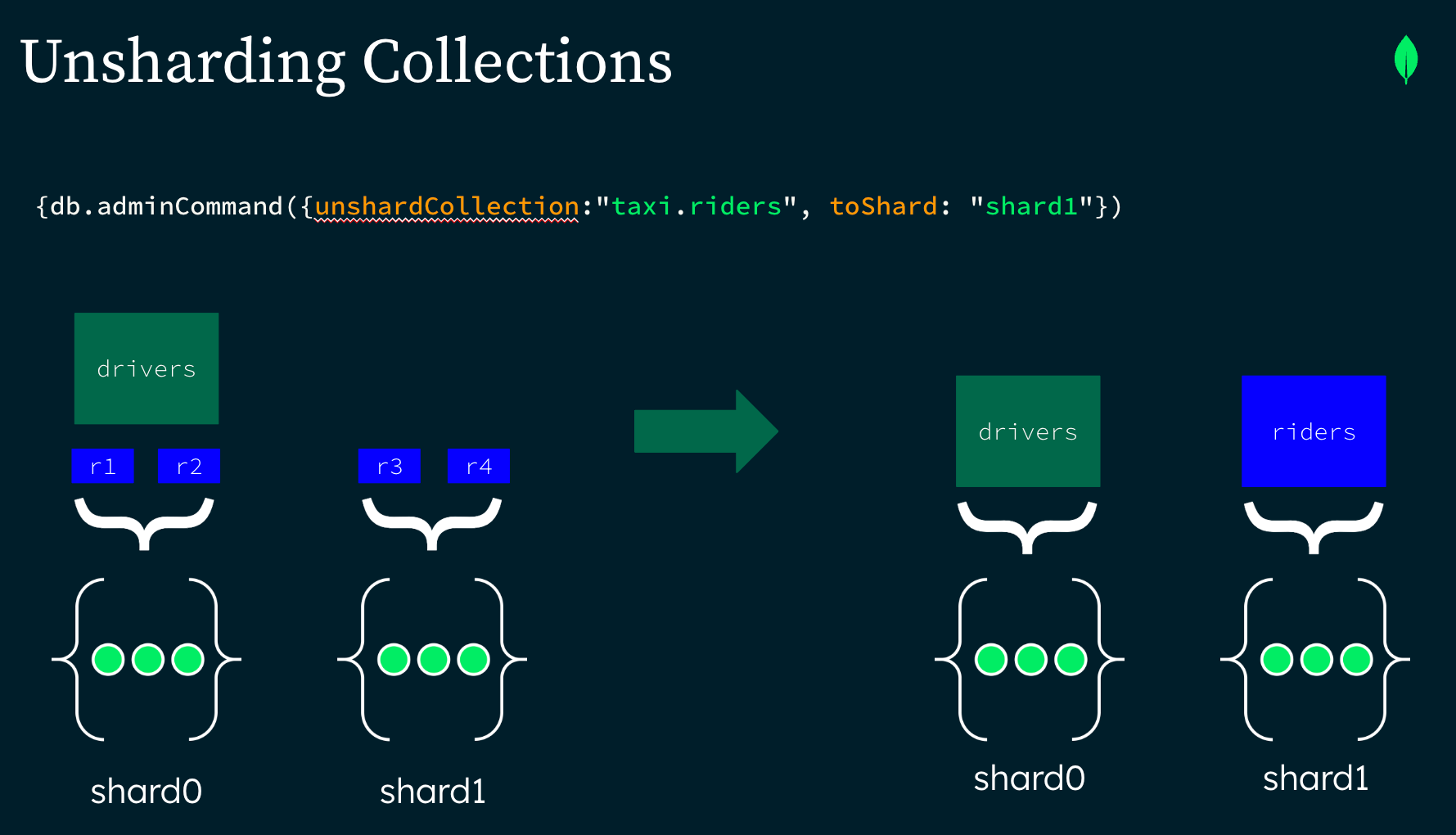
In this example we unsharded the “riders” collection in the “taxi” database and placed it on shard1.
A collection is unsharded to shard1 using the command:
MongoDB sharded database architecture
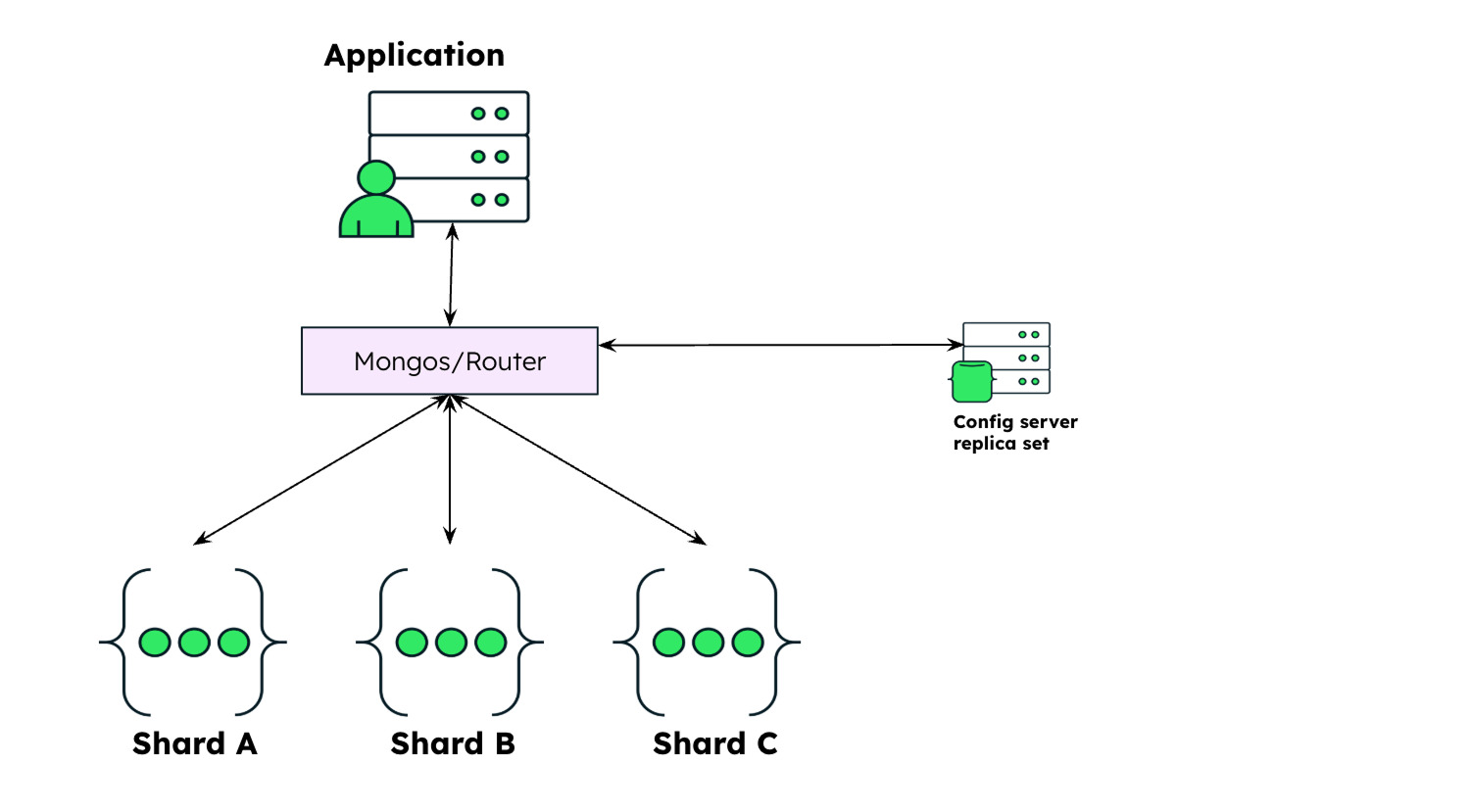
In MongoDB, a sharded cluster consists of:
- A shard.
- Mongos.
- Config server replica set.
Shard
A shard is a replica set at its core. It contains a subset of the cluster's data. Each shard has a primary and two secondary nodes by default.
Mongos
The mongos acts as a query router for client applications, handling both read and write operations. It dispatches client requests to the relevant shards and aggregates the result from shards into a consistent client response. Clients connect to a mongos, not to individual shards.
Config server replica set / config shard
A config server replica set is a replica set that stores the metadata of a sharded cluster. It is the authoritative source of sharding metadata. The sharding metadata reflects the state and organization of data in a sharded cluster. The metadata contains the list of sharded collections, routing information, the range map, and unsharded collections on non-primary shards.
Starting in MongoDB 8.0, you can configure a config server to store your application data in addition to the usual sharded cluster metadata. A mongod node that provides both config server and shard server functionality is called a config shard.
A sharded cluster looks like this:
Conclusion
MongoDB's sharded cluster architecture provides a versatile approach to database scaling with multiple strategies to match your specific needs:
- Start early with a sharded cluster, even with a single shard, to future-proof your application.
- Move unsharded collections between shards to isolate workloads, support multi-tenant architectures, comply with geographic requirements, optimize costs, and reduce collection density.
- Shard specific collections when they approach resource limits or grow beyond 3 TB.
- Unshard collections when application patterns change and the benefits of a sharded collection no longer outweigh the costs.
By leveraging these flexible scaling capabilities, you can optimize performance, control costs, and maintain operational simplicity as your application evolves—all while preserving a single, unified connection point for your applications.