Express.js (or simply Express) is a web application server framework for Node.js, and MongoDB is a general-purpose document database platform. You can use these together to build a web application that stores data in MongoDB. Since Express is a module running on top of Node.js, you can use the MongoDB Node.js driver to connect to any MongoDB database instance and query it.
Express & MongoDB
What is Express?
Express is a minimal web application framework for Node.js. It is designed to be fast, minimal, and modular. Express is a free and open-source MIT-licensed project. It is part of the OpenJS foundation and has an active community of contributors.
Express extends the Node.js http package with features for routing, middlewares, and views. Express is often used for creating APIs, especially REST APIs. The following sample implements a REST-like API with Express in only 20 lines of code!
The code above uses methods of the app object that correspond to HTTP methods—GET, POST, PUT, and DELETE. For example, the app.get() method is used to handle a GET request on the /products route. Similarly, the app.put() method is used to handle a PUT request on the /products/:productId route, where :productId is a parameter that is extracted from the URL.
You can build on top of this simple routing example to work with real data. A common use case is to create a REST API that stores data in a database, such as MongoDB. The different resources exposed as endpoints from the API represent collections in the database. For example, the /products endpoint represents the collection of products stored in the database.
For a full tutorial on how to build a REST API with Express and MongoDB, see Building a REST API with Express, Node, and MongoDB.
Does MongoDB support Express?
You can use MongoDB in your Express application by installing the MongoDB Node.js driver. The MongoDB Node.js driver is a Node.js module that allows you to connect your application to MongoDB and work with your data.
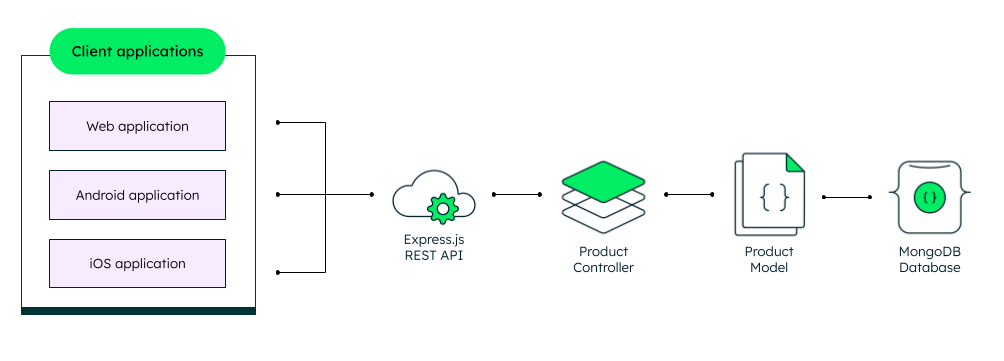
If you're building a REST API, it's considered a good practice to split your routing logic from your data storage logic. For example, you might have a Product controller that handles requests for the /products resource, and a Product model that stores the data. There are a number of popular JavaScript frameworks based on Express that do this for you. Let's take a look at some of them.
Other JavaScript frameworks
Express is a robust solution that has been around for more than 10 years. It is a great choice for building APIs, especially REST APIs. However, the JavaScript ecosystem is constantly evolving. Following Express, many JavaScript frameworks have been created to provide a more comprehensive and powerful set of features. Some of these frameworks, such as NestJS, integrate Express to expose similar routing and middleware capabilities. Others, such as Koa and Fastify, are considered to be only “inspired” by Express, providing more performant and developer-friendly solutions than the latter. Let's take a closer look at each of these frameworks.
Koa
Koa is a lightweight Node.js framework. It is built by the original team behind Express. The main difference between Koa and Express is the way both frameworks implement middleware. Koa doesn't have a built-in middleware mechanism but relies on promises and async functions for controlling the program flow. This allows you to stop relying on callbacks and thus, helps you escape the so-called “callback hell.”
Another difference is that Koa doesn't provide routing out of the box. Instead, you can use third-party Node modules such as koa-router or koa-route to implement routing.
Fastify
Fastify is a general-purpose server framework for Node that shines with its highly-optimized HTTP APIs. The framework aims to be as fast as possible and the benchmarks comparing it to other Node frameworks back up that claim.
Additionally, Fastify provides an extensible plugin architecture and a growing ecosystem of plugins. The architecture is designed to ensure plugin independence and encapsulation. This eliminates a myriad of issues caused by cross dependencies and allows you to refactor your code without worrying about breaking other parts of the application.
NestJS
NestJS (sometimes referred to as Nest) is a framework that provides an additional level of abstraction above frameworks like Express and Fastify. It comes with an out-of-the-box application architecture that helps you iterate and scale fast. The architecture of NestJS is heavily inspired by Angular. Similar to Angular, NestJS is built from the ground up with TypeScript and NestJS applications are written in TypeScript.
NestJS uses Express for providing HTTP capabilities. However, it's easy to replace Express with another framework such Fastify, taking advantage of the better performance of the latter.
As mentioned above, NestJS comes with a lot of built-in architecture solutions, including a solution for database communication. NestJS provides integration with Sequelize and TypeORM, which can be used to connect to a SQL or non-relational database, such as MongoDB. There's also a Mongoose integration supported by the NestJS team. However, NestJS is flexible enough and you can also connect to your database by loading its native Node.js driver.
What are the benefits of Express?
Adoption
Express is the most widely used Node.js framework. It has a strong community of contributors and is used by a wide variety of real-world projects. It is also a great choice for building APIs that has proven itself over time.
Simplicity
Express is an unopinionated framework that is easy to learn and use. You can extend it as you like and you can use it together with any other Node.js module or library.
Community Support
Express is one of the most widely used JavaScript frameworks. It has an enormous community which means you'll easily find answers to your questions when building with Express.
Express in the MEAN and MERN stacks
MEAN (MongoDB, Express, Angular, and Node.js) and MERN (MongoDB, Express, React, and Node.js) are popular JavaScript tech stacks for building end-to-end web applications. Express is one of the four essential technologies that form the MEAN and MERN stacks. The other three are:
- MongoDB for the database.
- Angular or React for the client application.
- Node.js for the server runtime environment.
When building MEAN/MERN applications, Express is used for building the REST API. This API is used for communication between the client-side application and the server-side application.
If you want to learn more about the MEAN and MERN stacks, you can read the dedicated MEAN and MERN articles.
Next steps
Express is a great choice for building REST APIs. Because Express runs on top of Node.js, you can easily connect to a MongoDB instance using the MongoDB Node.js driver. If you want to learn more, follow this full-blown tutorial for Building a REST API with Express, Node, and MongoDB.
FAQ
You can connect to any MongoDB database instance with the MongoDB Node.js driver. Since Express is running on Node.js, you can use the driver with Express as well.
Express doesn't have a built-in concept for a database. You can use any database driver that is compatible with Node.js. For example, you can connect to MongoDB with the MongoDB Node.js driver.
Node.js (or Node) is a JavaScript runtime environment. Express is a JavaScript framework that is built on top of Node.js and provides additional capabilities for building APIs and web applications.
You can use the Express routing mechanism to register routes that correspond to HTTP methods—GET, POST, PUT, and DELETE. Through these routes, you can perform CRUD Create, Read, Update, and Delete) operations on collections in your MongoDB database. For a full tutorial, check out the Building a REST API with Express, Node, and MongoDB
Featured Resources
- Building a REST API with Express, Node, and MongoDB
- MEAN Stack
- MERN Stack
- MongoDB with Node.js
- JavaScript and MongoDB
- Using a Database with Node.js
- Angular & MongoDB
- Webinar: Get Started with the MEAN Stack
- The Modern Application Stack - MEAN, MERN, and More
- The Modern Application Stack – Part 1: Introducing The MEAN Stack
- The MEAN Stack: MongoDB, ExpressJS, AngularJS and Node.js
Get started with Atlas today
Get started in seconds. Our free clusters come with 512 MB of storage so you can play around with sample data and get oriented with our platform.
GET STARTED WITH:
- 125+ regions worldwide
- Sample data sets
- Always-on authentication
- End-to-end encryption
- Command line tools