NewPower reliable AI agents with accurate, relevant data Read the blog >
NewBuild software faster with AI agents—without losing control Read the blog >

What is Container Orchestration?

Get Started Free with Atlas

Modern applications are often split into hundreds of small features that must be deployed, scaled, and monitored independently for greater efficiency. Container orchestration automates these operational tasks, enabling applications to remain highly available, resilient, and scalable across distributed environments.

Containers allow many instances of a given application service to be deployed, allowing services to scale more dynamically in response to heavier loads. They isolate application processes by running them in separate, lightweight execution environments, preventing applications from interfering with one another while sharing the same host operating system.

For larger applications requiring many containers, container orchestration plays a major role in managing the overall lifecycle of containers. Without intelligent, automated orchestration, managing hundreds or thousands of containers quickly becomes chaotic and error-prone.

This article explains what containers are, why we need them, how container orchestration works, and popular container orchestration tools. It also covers how to handle stateful applications to deliver highly scalable, available, and resilient applications while automating continuous integration and deployment.

Key takeaways

Table of contents

From monolith to microservices

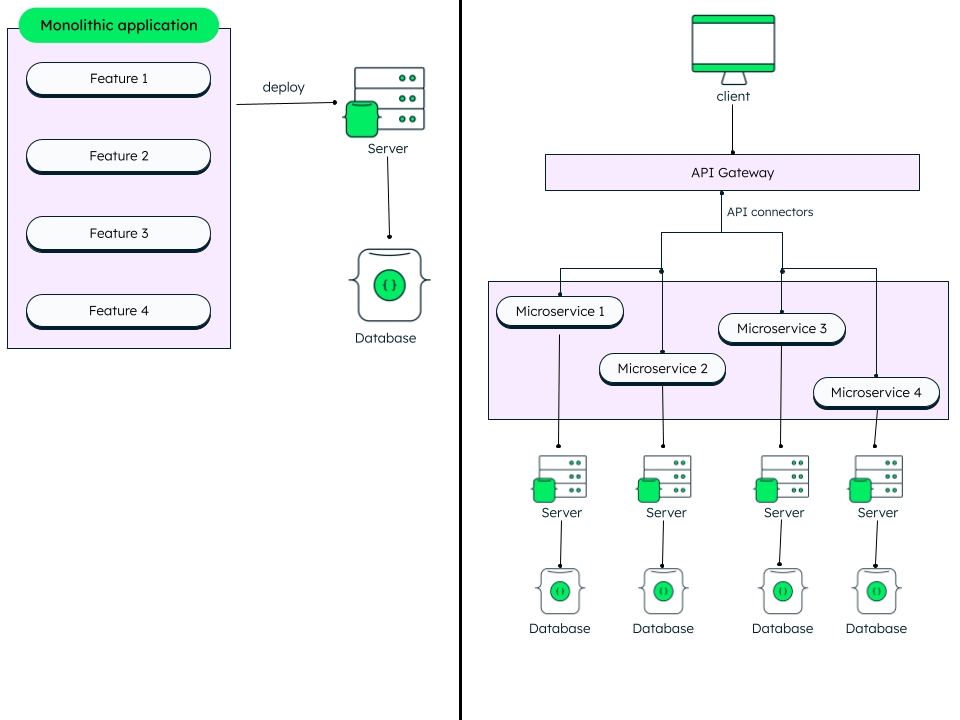
Imagine you want to build an exam registration portal, with features like existing user login, form details for registration, and direct application filing for guests. In a monolithic application, the three features are bundled as a single service, deployed onto one server, and connected to one database.

There are multiple problems with this architecture:

  • The entire application must undergo extensive testing and redeployment—even if a tiny change is made to a single feature.
  • Because the code is written as a single interconnected application, every part depends on the rest to run.
  • Dynamic scaling individual features is impossible.

To solve this, we can break the application down into small, focused services, called microservices. Each microservice handles an individual feature, manages its own data, and can be distributed across different servers.

For example, registration, login, book exam, can each run as an independent microservice accessed via an API gateway.

This way, each feature can work independently and can be accessed via the API gateway.

Architecture comparison showing a monolithic app deployed to a single server and database versus a microservices setup with an API gateway and four separate servers and databases

Architecture comparison showing a monolithic app deployed to a single server and database versus a microservices setup with an API gateway and four separate servers and databases

Why is containerization needed?

While deploying microservices on traditional virtual machines (VMs) provides clear benefits over monoliths, VMs still introduce challenges in scaling, deployment, and management due to traditional hardware overhead.

For example, if the “new registration” feature experiences a sudden spike in traffic, it needs extra capacity immediately—wheras “book exam” might remain quiet. In traditional virtual machines, the host operating system allocates fixed storage and RAM for each VM that cannot be easily shifted or reallocated from one resource to another.

These infrastructure and hardware issues can be solved by using containers.

What are containers?

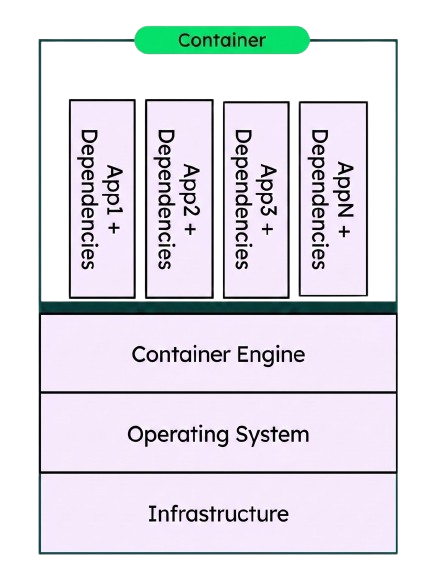
Containers are light-weight packages containing an application along with all the dependencies that are required to run it. They are light-weight because they share the host machine’s operating system kernel instead of running a full guest OS like a virtual machine.

Containers are created and executed by container runtimes such as Docker. At scale, platforms such as Kubernetes orchestrate these containers across a cluster of machines. A container orchestrator dynamically allocates CPU and memory to containers, automatically scaling down or terminating unused containers to free up resources for other workloads.

Diagram showing container architecture: multiple isolated applications and dependencies running on top of a shared container engine, operating system, and underlying infrastructure.

Diagram showing container architecture: multiple isolated applications and dependencies running on top of a shared container engine, operating system, and underlying infrastructure.

Consider a movie streaming platform: during peak hours—8 p.m. to 10 p.m.—traffic spikes, and the application requires additional container instances to handle requests. During off-peak hours, demand drops, and excess containers can be deleted.

Related: see how STACKIT used Kubernetes with MongoDB.

Container images

Think of a container image as a snapshot consisting of code, system libraries, tools, container runtime, and other settings required to run an application. Container images are light-weight, standalone executables.

In a production environment, an image becomes a running container. A single container image can be used to spin up multiple identical container instances simultaneously. Docker is a popular engine that converts container images into containers during runtime.

Container registries

A container registry is a centralized store where versioned container images are saved, managed, and distributed. Developers push newly built images to the registry, and deployment platforms pull the required images during application deployment.

What do container orchestrators do?

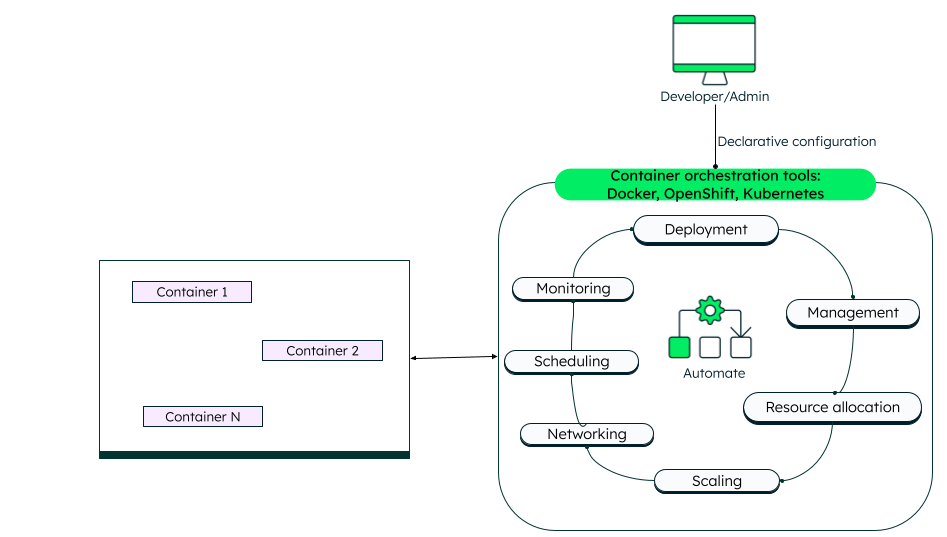
Manually creating, managing, and deleting multiple containers/containerized apps can become unmanageable as an application grows. Container orchestration solutions solve this by automating the entire container lifecycle—handling deployment, resource management, availability, and cloud integration to keep workloads running efficiently.

Key capabilities include:

  • Deployment: Specify and maintain the exact number of containers you want running at any given time.
  • Configuration: Easily manage and apply environment-specific settings across complex container deployments.
  • Resource allocation: Assign CPU and memory limits to individual containers to handle workload spikes and prevent resource allocation.
  • Scaling Automatically scale applications horizontally (adding/removing instances) or vertically (adjusting allocated resources) based on traffic demands.
  • Load balancing: Evenly distribute incoming traffic among the running instances of a given container to prevent bottlenecks.
  • Networking: Enable secure communication between internal containers and manage external access points.
  • Scheduling: Execute tasks based on demand or specific schedules, such as background cron jobs.
  • Health monitoring and self-healing: Track container status continuously, automatically restarting or replacing failed instances.
  • Resilience and high visibility: Spread container instances across different physical hardware to ensure that if one physical machine is lost, it won’t take down the entire application.

Flowchart illustrating container orchestration tools automating the lifecycle of multiple containers across key tasks like deployment, scaling, networking, scheduling, and monitoring.

Flowchart illustrating container orchestration tools automating the lifecycle of multiple containers across key tasks like deployment, scaling, networking, scheduling, and monitoring.

How does container orchestration work?

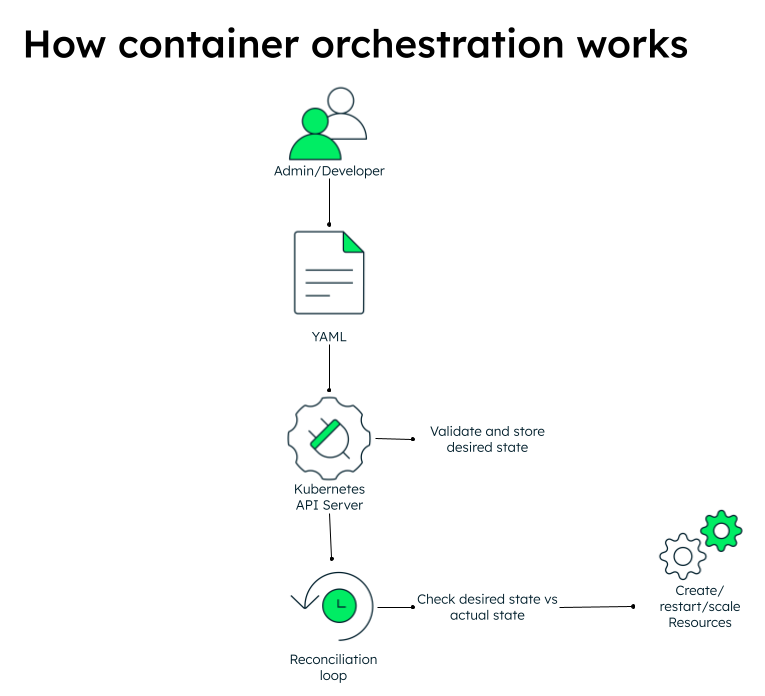
Developers or system administrators write a declarative configuration (e.g., in, .yaml or .json) that define the desired state of the application environment.

Container orchestration platforms continuously compare the declared state with the actual running state running in the cluster. In Kubernetes, this configuration is submitted to the Kubernetes API server, which validates and stores the desired state in the cluster. Controllers continuously monitor these resources through a reconciliation loop, comparing the desired state defined in the configuration with the actual state running in the cluster.

If a container crashes, a node fails, or  replica counts drop, the orchestration platform automatically reconciles the difference by creating, restarting, or rescheduling containers until the desired state is restored.

Diagram illustrating the Kubernetes reconciliation loop: declarative YAML submitted by an admin passes to the API server, which stores the desired state so a reconciliation loop can create, restart, or scale resources to match.

Diagram illustrating the Kubernetes reconciliation loop: declarative YAML submitted by an admin passes to the API server, which stores the desired state so a reconciliation loop can create, restart, or scale resources to match.

Types of container orchestration platforms for container management

Container orchestration platforms generally fall into three categories: open-source platforms, managed Kubernetes services (offered by major cloud providers), and enterprise container platforms. 

Open-source container orchestration tools

Open-source solutions such as Kubernetes and Docker Swarm provide flexibility for managing container infrastructure and deploying containers across on-premises and cloud environments.  

Docker Swarm

Docker Swarm is an open-source container orchestration framework that produces a single, virtual Docker host by clustering multiple Docker hosts together. It presents the same Docker API, allowing it to integrate with any tool that works with a single Docker host.

Kubernetes—one of the best container orchestration tools

Kubernetes (k8s) is an open-source multi-cloud container orchestration platform developed by Google, and maintained by the Cloud Native Computing Foundation (CNCF). 

Key features include:

  • Automated container deployment and replication.
  • Vertical or horizontal scaling.
  • Integrated load balancing across container groups.
  • Automated rolling updates and rollback strategies.
  • Self-healing through automatic rescheduling of failed containers.
  • Declarative networking and service exposure.

Large-scale containerized applications often deploy across multiple Kubernetes clusters to improve scalability, high availability, and disaster recovery.  

Kubernetes architecture

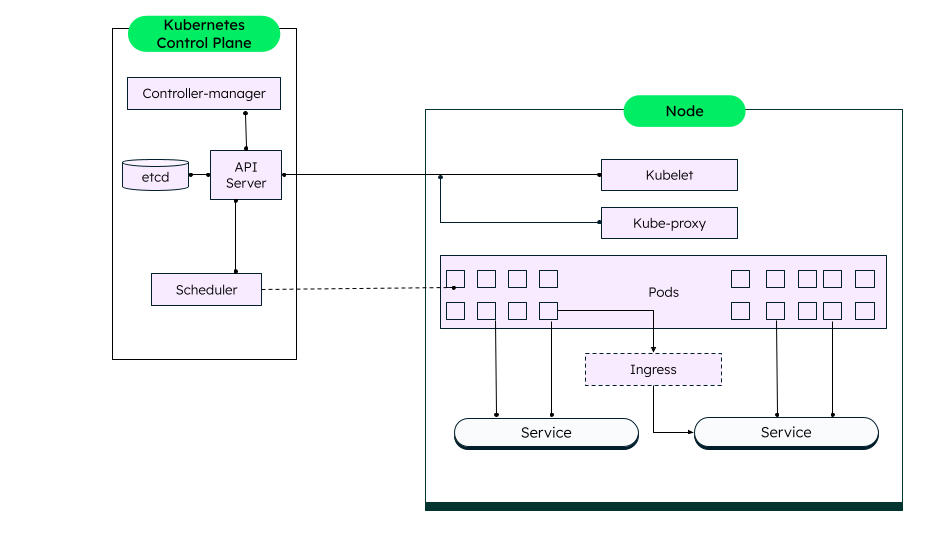
A Kubernetes cluster consists of two parts: a control plane (one or more machines running the Kubernetes control plane components) and one or more worker nodes. Each node is able to run pods, with a pod being a collection of one or more containers run together. The Kubernetes control manages the nodes and the pods—not the containers directly. The pods manage the container lifecycle.

Kubernetes architecture diagram showing a Control Plane (with API Server, etcd, Controller-manager, and Scheduler) managing a Node containing Kubelet, Kube-proxy, Pods, Ingress, and Services.

Kubernetes architecture diagram showing a Control Plane (with API Server, etcd, Controller-manager, and Scheduler) managing a Node containing Kubelet, Kube-proxy, Pods, Ingress, and Services.

Key components of the Kubernetes orchestration layer include:

  • Kubernetes Control Plane: The central management layer in a Kubernetes cluster. It runs a set of services that manage the overall state of the cluster and all workloads within it.
  • Cluster: A collection of one or more bare-metal servers or virtual machines (referred to as nodes) providing the pooled resources used by Kubernetes to run one or more applications.
  • Pod: A group of one or more containers and volumes co-located on the same host. Containers in the same pod share the same network namespace and can communicate with each other using localhost.
  • etcd Database: A distributed key-value store that holds all cluster configuration, pod configuration, authentication, and metadata.
  • Scheduler: Assigns newly created pods to suitable worker nodes based on resource availability and scheduling constraints.
  • Controllers: Continuously reconcile the actual cluster state with the desired state by managing resources such as deployments, replica sets, nodes, and Endpoints.
  • Kubelet: The primary agent on each node that interacts with the Kubernetes Control Plane and ensures all pods scheduled to that node are healthy, up, and running.
  • Kube-proxy: Manages network communication on each node by implementing Kubernetes Services and routing traffic to the appropriate pods.
  • Services: Act as a persistent network interface to pods, enabling communication from both inside and outside the cluster.
  • Ingress: An optional component that allows more granular control over traffic to the pods than services alone offer—for example, directing traffic to the right web server based on the URL path.

Managed Kubernetes services

Managed Kubernetes services offered by leading cloud providers—including Google Kubernetes Engine (GKE) on Google Cloud Platform (GCP), Amazon Elastic Kubernetes Service (EKS), and Azure Kubernetes Service (AKS)—simplify cluster provisioning, upgrades, scaling, and maintenance. This allows organizations to focus on container deployment and application development instead of maintaining the underlying Kubernetes infrastructure.

As fully managed solutions, these services automate the deployment, scaling, and management of containerized workloads, making it easier to build and operate cloud-native applications.

Benefits of container orchestration

Container orchestration supports managing multiple clusters. This enables organizations to isolate workloads across different environments or regions while maintaining centralized governance. 

DevOps and continuous delivery (CI/CD)

By automating deployment, scaling, and lifecycle management, container orchestrators make it easy to promote new code to production automatically after passing the tests. Orchestration platforms integrate directly with continuous integration/continuous deployment (CI/CD) tools to automate building, testing, and packaging containerized apps as part of the CI process, thus aligning with DevOps principles.

Scalability

When applications are built using microservices, adding more container instances increases capacity and throughput. Similarly, containers can be removed when demand falls. Using container orchestration makes this type of elastic scaling simple to achieve.

Isolation

Containers running on the same host are completely isolated from the others and the host itself. The single physical machine can host development, staging, and production environments simultaneously—even using conflicting language versions or database drivers—without risk of interface.

High availability

By running multiple containers, redundancy is more easily built into the application. If one container fails, then the surviving peers continue to provide the service. With container orchestration service, failing containers can be automatically recreated, restoring full capacity and redundancy.
Deploying stateless vs. stateful containers

Container orchestration platforms manage stateless and stateful workloads differently:

Stateless applications: REST APIs, web servers, and frontend apps store no persistent local data. Kubernetes manages them using declarative.yaml manifests. Because these pods use ephemeral storage, any locally written data is lost if a new pod is deleted or restarted, and the new pod is deployed with a clean state.

Stateful applications: Databases like MongoDB data require persistent data storage and consistent network identities across restarts (sticky identities). For this, container orchestration tools use StatefulSets, a workload API to manage stateful applications. Kubernetes manages these using StatefulSets. StatefulSets attach pods to PersistentVolumeClaims (PVCs) linked to durable external storage (PersistentVolumes), ensuring data survives pod restarts and migrations.

MongoDB and Kubernetes

MongoDB provides two dedicated Kubernetes Operators that automate the deployment, configuration, scaling, and operational management of MongoDB clusters running inside Kubernetes environments.

MongoDB Controllers for Kubernetes

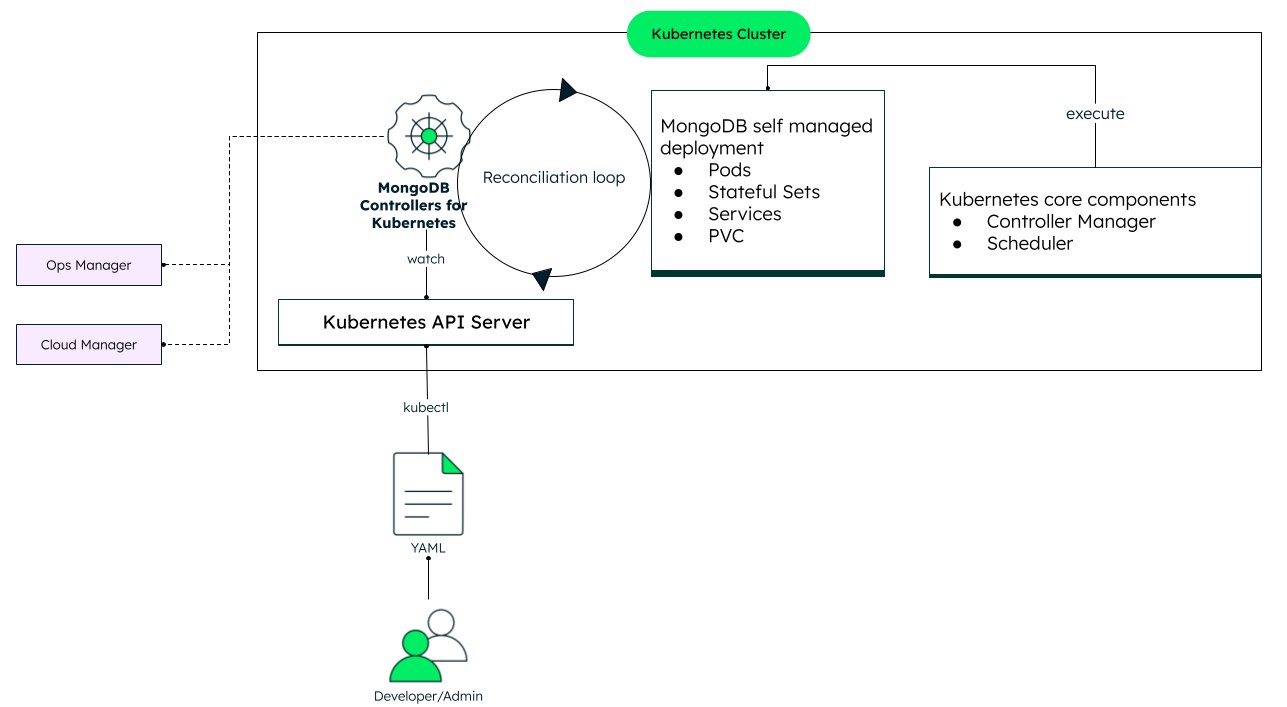
MongoDB Controllers for Kubernetes lets you deploy self-managed MongoDB Enterprise and MongoDB Community clusters directly within Kubernetes using Kubernetes-native tools such as YAML manifests and Custom Resources.

The Controllers extend Kubernetes by introducing Custom Resource Definitions (CRDs) and reconciliation logic, allowing MongoDB deployments to be managed as Kubernetes-native workloads.

Optional integration with MongoDB Ops Manager (or Cloud Manager in certain environments) automates deployment, scaling, upgrades, backups, and monitoring.

Once you apply a YAML manifest describing the desired MongoDB deployment, the Controllers reconcile the requested state by creating and managing Kubernetes resources such as StatefulSets, pods, services, and Persistent Volume Claims (PVCs). Kubernetes then schedules the MongoDB pods and provisions the required persistent storage, while the Controllers continuously ensure the running state matches the declared configuration.

Diagram showing how MongoDB Controllers for Kubernetes watch the API Server to execute self-managed MongoDB resources (Pods, StatefulSets, Services, PVCs) inside a Kubernetes cluster based on developer YAML configs.

Diagram showing how MongoDB Controllers for Kubernetes watch the API Server to execute self-managed MongoDB resources (Pods, StatefulSets, Services, PVCs) inside a Kubernetes cluster based on developer YAML configs.

MongoDB Atlas Kubernetes Operator

The MongoDB Atlas Kubernetes Operator enables teams to manage fully MongoDB Atlas cloud resources using Kubernetes manifests. Instead of manually configuring Atlas through the web interface or CLI, database infrastructure can be managed declaratively alongside Kubernetes applications using infrastructure as code (IaC) practices.

Why use MongoDB Atlas and the Atlas Kubernetes Operator for applications deployed on Kubernetes

Atlas offers a developer data platform that is not only incredibly powerful, but also comes at a much lower total cost of ownership (TCO), thanks to the high degree of intelligent automation built into the platform.

In this way, it's a fantastic compliment to Kubernetes-based applications in that both together can enable developers to focus on iterating on their applications rather than spending all their time manually managing infrastructure.

The Atlas Kubernetes Operator adds to this by providing the means to manage Atlas in a way that is becoming more and more common for other infrastructure—as IaC via declarative configuration files.

With IaC, database infrastructure provisioning and management can be automated, saving time that is otherwise consumed in manually scaling, restarting, and spinning the infrastructure from time to time. The admin or developer only configures the desired state and not how to reach it.

This also simplifies and speeds up the CI/CD pipeline and promotes the DevOps culture through continuous integration, testing, and deployment of code changes. Infrastructure changes can be automatically tracked, audited, and managed like code, using version control tools like Git.

This abstracts the developer from much of the complexity of infrastructure. In a simple and consistent format, developers can define the desired state of both their application in Kubernetes and, thanks to the Atlas Kubernetes Operator, Atlas within their code repository, and have it applied to Kubernetes using automation, where the Atlas Operator will enact the required changes to Atlas.

The Atlas Operator even helps prevent configuration drift thanks to its automated periodic reconciliation between the configuration applied in Kubernetes and Atlas, ensuring the small manual changes via another interface don't eventually undermine your applications.

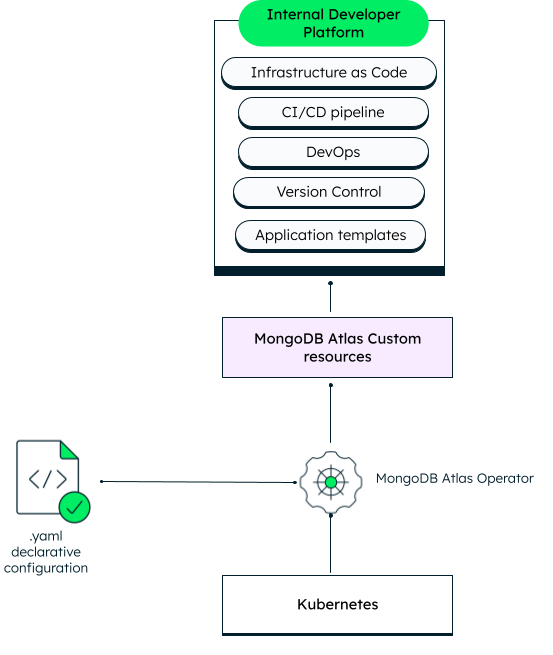
The Atlas Kubernetes Operator, thus, powers an Internal Developer Platform (IDP)—consisting of IaC, CI/CD, and DevOps principles—to manage containers via Kubernetes and enabling self-service capabilities, for automation.

Diagram showing how the MongoDB Atlas Operator processes declarative YAML configurations in Kubernetes to provision MongoDB Atlas custom resources for an Internal Developer Platform (IDP).

Diagram showing how the MongoDB Atlas Operator processes declarative YAML configurations in Kubernetes to provision MongoDB Atlas custom resources for an Internal Developer Platform (IDP).

FAQs

Infrastructure as Code — Learn to automate your MongoDB Atlas deployments through our Infrastructure-as-Code (IaC) integrations through this YouTube podcast.

MongoDB Atlas Kubernetes Operator –- Watch the webinar to learn more about the MongoDB Atlas Kubernetes operator.

Deploying MongoDB Replica Set across multiple Kubernetes Clusters — Watch this demo on how to deploy a MongoDB Replica Set across multiple Kubernetes Clusters.

Get started with Atlas today

Get started in seconds. Our free clusters come with 512 MB of storage so you can play around with sample data and get oriented with our platform.
Try FreeContact sales
GET STARTED WITH:
  • 125+ regions worldwide
  • Sample data sets
  • Always-on authentication
  • End-to-end encryption
  • Command line tools